Claude Can't Read Your Database? Connect It Directly with MCP
Build an MCP server in 50 lines of Python to connect Claude to your database. Execute SQL queries with natural language.
Claude Can't Read Your Database? Connect It Directly with MCP
Stop Copy-Pasting Data Every Time You Ask for Analysis
Are you copying CSV data into Claude every time you need analysis? Or taking screenshots of query results to share?
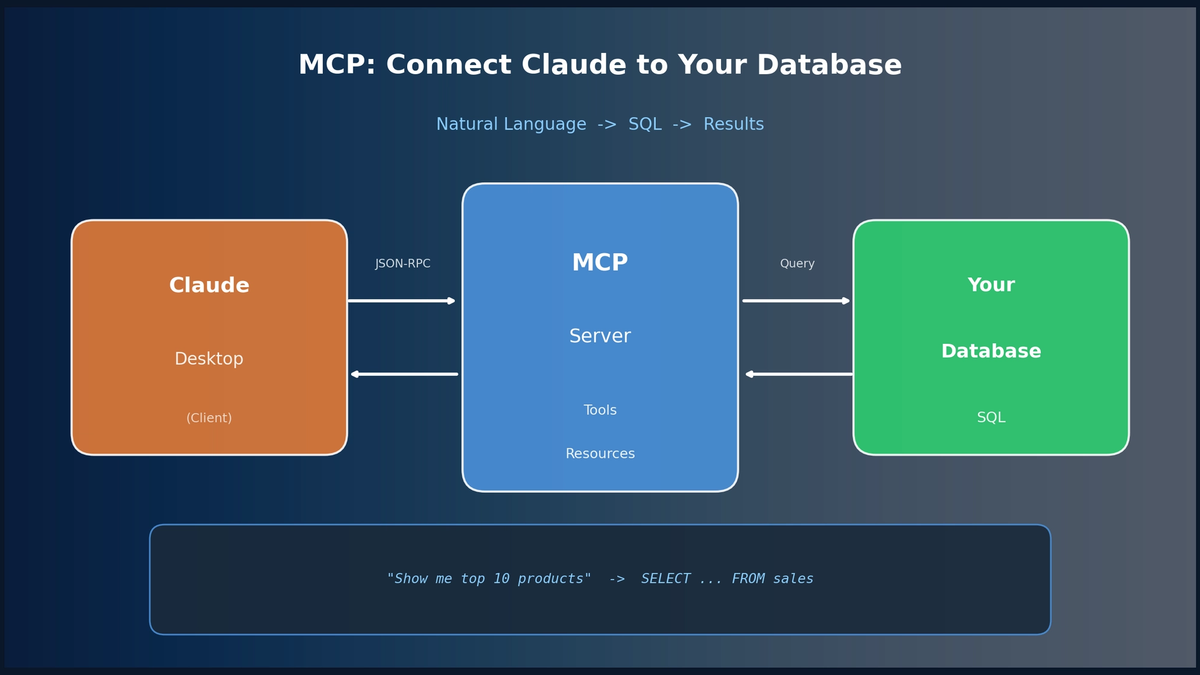
With MCP (Model Context Protocol), Claude directly accesses your database and executes queries. Say "Show me top 10 products by revenue last month" and Claude writes the SQL, runs it, and shows you results.
This guide covers building an MCP server in 50 lines of Python and connecting it to Claude Desktop.
What is MCP? — 5-Minute Primer
MCP (Model Context Protocol) is Anthropic's standard protocol for connecting AI to external systems.
Three Core Components
┌─────────────────┐     JSON-RPC      ┌─────────────────┐
│   Claude        │ ←───────────────→ │   MCP Server    │
│   (Client)      │    stdio/SSE      │   (Your Code)   │
└─────────────────┘                   └─────────────────┘
                                              │
                                              ▼
                                      ┌───────────────┐
                                      │  Your DB/API  │
└───────────────┘Server: The program you build in Python/TypeScript. Provides DB connections, query execution, etc.
Client: Claude Desktop acts as the client, connecting to servers and using their capabilities.
Protocol: The JSON-RPC specification for server-client communication.
Three Capabilities MCP Provides
| Capability | Description | Example |
|---|---|---|
| **Tools** | Functions AI can call | `execute_query(sql)` |
| **Resources** | Data AI can read | DB schema, table lists |
| **Prompts** | Reusable templates | "Sales analysis prompt" |
Building an MCP Server in 50 Lines of Python
Basic Structure
from mcp.server import Server
from mcp.types import Tool, TextContent
import mcp.server.stdio

# 1. Create server
server = Server("my-analytics")

# 2. Define tools — functions AI can call
@server.list_tools()
async def list_tools():
    return [
        Tool(
            name="run_query",
            description="Execute SQL SELECT query",
            inputSchema={
                "type": "object",
                "properties": {
                    "query": {"type": "string", "description": "SQL query"}
                },
                "required": ["query"]
            }
        )
    ]

# 3. Handle tool calls
@server.call_tool()
async def call_tool(name: str, arguments: dict):
    if name == "run_query":
        result = execute_sql(arguments["query"])
        return [TextContent(type="text", text=result)]

# 4. Run server
async def main():
    async with mcp.server.stdio.stdio_server() as (read, write):
        await server.run(read, write, server.create_initialization_options())

if __name__ == "__main__":
    import asyncio
    asyncio.run(main())
Key Points:
@server.list_tools(): Tells AI "these functions are available"inputSchema: JSON Schema defines parameters → AI calls with correct format@server.call_tool(): Actual function implementation
Production-Ready DB Analytics Server
import sqlite3
import pandas as pd
import json

db_path = "analytics.db"

def get_connection():
    return sqlite3.connect(db_path)

def validate_query(query: str) -> tuple[bool, str]:
    """Query validation for security"""
    query_upper = query.strip().upper()

    if not query_upper.startswith("SELECT"):
        return False, "Only SELECT queries allowed"

    dangerous = ["DROP", "DELETE", "UPDATE", "INSERT", "ALTER"]
    for keyword in dangerous:
        if keyword in query_upper:
            return False, f"Disallowed keyword: {keyword}"

    return True, "OK"

@server.list_tools()
async def list_tools():
    return [
        Tool(
            name="execute_query",
            description="Execute SQL SELECT query, return results as JSON",
            inputSchema={
                "type": "object",
                "properties": {
                    "query": {"type": "string"},
                    "limit": {"type": "integer", "default": 100}
                },
                "required": ["query"]
            }
        ),
        Tool(
            name="get_table_info",
            description="Get table schema and sample data",
            inputSchema={
                "type": "object",
                "properties": {
                    "table_name": {"type": "string"}
                },
                "required": ["table_name"]
            }
        ),
        Tool(
            name="list_tables",
            description="List all tables in database",
            inputSchema={"type": "object", "properties": {}}
        )
    ]

@server.call_tool()
async def call_tool(name: str, arguments: dict):
    conn = get_connection()

    if name == "execute_query":
        query = arguments["query"]
        is_valid, msg = validate_query(query)
        if not is_valid:
            return [TextContent(type="text", text=f"Error: {msg}")]

        limit = arguments.get("limit", 100)
        df = pd.read_sql_query(f"{query} LIMIT {limit}", conn)
        return [TextContent(type="text", text=df.to_json(orient="records", indent=2))]

    elif name == "get_table_info":
        table = arguments["table_name"]

        # Column info
        cursor = conn.execute(f"PRAGMA table_info({table})")
        columns = [{"name": c[1], "type": c[2]} for c in cursor.fetchall()]

        # Row count
        count = conn.execute(f"SELECT COUNT(*) FROM {table}").fetchone()[0]

        # Sample data
        sample = pd.read_sql_query(f"SELECT * FROM {table} LIMIT 5", conn)

        result = {
            "table": table,
            "row_count": count,
            "columns": columns,
            "sample": sample.to_dict(orient="records")
        }
        return [TextContent(type="text", text=json.dumps(result, indent=2))]

    elif name == "list_tables":
        cursor = conn.execute("SELECT name FROM sqlite_master WHERE type='table'")
        tables = [row[0] for row in cursor.fetchall()]
        return [TextContent(type="text", text=json.dumps(tables, indent=2))]
Connecting to Claude Desktop — One Config File
Config File Location
- macOS:
~/Library/Application Support/Claude/claude_desktop_config.json - Windows:
%APPDATA%\Claude\claude_desktop_config.json
Example Configuration
{
  "mcpServers": {
    "my-analytics": {
      "command": "python",
      "args": ["/Users/yourname/mcp/analytics_server.py"],
      "env": {
        "DB_PATH": "/Users/yourname/data/analytics.db"
      }
    }
  }
}
Restart Claude Desktop after saving to complete the connection.
Verifying Connection
Click the hammer icon (🔨) in Claude Desktop to see available tools. If you see execute_query, get_table_info, etc., you're connected.
Real-World Usage Scenarios
1. Natural Language → SQL Auto-Conversion
You: "Show me top 10 products by revenue last month"
Claude: (internally calls execute_query)
SELECT product_name, SUM(revenue) as total_revenue
FROM sales
WHERE sale_date >= date('now', '-1 month')
GROUP BY product_name
ORDER BY total_revenue DESC
LIMIT 10
2. Data Exploration
You: "What's the structure of the customers table?"
Claude: (calls get_table_info)
{
  "table": "customers",
  "row_count": 15420,
  "columns": [
    {"name": "id", "type": "INTEGER"},
    {"name": "name", "type": "TEXT"},
    {"name": "email", "type": "TEXT"},
    {"name": "created_at", "type": "DATETIME"}
  ]
}
3. Complex Analysis Through Conversation
You: "Analyze average purchase amount by age group and recommend which segment to target"
Claude executes queries, analyzes results, and provides actionable insights.
Providing Context with Resources
Beyond Tools, Resources give AI background knowledge.
@server.list_resources()
async def list_resources():
    conn = get_connection()
    cursor = conn.execute("SELECT name FROM sqlite_master WHERE type='table'")
    tables = [row[0] for row in cursor.fetchall()]

    return [
        Resource(
            uri=f"db://schema/{table}",
            name=f"Table: {table}",
            description=f"Schema information for {table}",
            mimeType="application/json"
        )
        for table in tables
    ]

@server.read_resource()
async def read_resource(uri: str):
    if uri.startswith("db://schema/"):
        table = uri.replace("db://schema/", "")
        conn = get_connection()
        cursor = conn.execute(f"PRAGMA table_info({table})")
        columns = [{"name": c[1], "type": c[2]} for c in cursor.fetchall()]
        return json.dumps({"table": table, "columns": columns}, indent=2)
With resources defined, Claude understands table structure before writing queries, producing more accurate SQL.
Security Best Practices
1. Table Whitelist
ALLOWED_TABLES = ["sales", "customers", "products"]

def validate_table(table: str) -> bool:
    return table.lower() in ALLOWED_TABLES
2. Result Size Limits
MAX_ROWS = 1000

df = pd.read_sql_query(f"{query} LIMIT {min(limit, MAX_ROWS)}", conn)
3. Logging
import logging

logging.info(f"Query executed: {query[:100]}...")
Wrapping Up
With MCP, Claude becomes a true data analysis partner:
- No copy-paste — query with natural language
- Real-time data analysis
- Context retention — no need to explain table structure every time
Start with 50 lines of Python and expand from there. Connect to PostgreSQL, BigQuery, Snowflake — any data source works.
Check the full example code on GitHub: Includes notebook examples too.
Subscribe to Newsletter
Related Posts

Data Analysis Cookbook: Master Data Analysis with SQL and Pandas
Learn data analysis with dual tracks: SQL (BigQuery) and Pandas. 85 interview prep problems.
Google Stitch MCP API: Generate UI Designs via AI Agents
Google Labs Stitch now supports MCP servers, allowing AI tools like Claude Code and Cursor to generate UI designs through API calls. Note: Some details in this article are from unofficial sources and may change.
Qwen3-Max-Thinking Snapshot Release: A New Standard in Reasoning AI
The recent trend in the LLM market goes beyond simply learning "more data" — it's now focused on "how the model thinks." Alibaba Cloud has released an API snapshot (qwen3-max-2026-01-23) of its most powerful model, Qwen3-Max-Thinking.