RAG 시스템의 진짜 병목: 벡터 DB가 아니라 원본 데이터의 1:N 관계입니다
RAG 정확도 문제를 벡터 DB 튜닝으로 해결하려는 팀이 많습니다. 하지만 실제 병목은 원본 데이터의 관계형 구조를 무시한 Chunking에서 발생합니다.
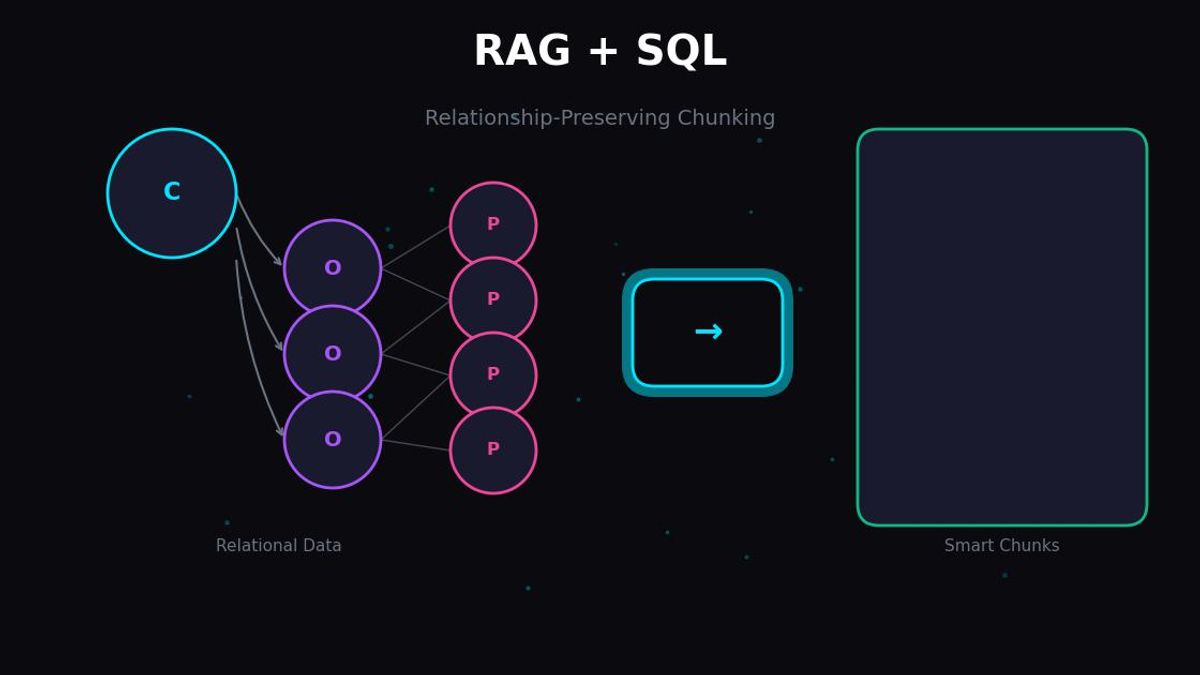
RAG 시스템의 정확도 문제를 벡터 DB 튜닝으로 해결하려는 팀이 많습니다. 하지만 실제 병목은 원본 데이터의 관계형 구조를 무시한 Chunking에서 발생합니다. 고객-주문-상품의 1:N:N 관계를 flat하게 임베딩하면, 아무리 좋은 벡터 DB를 써도 hallucination은 피할 수 없습니다.
이 글에서는 SQL 관계형 데이터를 RAG 시스템에 올바르게 통합하는 방법을 다룹니다.
1. 왜 벡터 DB만으로는 부족한가
현실에서 마주치는 문제
RAG 시스템을 구축하면서 이런 질문을 받아본 적 있을 것입니다:
"고객 A가 최근 3개월간 주문한 상품 중 반품률이 가장 높은 카테고리는?"
이 질문에 정확히 답하려면 다음 데이터가 동시에 필요합니다:
- 고객 정보 (customer_id, name, segment)
- 주문 정보 (order_id, order_date, customer_id)
- 주문 상세 (order_id, product_id, quantity, return_status)
- 상품 정보 (product_id, category, name)
문제는 대부분의 RAG 시스템이 이 데이터를 각각 별도의 chunk로 임베딩한다는 것입니다.
# 흔히 보는 잘못된 접근
chunks = [
    "고객 A는 VIP 등급이며 서울에 거주합니다.",
    "주문 #1234는 2024-01-15에 생성되었습니다.",
    "상품 X는 전자제품 카테고리입니다.",
]

# 각 chunk를 독립적으로 임베딩
for chunk in chunks:
    vector = embed(chunk)
    vector_db.insert(vector)
이렇게 하면 벡터 검색 시 "고객 A의 주문"이라는 관계를 찾을 수 없습니다.
벡터 유사도의 한계
벡터 검색은 의미적 유사성을 기반으로 합니다. 하지만 관계형 데이터에서 중요한 것은 구조적 연결입니다.
# 벡터 유사도 예시
query = "고객 A의 주문"

# 의미적으로 유사한 결과 (잘못된 결과)
results = [
    "고객 B의 주문 내역입니다.",  # '주문' 키워드 유사
    "A사의 대량 주문 처리 방법",   # 'A'와 '주문' 유사
    "고객 만족도 조사 결과",       # '고객' 유사
]

# 실제로 필요한 결과
expected = [
    "고객 A (ID: 123)의 주문 #456, #789",
    "주문 #456: 상품 X, Y (총 150,000원)",
]
벡터 DB는 "고객"과 "주문"이라는 단어의 의미는 이해하지만, customer_id = 123인 레코드와 연결된 order_id들이라는 관계는 이해하지 못합니다.
근본적인 원인
데이터의 두 가지 속성
1. 의미적 속성 (Semantic)
- "이 텍스트가 무슨 내용인가?"
- 벡터 임베딩으로 캡처 가능
- 유사도 검색에 적합
2. 구조적 속성 (Structural)
- "이 데이터가 어떤 데이터와 연결되는가?"
- Foreign Key, JOIN으로 표현
- 벡터로는 캡처 불가능
RAG 시스템의 정확도 문제는 구조적 속성을 무시하고 의미적 속성만 인덱싱했기 때문에 발생합니다.
2. 관계형 데이터의 본질: 1:N, N:M 이해하기
E-Commerce 도메인의 관계 구조
실제 비즈니스 데이터는 복잡한 관계를 가진다. E-Commerce를 예로 들면:
-- 고객 테이블 (1의 측면)
CREATE TABLE customers (
    customer_id SERIAL PRIMARY KEY,
    name VARCHAR(100),
    email VARCHAR(255),
    segment VARCHAR(50),  -- VIP, Regular, New
    created_at TIMESTAMP
);

-- 주문 테이블 (N의 측면, 고객과 1:N)
CREATE TABLE orders (
    order_id SERIAL PRIMARY KEY,
    customer_id INTEGER REFERENCES customers(customer_id),
    order_date TIMESTAMP,
    total_amount DECIMAL(10, 2),
    status VARCHAR(50)  -- pending, completed, cancelled
);

-- 주문 상세 테이블 (주문과 1:N, 상품과 N:1)
CREATE TABLE order_items (
    item_id SERIAL PRIMARY KEY,
    order_id INTEGER REFERENCES orders(order_id),
    product_id INTEGER REFERENCES products(product_id),
    quantity INTEGER,
    unit_price DECIMAL(10, 2),
    return_status VARCHAR(50)  -- none, requested, completed
);

-- 상품 테이블
CREATE TABLE products (
    product_id SERIAL PRIMARY KEY,
    name VARCHAR(255),
    category VARCHAR(100),
    description TEXT,
    price DECIMAL(10, 2)
);
관계의 방향성과 카디널리티
관계 유형별 특성
1:N (One-to-Many)
고객 → 주문: 한 고객이 여러 주문 가능
주문 → 주문상세: 한 주문에 여러 상품 포함
Chunk 전략: Parent-Child 패턴 적용
N:M (Many-to-Many)
상품 ↔ 태그: 상품은 여러 태그, 태그는 여러 상품
고객 ↔ 상품(위시리스트): 다대다 관계
Chunk 전략: 중간 테이블 기준 그룹핑
1:1 (One-to-One)
고객 → 고객상세: 확장 정보
Chunk 전략: 단일 문서로 병합
관계를 무시하면 생기는 정보 손실
# 원본 데이터의 관계
customer_123 = {
    "id": 123,
    "name": "김철수",
    "orders": [
        {
            "order_id": 456,
            "items": [
                {"product": "노트북", "qty": 1, "returned": False},
                {"product": "마우스", "qty": 2, "returned": True},
            ]
        },
        {
            "order_id": 789,
            "items": [
                {"product": "키보드", "qty": 1, "returned": True},
            ]
        }
    ]
}

# 잘못된 Chunking (관계 손실)
flat_chunks = [
    "김철수 고객 정보",
    "주문 456 정보",
    "주문 789 정보",
    "노트북 상품 정보",
    "마우스 상품 정보",
    "키보드 상품 정보",
]
# 문제: "김철수가 반품한 상품은?" 질문에 답할 수 없음

# 올바른 Chunking (관계 보존)
relational_chunk = """
고객: 김철수 (ID: 123)
- 주문 #456 (2024-01-15)
  - 노트북 x1 (반품: 없음)
  - 마우스 x2 (반품: 완료)
- 주문 #789 (2024-02-20)
  - 키보드 x1 (반품: 완료)
반품 요약: 마우스, 키보드 (총 2건)
"""
3. AS-IS: 잘못된 Chunking이 만드는 Hallucination
전형적인 실수 패턴
패턴 1: 테이블별 독립 Chunking
# AS-IS: 테이블별로 따로 임베딩
def wrong_chunking_by_table():
    # 고객 테이블 chunk
    customers = db.query("SELECT * FROM customers")
    for customer in customers:
        chunk = f"고객 {customer.name}은 {customer.segment} 등급입니다."
        embed_and_store(chunk)

    # 주문 테이블 chunk (별도)
    orders = db.query("SELECT * FROM orders")
    for order in orders:
        chunk = f"주문 #{order.order_id}는 {order.order_date}에 생성되었습니다."
        embed_and_store(chunk)

    # 상품 테이블 chunk (별도)
    products = db.query("SELECT * FROM products")
    for product in products:
        chunk = f"{product.name}은 {product.category} 카테고리 상품입니다."
        embed_and_store(chunk)
왜 문제인가요?
# 사용자 질문
query = "VIP 고객이 가장 많이 구매한 카테고리는?"

# 검색 결과 (관계 없이 유사도만으로 검색)
results = [
    "고객 A는 VIP 등급입니다.",           # VIP 매칭
    "고객 B는 VIP 등급입니다.",           # VIP 매칭
    "전자제품은 인기 카테고리입니다.",      # 카테고리 매칭
    "의류 카테고리 상품 목록",             # 카테고리 매칭
]

# LLM이 받는 context에는 "누가 무엇을 샀는지" 정보가 없음
# → Hallucination 발생: "VIP 고객은 전자제품을 많이 구매합니다" (근거 없음)
패턴 2: JOIN 결과를 무분별하게 Flatten
# AS-IS: JOIN 결과를 그대로 chunk로
def wrong_flattening():
    query = """
    SELECT c.name, o.order_id, p.name as product_name
    FROM customers c
    JOIN orders o ON c.customer_id = o.customer_id
    JOIN order_items oi ON o.order_id = oi.order_id
    JOIN products p ON oi.product_id = p.product_id
    """

    results = db.query(query)
    for row in results:
        # 각 row를 독립적인 chunk로 처리
        chunk = f"{row.name}이 주문 #{row.order_id}에서 {row.product_name}을 구매"
        embed_and_store(chunk)
왜 문제인가요?
# 원본 데이터
# 고객 A의 주문 #1: 상품 X, Y, Z (3개 아이템)
#
# Flatten 후 chunks:
# - "고객 A가 주문 #1에서 상품 X를 구매"
# - "고객 A가 주문 #1에서 상품 Y를 구매"
# - "고객 A가 주문 #1에서 상품 Z를 구매"

# 문제점:
# 1. 동일 주문이 3개의 chunk로 분리됨
# 2. "고객 A의 주문 #1에 포함된 전체 상품"을 한번에 못 가져옴
# 3. 검색 시 일부 상품만 retrieve되어 불완전한 답변
패턴 3: Context Window 최적화라는 함정
# AS-IS: 토큰 수 줄이려고 요약
def wrong_summarization():
    customer_data = get_full_customer_profile(customer_id=123)

    # 원본: 주문 50건, 상품 200개 상세 정보
    # "토큰 절약"을 위해 요약
    summary = f"""
    고객 123 요약:
    - 총 주문: 50건
    - 총 구매액: 5,000,000원
    - 주요 카테고리: 전자제품
    """
    embed_and_store(summary)
왜 문제인가요?
# 사용자 질문
query = "고객 123이 2024년 1월에 산 상품 중 아직 배송 안 된 건?"

# 요약본에는 개별 주문/배송 상태가 없음
# → "정보를 찾을 수 없습니다" 또는 hallucination
Hallucination 발생 메커니즘
def demonstrate_hallucination():
    """
    Hallucination이 발생하는 구체적 과정
    """

    # Step 1: 잘못된 chunking으로 저장된 데이터
    stored_chunks = [
        {"id": 1, "text": "고객 A는 VIP입니다", "vector": [0.1, 0.2, ...]},
        {"id": 2, "text": "주문 #100은 2024-01-15에 생성", "vector": [0.3, 0.1, ...]},
        {"id": 3, "text": "상품 X는 전자제품", "vector": [0.2, 0.4, ...]},
        # 관계 정보 없음: 고객 A가 주문 #100을 했는지? 주문 #100에 상품 X가 있는지?
    ]

    # Step 2: 사용자 질문
    question = "고객 A가 주문한 전자제품은?"

    # Step 3: 벡터 검색 (의미적 유사도)
    retrieved = [
        "고객 A는 VIP입니다",           # "고객 A" 매칭
        "상품 X는 전자제품",            # "전자제품" 매칭
    ]

    # Step 4: LLM에게 전달
    prompt = f"""
    Context: {retrieved}
    Question: {question}
    """

    # Step 5: LLM의 추론 (hallucination)
    llm_response = "고객 A가 주문한 전자제품은 상품 X입니다."

    # 실제로는 고객 A와 상품 X 사이에 연결 관계가 있는지 알 수 없음!
    # LLM은 context에 두 정보가 함께 있으니 연결된 것으로 "추측"
4. TO-BE: 관계를 보존하는 Chunking 전략
핵심 원칙
관계 보존 Chunking 3대 원칙
1. 관계의 "1" 측을 기준으로 그룹핑
- 고객 기준: 고객 + 해당 고객의 모든 주문
- 주문 기준: 주문 + 해당 주문의 모든 아이템
2. Chunk 내에 관계 체인 완전 포함
- 고객 → 주문 → 상품까지 한 chunk에
- FK 참조를 텍스트로 명시
3. Metadata에 관계 식별자 포함
- customer_id, order_id를 metadata로 저장
- 검색 후 SQL로 추가 정보 조회 가능
TO-BE: 관계 보존 Chunking 구현
from typing import List, Dict, Any
from dataclasses import dataclass
import json

@dataclass
class RelationalChunk:
    """관계 정보를 보존하는 Chunk 구조"""
    text: str                          # 임베딩할 텍스트
    metadata: Dict[str, Any]           # 관계 식별자들
    parent_id: str = None              # Parent-Child 패턴용
    chunk_type: str = "standalone"     # standalone, parent, child

def create_customer_centric_chunks(db_connection) -> List[RelationalChunk]:
    """
    TO-BE: 고객 중심으로 관계를 보존하는 Chunking

    핵심: 고객 한 명의 전체 컨텍스트를 하나의 Chunk 그룹으로
    """

    query = """
    WITH customer_orders AS (
        SELECT
            c.customer_id,
            c.name,
            c.email,
            c.segment,
            json_agg(
                json_build_object(
                    'order_id', o.order_id,
                    'order_date', o.order_date,
                    'total_amount', o.total_amount,
                    'status', o.status,
                    'items', (
                        SELECT json_agg(
                            json_build_object(
                                'product_id', p.product_id,
                                'product_name', p.name,
                                'category', p.category,
                                'quantity', oi.quantity,
                                'unit_price', oi.unit_price,
                                'return_status', oi.return_status
                            )
                        )
                        FROM order_items oi
                        JOIN products p ON oi.product_id = p.product_id
                        WHERE oi.order_id = o.order_id
                    )
                ) ORDER BY o.order_date DESC
            ) as orders
        FROM customers c
        LEFT JOIN orders o ON c.customer_id = o.customer_id
        GROUP BY c.customer_id, c.name, c.email, c.segment
    )
    SELECT * FROM customer_orders
    """

    chunks = []
    results = db_connection.execute(query)

    for row in results:
        # 고객 전체 프로필을 하나의 chunk로
        chunk_text = format_customer_profile(row)

        chunk = RelationalChunk(
            text=chunk_text,
            metadata={
                "customer_id": row['customer_id'],
                "customer_name": row['name'],
                "segment": row['segment'],
                "order_ids": [o['order_id'] for o in row['orders'] if o],
                "categories": extract_categories(row['orders']),
                "total_orders": len([o for o in row['orders'] if o]),
                "has_returns": has_any_returns(row['orders']),
            },
            chunk_type="customer_profile"
        )
        chunks.append(chunk)

    return chunks

def format_customer_profile(row: Dict) -> str:
    """
    고객 프로필을 검색 가능한 텍스트로 포맷팅
    관계 정보를 자연어로 명시적 표현
    """

    lines = [
        f"## 고객 프로필: {row['name']}",
        f"고객 ID: {row['customer_id']}",
        f"이메일: {row['email']}",
        f"등급: {row['segment']}",
        "",
        "### 주문 이력",
    ]

    orders = row.get('orders', [])
    if not orders or orders[0] is None:
        lines.append("주문 내역 없음")
    else:
        for order in orders:
            lines.append(f"\n#### 주문 #{order['order_id']} ({order['order_date']})")
            lines.append(f"상태: {order['status']} | 총액: {order['total_amount']:,}원")

            items = order.get('items', [])
            if items:
                lines.append("포함 상품:")
                for item in items:
                    return_info = f" [반품: {item['return_status']}]" if item['return_status'] != 'none' else ""
                    lines.append(
                        f"  - {item['product_name']} ({item['category']}) "
                        f"x{item['quantity']} @ {item['unit_price']:,}원{return_info}"
                    )

    # 요약 통계 (검색 키워드로 활용)
    lines.extend([
        "",
        "### 요약",
        f"총 주문 수: {len([o for o in orders if o])}건",
        f"구매 카테고리: {', '.join(extract_categories(orders))}",
        f"반품 이력: {'있음' if has_any_returns(orders) else '없음'}",
    ])

    return "\n".join(lines)

def extract_categories(orders: List[Dict]) -> List[str]:
    """주문에서 고유 카테고리 추출"""
    categories = set()
    for order in orders:
        if order and order.get('items'):
            for item in order['items']:
                if item.get('category'):
                    categories.add(item['category'])
    return list(categories)

def has_any_returns(orders: List[Dict]) -> bool:
    """반품 이력 존재 여부"""
    for order in orders:
        if order and order.get('items'):
            for item in order['items']:
                if item.get('return_status') not in (None, 'none'):
                    return True
    return False
관계 보존 Chunk의 실제 모습
## 고객 프로필: 김철수
고객 ID: 123
이메일: kim@example.com
등급: VIP

### 주문 이력

#### 주문 #456 (2024-01-15)
상태: completed | 총액: 1,500,000원
포함 상품:
  - MacBook Pro (전자제품) x1 @ 1,200,000원
  - Magic Mouse (전자제품) x2 @ 150,000원 [반품: completed]

#### 주문 #789 (2024-02-20)
상태: completed | 총액: 89,000원
포함 상품:
  - 기계식 키보드 (전자제품) x1 @ 89,000원 [반품: completed]

### 요약
총 주문 수: 2건
구매 카테고리: 전자제품
반품 이력: 있음
이제 "김철수가 반품한 상품은?"이라는 질문에 정확히 답할 수 있습니다.
5. Parent-Child Document 패턴 심층 분석
패턴 개요
대용량 관계형 데이터에서는 모든 관계를 하나의 chunk에 넣을 수 없습니다. 이때 Parent-Child Document 패턴을 사용합니다.
Parent-Child Document 패턴
Parent Document (요약)
전체 맥락을 담은 요약 정보
모든 Child의 ID 참조
검색 시 Parent만으로도 관련성 판단 가능
Child Documents (상세)
개별 상세 정보
Parent ID 역참조
세부 검색 시 활용
검색 전략
Step 1: Child 검색으로 관련 문서 찾기
Step 2: Child의 Parent 조회
Step 3: Parent의 전체 맥락을 LLM에 전달
구현 코드
from typing import List, Tuple
from dataclasses import dataclass, field
import uuid

@dataclass
class ParentDocument:
    """부모 문서: 전체 맥락 + 자식 참조"""
    doc_id: str
    text: str
    child_ids: List[str]
    metadata: Dict[str, Any]

@dataclass
class ChildDocument:
    """자식 문서: 상세 정보 + 부모 참조"""
    doc_id: str
    parent_id: str
    text: str
    metadata: Dict[str, Any]

class ParentChildChunker:
    """
    Parent-Child 패턴으로 관계형 데이터 Chunking

    사용 시나리오:
    - 고객(Parent) - 개별 주문(Child)
    - 제품(Parent) - 개별 리뷰(Child)
    - 문서(Parent) - 섹션/단락(Child)
    """

    def __init__(self, db_connection):
        self.db = db_connection

    def create_customer_order_chunks(self) -> Tuple[List[ParentDocument], List[ChildDocument]]:
        """
        고객-주문 관계를 Parent-Child 구조로 변환

        Parent: 고객 요약 (기본 정보 + 주문 통계)
        Child: 개별 주문 상세
        """

        parents = []
        children = []

        # 고객별 처리
        customers = self.db.query("SELECT * FROM customers")

        for customer in customers:
            customer_id = customer['customer_id']
            parent_id = f"customer_{customer_id}"

            # 해당 고객의 주문들 조회
            orders = self.db.query("""
                SELECT o.*,
                       json_agg(
                           json_build_object(
                               'product_name', p.name,
                               'category', p.category,
                               'quantity', oi.quantity,
                               'return_status', oi.return_status
                           )
                       ) as items
                FROM orders o
                JOIN order_items oi ON o.order_id = oi.order_id
                JOIN products p ON oi.product_id = p.product_id
                WHERE o.customer_id = %s
                GROUP BY o.order_id
            """, [customer_id])

            child_ids = []

            # Child documents 생성 (개별 주문)
            for order in orders:
                child_id = f"order_{order['order_id']}"
                child_ids.append(child_id)

                child_text = self._format_order_detail(order, customer)

                child = ChildDocument(
                    doc_id=child_id,
                    parent_id=parent_id,
                    text=child_text,
                    metadata={
                        "order_id": order['order_id'],
                        "customer_id": customer_id,
                        "order_date": str(order['order_date']),
                        "categories": list(set(i['category'] for i in order['items'])),
                        "has_return": any(i['return_status'] != 'none' for i in order['items']),
                    }
                )
                children.append(child)

            # Parent document 생성 (고객 요약)
            parent_text = self._format_customer_summary(customer, orders)

            parent = ParentDocument(
                doc_id=parent_id,
                text=parent_text,
                child_ids=child_ids,
                metadata={
                    "customer_id": customer_id,
                    "segment": customer['segment'],
                    "total_orders": len(orders),
                    "order_ids": [o['order_id'] for o in orders],
                }
            )
            parents.append(parent)

        return parents, children

    def _format_customer_summary(self, customer: Dict, orders: List[Dict]) -> str:
        """Parent 문서용 고객 요약 포맷"""

        total_amount = sum(o['total_amount'] for o in orders)
        categories = set()
        return_count = 0

        for order in orders:
            for item in order['items']:
                categories.add(item['category'])
                if item['return_status'] != 'none':
                    return_count += 1

        return f"""
고객 요약: {customer['name']} (ID: {customer['customer_id']})
등급: {customer['segment']}
이메일: {customer['email']}

주문 통계:
- 총 주문 수: {len(orders)}건
- 총 구매액: {total_amount:,.0f}원
- 구매 카테고리: {', '.join(categories)}
- 반품 건수: {return_count}건

이 고객의 상세 주문 정보는 개별 주문 문서를 참조하세요.
주문 ID 목록: {', '.join(str(o['order_id']) for o in orders)}
""".strip()

    def _format_order_detail(self, order: Dict, customer: Dict) -> str:
        """Child 문서용 주문 상세 포맷"""

        items_text = []
        for item in order['items']:
            return_info = f" (반품: {item['return_status']})" if item['return_status'] != 'none' else ""
            items_text.append(f"  - {item['product_name']} [{item['category']}] x{item['quantity']}{return_info}")

        return f"""
주문 상세: #{order['order_id']}
고객: {customer['name']} (ID: {customer['customer_id']}, {customer['segment']})
주문일: {order['order_date']}
상태: {order['status']}
총액: {order['total_amount']:,.0f}원

주문 상품:
{chr(10).join(items_text)}
""".strip()
Parent-Child 검색 전략
class ParentChildRetriever:
    """
    Parent-Child 구조에서의 검색 전략

    핵심: Child로 검색하고, Parent로 맥락 확보
    """

    def __init__(self, vector_db, sql_db):
        self.vector_db = vector_db
        self.sql_db = sql_db

    def retrieve(self, query: str, top_k: int = 5) -> List[Dict]:
        """
        2단계 검색 전략

        1. 벡터 검색으로 관련 Child 찾기
        2. Child의 Parent 조회하여 전체 맥락 확보
        """

        # Step 1: Child documents에서 검색
        child_results = self.vector_db.search(
            query=query,
            filter={"doc_type": "child"},
            top_k=top_k
        )

        # Step 2: 관련 Parent IDs 수집
        parent_ids = set()
        for result in child_results:
            parent_ids.add(result.metadata['parent_id'])

        # Step 3: Parent documents 조회
        parents = self.vector_db.get_by_ids(list(parent_ids))

        # Step 4: 결과 조합
        enriched_results = []
        for child in child_results:
            parent = next(
                (p for p in parents if p.doc_id == child.metadata['parent_id']),
                None
            )

            enriched_results.append({
                "child": child,
                "parent": parent,
                "context": self._build_context(parent, child),
            })

        return enriched_results

    def _build_context(self, parent: ParentDocument, child: ChildDocument) -> str:
        """LLM에게 전달할 통합 컨텍스트 생성"""

        return f"""
[전체 맥락 - 고객 정보]
{parent.text}

[상세 정보 - 관련 주문]
{child.text}
"""

    def retrieve_with_sql_fallback(self, query: str, customer_id: int = None) -> Dict:
        """
        벡터 검색 + SQL 보완 전략

        벡터 검색으로 관련 문서를 찾고,
        정확한 수치가 필요하면 SQL로 보완
        """

        # 벡터 검색
        vector_results = self.retrieve(query)

        # SQL로 정확한 데이터 보완
        if customer_id and self._needs_exact_numbers(query):
            sql_data = self.sql_db.query("""
                SELECT
                    COUNT(DISTINCT o.order_id) as order_count,
                    SUM(o.total_amount) as total_spent,
                    COUNT(CASE WHEN oi.return_status != 'none' THEN 1 END) as return_count
                FROM customers c
                JOIN orders o ON c.customer_id = o.customer_id
                JOIN order_items oi ON o.order_id = oi.order_id
                WHERE c.customer_id = %s
            """, [customer_id])

            return {
                "vector_context": vector_results,
                "exact_data": sql_data,
            }

        return {"vector_context": vector_results}

    def _needs_exact_numbers(self, query: str) -> bool:
        """정확한 수치가 필요한 쿼리인지 판단"""
        exact_keywords = ['총', '합계', '몇 개', '몇 건', '얼마', '평균', '최대', '최소']
        return any(kw in query for kw in exact_keywords)
6. SQL JOIN 결과를 Embedding할 때 주의점
JOIN의 함정: 데이터 폭발
-- 단순해 보이는 JOIN
SELECT c.name, o.order_id, p.name as product
FROM customers c
JOIN orders o ON c.customer_id = o.customer_id
JOIN order_items oi ON o.order_id = oi.order_id
JOIN products p ON oi.product_id = p.product_id;
문제점:
원본 레코드 수:
- customers: 1,000
- orders: 10,000
- order_items: 50,000
- products: 5,000

JOIN 결과: 50,000 rows (order_items 기준으로 폭발)

각 row를 chunk로 만들면:
- 50,000개의 chunk
- 동일 고객 정보가 수십~수백 번 중복
- 임베딩 비용 폭증
- 검색 시 중복 결과
올바른 JOIN 전략
class SmartJoinChunker:
    """
    JOIN 결과를 효율적으로 Chunking하는 전략
    """

    def __init__(self, db_connection):
        self.db = db_connection

    def chunk_with_aggregation(self) -> List[RelationalChunk]:
        """
        전략 1: GROUP BY + JSON 집계

        1:N 관계를 JSON 배열로 집계하여 중복 제거
        """

        query = """
        SELECT
            c.customer_id,
            c.name,
            c.segment,
            -- 주문을 JSON 배열로 집계
            json_agg(
                DISTINCT jsonb_build_object(
                    'order_id', o.order_id,
                    'order_date', o.order_date,
                    'items', (
                        SELECT json_agg(
                            jsonb_build_object(
                                'product', p.name,
                                'category', p.category,
                                'qty', oi.quantity
                            )
                        )
                        FROM order_items oi
                        JOIN products p ON oi.product_id = p.product_id
                        WHERE oi.order_id = o.order_id
                    )
                )
            ) as orders
        FROM customers c
        LEFT JOIN orders o ON c.customer_id = o.customer_id
        GROUP BY c.customer_id, c.name, c.segment
        """

        results = self.db.query(query)

        chunks = []
        for row in results:
            chunk = RelationalChunk(
                text=self._format_aggregated_customer(row),
                metadata={
                    "customer_id": row['customer_id'],
                    "type": "customer_profile",
                }
            )
            chunks.append(chunk)

        return chunks  # customers 수만큼만 생성 (1,000개)

    def chunk_with_window_functions(self) -> List[RelationalChunk]:
        """
        전략 2: Window Function으로 컨텍스트 보존

        각 레코드에 관련 컨텍스트를 포함
        """

        query = """
        WITH order_context AS (
            SELECT
                o.order_id,
                o.customer_id,
                o.order_date,
                c.name as customer_name,
                c.segment,
                -- 동일 고객의 다른 주문 수
                COUNT(*) OVER (PARTITION BY o.customer_id) as customer_total_orders,
                -- 동일 고객의 총 구매액
                SUM(o.total_amount) OVER (PARTITION BY o.customer_id) as customer_total_spent,
                -- 주문 순서
                ROW_NUMBER() OVER (PARTITION BY o.customer_id ORDER BY o.order_date) as order_sequence
            FROM orders o
            JOIN customers c ON o.customer_id = c.customer_id
        )
        SELECT
            oc.*,
            json_agg(
                jsonb_build_object(
                    'product', p.name,
                    'category', p.category,
                    'quantity', oi.quantity
                )
            ) as items
        FROM order_context oc
        JOIN order_items oi ON oc.order_id = oi.order_id
        JOIN products p ON oi.product_id = p.product_id
        GROUP BY oc.order_id, oc.customer_id, oc.order_date,
                 oc.customer_name, oc.segment, oc.customer_total_orders,
                 oc.customer_total_spent, oc.order_sequence
        """

        results = self.db.query(query)

        chunks = []
        for row in results:
            # 각 주문이 고객 컨텍스트를 포함
            chunk = RelationalChunk(
                text=self._format_order_with_context(row),
                metadata={
                    "order_id": row['order_id'],
                    "customer_id": row['customer_id'],
                    "type": "order_with_context",
                }
            )
            chunks.append(chunk)

        return chunks  # orders 수만큼 생성 (10,000개), 하지만 각각 컨텍스트 포함

    def _format_order_with_context(self, row: Dict) -> str:
        """주문 + 고객 컨텍스트 포맷"""

        items_text = "\n".join([
            f"  - {item['product']} ({item['category']}) x{item['quantity']}"
            for item in row['items']
        ])

        return f"""
주문 #{row['order_id']} ({row['order_date']})

고객 정보:
- 이름: {row['customer_name']} (ID: {row['customer_id']})
- 등급: {row['segment']}
- 총 주문 수: {row['customer_total_orders']}건 (이 주문은 {row['order_sequence']}번째)
- 누적 구매액: {row['customer_total_spent']:,.0f}원

주문 상품:
{items_text}
""".strip()
중복 제거와 Deduplication
class ChunkDeduplicator:
    """
    Embedding 전 중복 chunk 제거
    """

    def deduplicate_chunks(
        self,
        chunks: List[RelationalChunk],
        strategy: str = "exact"
    ) -> List[RelationalChunk]:
        """
        중복 제거 전략

        - exact: 정확히 같은 텍스트 제거
        - semantic: 의미적으로 유사한 것도 제거 (임베딩 비용 발생)
        - id_based: metadata의 primary key 기준
        """

        if strategy == "exact":
            seen = set()
            unique = []
            for chunk in chunks:
                text_hash = hash(chunk.text)
                if text_hash not in seen:
                    seen.add(text_hash)
                    unique.append(chunk)
            return unique

        elif strategy == "id_based":
            # Primary key 기준 중복 제거
            seen_ids = set()
            unique = []
            for chunk in chunks:
                primary_key = self._get_primary_key(chunk)
                if primary_key not in seen_ids:
                    seen_ids.add(primary_key)
                    unique.append(chunk)
            return unique

        elif strategy == "semantic":
            return self._semantic_dedup(chunks)

    def _get_primary_key(self, chunk: RelationalChunk) -> str:
        """Chunk의 primary key 추출"""
        meta = chunk.metadata
        if "customer_id" in meta and "order_id" not in meta:
            return f"customer_{meta['customer_id']}"
        elif "order_id" in meta:
            return f"order_{meta['order_id']}"
        else:
            return hash(chunk.text)

    def _semantic_dedup(
        self,
        chunks: List[RelationalChunk],
        threshold: float = 0.95
    ) -> List[RelationalChunk]:
        """
        의미적 유사도 기반 중복 제거

        주의: 임베딩 API 호출 필요
        """
        from sklearn.metrics.pairwise import cosine_similarity
        import numpy as np

        # 임베딩 생성
        embeddings = [self._embed(chunk.text) for chunk in chunks]
        embeddings = np.array(embeddings)

        # 유사도 행렬
        similarity_matrix = cosine_similarity(embeddings)

        # 중복 마킹
        unique_indices = []
        removed = set()

        for i in range(len(chunks)):
            if i in removed:
                continue
            unique_indices.append(i)

            # i와 유사한 것들 제거 대상으로
            for j in range(i + 1, len(chunks)):
                if similarity_matrix[i, j] > threshold:
                    removed.add(j)

        return [chunks[i] for i in unique_indices]
7. Metadata 필터링 vs 순수 Vector Search
두 접근법의 차이
검색 전략 비교
순수 Vector Search
장점: 의미적 유사성 탐색, 유연한 검색
단점: 정확한 필터링 불가, 관계 무시
적합: "~와 비슷한 것 찾아줘"
Metadata 필터링 + Vector Search
장점: 정확한 조건 필터링, 관계 ID로 연결
단점: 필터 조건 명시 필요
적합: "VIP 고객 중에서 ~한 것 찾아줘"
Hybrid (SQL + Vector)
장점: SQL로 정확한 필터 + Vector로 유사성
단점: 구현 복잡도 증가
적합: 복잡한 비즈니스 쿼리
Metadata 설계 원칙
class MetadataDesigner:
    """
    효과적인 Metadata 설계

    원칙:
    1. 관계 ID는 필수 (customer_id, order_id 등)
    2. 자주 필터링하는 속성만 포함
    3. 값의 카디널리티 고려 (너무 세분화하면 필터 효과 없음)
    """

    @staticmethod
    def design_customer_metadata(customer: Dict, orders: List[Dict]) -> Dict:
        """
        고객 chunk용 metadata 설계
        """

        # 필수: 관계 식별자
        metadata = {
            "customer_id": customer['customer_id'],
            "type": "customer_profile",
        }

        # 권장: 자주 필터링하는 속성
        metadata.update({
            "segment": customer['segment'],  # VIP, Regular 등
            "registration_year": customer['created_at'].year,
        })

        # 권장: 집계된 검색 조건
        categories = set()
        has_returns = False
        for order in orders:
            for item in order.get('items', []):
                categories.add(item['category'])
                if item.get('return_status') not in (None, 'none'):
                    has_returns = True

        metadata.update({
            "categories": list(categories),  # 리스트 필터링 지원
            "has_returns": has_returns,       # 불리언 필터
            "total_orders": len(orders),      # 범위 필터용
        })

        # 비권장: 너무 세부적인 정보
        # - 개별 주문 날짜들 (SQL로 처리)
        # - 개별 상품 ID들 (너무 많음)
        # - 정확한 금액 (범위 쿼리는 SQL이 적합)

        return metadata
Hybrid 검색 구현
class HybridRetriever:
    """
    SQL 필터링 + Vector Search 결합

    전략:
    1. SQL로 후보군 좁히기 (정확한 조건)
    2. Vector Search로 관련성 정렬 (의미적 유사성)
    """

    def __init__(self, sql_db, vector_db):
        self.sql_db = sql_db
        self.vector_db = vector_db

    def search(
        self,
        query: str,
        filters: Dict = None,
        top_k: int = 10
    ) -> List[Dict]:
        """
        Hybrid 검색 실행

        예시:
        query = "반품 관련 불만 사항"
        filters = {
            "segment": "VIP",
            "has_returns": True,
            "order_date_after": "2024-01-01"
        }
        """

        # Step 1: SQL로 후보 ID 추출
        candidate_ids = self._sql_filter(filters)

        if not candidate_ids:
            # 조건에 맞는 데이터 없음
            return []

        # Step 2: Vector Search with ID 필터
        vector_results = self.vector_db.search(
            query=query,
            filter={"customer_id": {"$in": candidate_ids}},
            top_k=top_k
        )

        # Step 3: SQL로 상세 정보 보강
        enriched = self._enrich_with_sql(vector_results)

        return enriched

    def _sql_filter(self, filters: Dict) -> List[int]:
        """SQL로 조건에 맞는 customer_id 추출"""

        if not filters:
            return None  # 필터 없으면 전체 대상

        conditions = ["1=1"]
        params = []

        if filters.get("segment"):
            conditions.append("c.segment = %s")
            params.append(filters["segment"])

        if filters.get("has_returns"):
            conditions.append("""
                EXISTS (
                    SELECT 1 FROM orders o
                    JOIN order_items oi ON o.order_id = oi.order_id
                    WHERE o.customer_id = c.customer_id
                    AND oi.return_status != 'none'
                )
            """)

        if filters.get("order_date_after"):
            conditions.append("""
                EXISTS (
                    SELECT 1 FROM orders o
                    WHERE o.customer_id = c.customer_id
                    AND o.order_date >= %s
                )
            """)
            params.append(filters["order_date_after"])

        query = f"""
            SELECT DISTINCT c.customer_id
            FROM customers c
            WHERE {' AND '.join(conditions)}
        """

        results = self.sql_db.query(query, params)
        return [r['customer_id'] for r in results]

    def _enrich_with_sql(self, vector_results: List) -> List[Dict]:
        """Vector 결과에 SQL 데이터 보강"""

        customer_ids = [r.metadata['customer_id'] for r in vector_results]

        sql_data = self.sql_db.query("""
            SELECT
                c.customer_id,
                c.name,
                COUNT(o.order_id) as order_count,
                SUM(o.total_amount) as total_spent,
                MAX(o.order_date) as last_order_date
            FROM customers c
            LEFT JOIN orders o ON c.customer_id = o.customer_id
            WHERE c.customer_id = ANY(%s)
            GROUP BY c.customer_id, c.name
        """, [customer_ids])

        sql_lookup = {d['customer_id']: d for d in sql_data}

        enriched = []
        for result in vector_results:
            cid = result.metadata['customer_id']
            enriched.append({
                "text": result.text,
                "score": result.score,
                "metadata": result.metadata,
                "sql_data": sql_lookup.get(cid, {}),
            })

        return enriched
성능 비교
def benchmark_search_strategies():
    """
    검색 전략별 성능 비교
    """

    queries = [
        {
            "question": "VIP 고객 중 반품이 많은 사람은?",
            "expected_filter": {"segment": "VIP", "has_returns": True},
        },
        {
            "question": "전자제품을 자주 구매하는 고객의 특성",
            "expected_filter": {"categories": {"$contains": "전자제품"}},
        },
        {
            "question": "최근 3개월 구매 이력이 있는 휴면 고객",
            "expected_filter": {
                "order_date_after": "2024-09-01",
                "segment": "Dormant",
            },
        },
    ]

    results = []

    for q in queries:
        # 전략 1: 순수 Vector Search
        start = time.time()
        pure_vector = vector_db.search(q["question"], top_k=10)
        pure_vector_time = time.time() - start
        pure_vector_precision = calculate_precision(pure_vector, q)

        # 전략 2: Metadata 필터 + Vector
        start = time.time()
        metadata_vector = vector_db.search(
            q["question"],
            filter=q["expected_filter"],
            top_k=10
        )
        metadata_time = time.time() - start
        metadata_precision = calculate_precision(metadata_vector, q)

        # 전략 3: SQL + Vector Hybrid
        start = time.time()
        hybrid = hybrid_retriever.search(
            q["question"],
            filters=q["expected_filter"],
            top_k=10
        )
        hybrid_time = time.time() - start
        hybrid_precision = calculate_precision(hybrid, q)

        results.append({
            "question": q["question"],
            "pure_vector": {"time": pure_vector_time, "precision": pure_vector_precision},
            "metadata": {"time": metadata_time, "precision": metadata_precision},
            "hybrid": {"time": hybrid_time, "precision": hybrid_precision},
        })

    return results

# 예상 결과:
# ┌─────────────────────────────────┬─────────────┬─────────────┬─────────────┐
# │ Query                           │ Pure Vector │ Metadata    │ Hybrid      │
# ├─────────────────────────────────┼─────────────┼─────────────┼─────────────┤
# │ VIP 고객 중 반품 많은 사람       │ P: 0.3      │ P: 0.7      │ P: 0.9      │
# │                                 │ T: 50ms     │ T: 45ms     │ T: 80ms     │
# ├─────────────────────────────────┼─────────────┼─────────────┼─────────────┤
# │ 전자제품 자주 구매 고객          │ P: 0.4      │ P: 0.8      │ P: 0.95     │
# │                                 │ T: 48ms     │ T: 52ms     │ T: 85ms     │
# └─────────────────────────────────┴─────────────┴─────────────┴─────────────┘
8. 실전 구현: 고객-주문-상품 RAG 시스템
전체 아키텍처
"""
E-Commerce RAG 시스템 전체 구현
구성요소:
1. DataLoader: SQL에서 관계 데이터 로드
2. ChunkBuilder: 관계 보존 Chunking
3. Indexer: 벡터 DB 인덱싱
4. Retriever: Hybrid 검색
5. Generator: LLM 응답 생성
"""
from dataclasses import dataclass
from typing import List, Dict, Optional, Tuple
import json
from datetime import datetime
import psycopg2
from openai import OpenAI
# 설정
@dataclass
class RAGConfig:
# Database
db_host: str = "localhost"
db_name: str = "ecommerce"
db_user: str = "user"
db_password: str = "password"
# Vector DB
vector_db_url: str = "http://localhost:6333"
collection_name: str = "customer_profiles"
# Embedding
embedding_model: str = "text-embedding-3-small"
embedding_dimension: int = 1536
# LLM
llm_model: str = "gpt-4-turbo-preview"
max_tokens: int = 2000
# Chunking
chunk_strategy: str = "customer_centric" # customer_centric, order_centric, parent_child
class EcommerceRAG:
"""
E-Commerce RAG 시스템 메인 클래스
"""
def __init__(self, config: RAGConfig):
self.config = config
self.sql_db = self._connect_sql()
self.vector_db = self._connect_vector_db()
self.openai = OpenAI()
def _connect_sql(self):
return psycopg2.connect(
host=self.config.db_host,
database=self.config.db_name,
user=self.config.db_user,
password=self.config.db_password
)
def _connect_vector_db(self):
from qdrant_client import QdrantClient
return QdrantClient(url=self.config.vector_db_url)
# =========================================
# 1. 데이터 로드 및 Chunking
# =========================================
def build_index(self):
"""
SQL 데이터를 벡터 DB에 인덱싱
"""
print("Starting index build...")
# Step 1: 관계 데이터 로드
customers = self._load_customer_data()
print(f"Loaded {len(customers)} customers with orders")
# Step 2: Chunk 생성
chunks = self._create_chunks(customers)
print(f"Created {len(chunks)} chunks")
# Step 3: 임베딩 및 인덱싱
self._index_chunks(chunks)
print("Indexing complete!")
return len(chunks)
def _load_customer_data(self) -> List[Dict]:
"""
고객-주문-상품 관계 데이터 로드
핵심: JSON 집계로 1:N 관계를 하나의 레코드로
"""
query = """
WITH order_details AS (
SELECT
o.order_id,
o.customer_id,
o.order_date,
o.total_amount,
o.status,
json_agg(
json_build_object(
'product_id', p.product_id,
'product_name', p.name,
'category', p.category,
'quantity', oi.quantity,
'unit_price', oi.unit_price,
'return_status', oi.return_status
)
) as items
FROM orders o
JOIN order_items oi ON o.order_id = oi.order_id
JOIN products p ON oi.product_id = p.product_id
GROUP BY o.order_id
)
SELECT
c.customer_id,
c.name,
c.email,
c.segment,
c.created_at,
COALESCE(
json_agg(
json_build_object(
'order_id', od.order_id,
'order_date', od.order_date,
'total_amount', od.total_amount,
'status', od.status,
'items', od.items
) ORDER BY od.order_date DESC
) FILTER (WHERE od.order_id IS NOT NULL),
'[]'::json
) as orders
FROM customers c
LEFT JOIN order_details od ON c.customer_id = od.customer_id
GROUP BY c.customer_id, c.name, c.email, c.segment, c.created_at
"""
with self.sql_db.cursor() as cur:
cur.execute(query)
columns = [desc[0] for desc in cur.description]
results = [dict(zip(columns, row)) for row in cur.fetchall()]
return results
def _create_chunks(self, customers: List[Dict]) -> List[Dict]:
"""
관계 보존 Chunk 생성
"""
chunks = []
for customer in customers:
chunk_text = self._format_customer_chunk(customer)
# Metadata 설계
orders = customer['orders'] if customer['orders'] else []
categories = self._extract_categories(orders)
metadata = {
"customer_id": customer['customer_id'],
"customer_name": customer['name'],
"segment": customer['segment'],
"categories": categories,
"has_returns": self._has_returns(orders),
"total_orders": len(orders),
"total_spent": sum(o['total_amount'] for o in orders if o.get('total_amount')),
"last_order_date": orders[0]['order_date'] if orders else None,
}
chunks.append({
"text": chunk_text,
"metadata": metadata,
})
return chunks
def _format_customer_chunk(self, customer: Dict) -> str:
"""
고객 데이터를 검색 가능한 텍스트로 변환
핵심: 관계 정보를 명시적으로 포함
"""
lines = [
f"# 고객 프로필: {customer['name']}",
f"",
f"## 기본 정보",
f"- 고객 ID: {customer['customer_id']}",
f"- 이메일: {customer['email']}",
f"- 등급: {customer['segment']}",
f"- 가입일: {customer['created_at']}",
f"",
]
orders = customer['orders'] if customer['orders'] else []
if orders:
# 요약 통계
total_spent = sum(o['total_amount'] for o in orders if o.get('total_amount'))
categories = self._extract_categories(orders)
return_count = sum(
1 for o in orders
for item in (o.get('items') or [])
if item.get('return_status') not in (None, 'none')
)
lines.extend([
f"## 구매 요약",
f"- 총 주문 수: {len(orders)}건",
f"- 총 구매액: {total_spent:,.0f}원",
f"- 구매 카테고리: {', '.join(categories)}",
f"- 반품 건수: {return_count}건",
f"",
f"## 주문 상세",
])
# 최근 10건만 상세 포함 (너무 길면 truncate)
for order in orders[:10]:
lines.append(f"")
lines.append(f"### 주문 #{order['order_id']} ({order['order_date']})")
lines.append(f"상태: {order['status']} | 금액: {order['total_amount']:,.0f}원")
items = order.get('items') or []
if items:
lines.append("상품:")
for item in items:
return_info = ""
if item.get('return_status') not in (None, 'none'):
return_info = f" [반품: {item['return_status']}]"
lines.append(
f" - {item['product_name']} ({item['category']}) "
f"x{item['quantity']} @ {item['unit_price']:,.0f}원{return_info}"
)
if len(orders) > 10:
lines.append(f"")
lines.append(f"... 외 {len(orders) - 10}건의 주문 이력")
else:
lines.extend([
f"## 구매 이력",
f"주문 내역 없음",
])
return "\n".join(lines)
def _extract_categories(self, orders: List[Dict]) -> List[str]:
categories = set()
for order in orders:
for item in (order.get('items') or []):
if item.get('category'):
categories.add(item['category'])
return list(categories)
def _has_returns(self, orders: List[Dict]) -> bool:
for order in orders:
for item in (order.get('items') or []):
if item.get('return_status') not in (None, 'none'):
return True
return False
# =========================================
# 2. 인덱싱
# =========================================
def _index_chunks(self, chunks: List[Dict]):
"""
Chunk들을 벡터 DB에 인덱싱
"""
from qdrant_client.models import Distance, VectorParams, PointStruct
# 컬렉션 생성
self.vector_db.recreate_collection(
collection_name=self.config.collection_name,
vectors_config=VectorParams(
size=self.config.embedding_dimension,
distance=Distance.COSINE
)
)
# 배치 임베딩 및 인덱싱
batch_size = 100
for i in range(0, len(chunks), batch_size):
batch = chunks[i:i + batch_size]
# 임베딩 생성
texts = [c['text'] for c in batch]
embeddings = self._embed_texts(texts)
# 포인트 생성
points = [
PointStruct(
id=i + j,
vector=embeddings[j],
payload={
"text": batch[j]['text'],
**batch[j]['metadata']
}
)
for j in range(len(batch))
]
# 업로드
self.vector_db.upsert(
collection_name=self.config.collection_name,
points=points
)
print(f"Indexed {min(i + batch_size, len(chunks))}/{len(chunks)} chunks")
def _embed_texts(self, texts: List[str]) -> List[List[float]]:
"""텍스트 임베딩 생성"""
response = self.openai.embeddings.create(
model=self.config.embedding_model,
input=texts
)
return [item.embedding for item in response.data]
# =========================================
# 3. 검색 및 응답 생성
# =========================================
def query(
self,
question: str,
filters: Dict = None,
top_k: int = 5
) -> Dict:
"""
RAG 질의 실행
Args:
question: 사용자 질문
filters: 메타데이터 필터 (optional)
top_k: 검색 결과 수
Returns:
{
"answer": str,
"sources": List[Dict],
"sql_supplement": Dict (optional)
}
"""
# Step 1: 질문 분석 및 필터 추출
parsed = self._parse_question(question)
# Step 2: 벡터 검색
search_results = self._search(
question,
filters=filters or parsed.get('filters'),
top_k=top_k
)
# Step 3: SQL 보완 (정확한 수치 필요시)
sql_data = None
if parsed.get('needs_exact_data'):
sql_data = self._get_exact_data(parsed)
# Step 4: LLM 응답 생성
answer = self._generate_answer(question, search_results, sql_data)
return {
"answer": answer,
"sources": [
{
"customer_id": r.payload['customer_id'],
"customer_name": r.payload['customer_name'],
"score": r.score,
}
for r in search_results
],
"sql_supplement": sql_data,
}
def _parse_question(self, question: str) -> Dict:
"""
질문에서 필터 조건과 데이터 요구사항 추출
"""
# 간단한 규칙 기반 파싱 (프로덕션에서는 LLM 활용 권장)
parsed = {
"filters": {},
"needs_exact_data": False,
}
# 세그먼트 필터
if "VIP" in question.upper():
parsed["filters"]["segment"] = "VIP"
elif "휴면" in question or "dormant" in question.lower():
parsed["filters"]["segment"] = "Dormant"
# 반품 필터
if "반품" in question or "return" in question.lower():
parsed["filters"]["has_returns"] = True
# 카테고리 필터
categories = ["전자제품", "의류", "식품", "가구"]
for cat in categories:
if cat in question:
parsed["filters"]["categories"] = {"$contains": cat}
break
# 정확한 수치 필요 여부
exact_keywords = ['총', '합계', '몇 개', '몇 건', '얼마', '평균', '최대', '최소', '비율']
parsed["needs_exact_data"] = any(kw in question for kw in exact_keywords)
return parsed
def _search(
self,
query: str,
filters: Dict = None,
top_k: int = 5
) -> List:
"""벡터 검색 실행"""
from qdrant_client.models import Filter, FieldCondition, MatchValue
# 쿼리 임베딩
query_vector = self._embed_texts([query])[0]
# 필터 구성
qdrant_filter = None
if filters:
conditions = []
for key, value in filters.items():
if isinstance(value, dict) and "$contains" in value:
# 리스트 포함 조건
conditions.append(
FieldCondition(
key=key,
match=MatchValue(value=value["$contains"])
)
)
else:
conditions.append(
FieldCondition(
key=key,
match=MatchValue(value=value)
)
)
if conditions:
qdrant_filter = Filter(must=conditions)
# 검색 실행
results = self.vector_db.search(
collection_name=self.config.collection_name,
query_vector=query_vector,
query_filter=qdrant_filter,
limit=top_k
)
return results
def _get_exact_data(self, parsed: Dict) -> Dict:
"""SQL로 정확한 통계 데이터 조회"""
# 필터 조건 구성
where_clauses = ["1=1"]
params = []
if parsed["filters"].get("segment"):
where_clauses.append("c.segment = %s")
params.append(parsed["filters"]["segment"])
if parsed["filters"].get("has_returns"):
where_clauses.append("""
EXISTS (
SELECT 1 FROM order_items oi2
JOIN orders o2 ON oi2.order_id = o2.order_id
WHERE o2.customer_id = c.customer_id
AND oi2.return_status != 'none'
)
""")
query = f"""
SELECT
COUNT(DISTINCT c.customer_id) as customer_count,
COUNT(DISTINCT o.order_id) as order_count,
COALESCE(SUM(o.total_amount), 0) as total_revenue,
COALESCE(AVG(o.total_amount), 0) as avg_order_value,
COUNT(CASE WHEN oi.return_status != 'none' THEN 1 END) as return_count
FROM customers c
LEFT JOIN orders o ON c.customer_id = o.customer_id
LEFT JOIN order_items oi ON o.order_id = oi.order_id
WHERE {' AND '.join(where_clauses)}
"""
with self.sql_db.cursor() as cur:
cur.execute(query, params)
columns = [desc[0] for desc in cur.description]
row = cur.fetchone()
return dict(zip(columns, row)) if row else {}
def _generate_answer(
self,
question: str,
search_results: List,
sql_data: Dict = None
) -> str:
"""LLM으로 최종 응답 생성"""
# 컨텍스트 구성
context_parts = []
for i, result in enumerate(search_results, 1):
context_parts.append(f"[검색 결과 {i}] (관련도: {result.score:.2f})")
context_parts.append(result.payload['text'])
context_parts.append("")
context = "\n".join(context_parts)
# SQL 보완 데이터
sql_info = ""
if sql_data:
sql_info = f"""
정확한 통계 데이터:
- 해당 고객 수: {sql_data.get('customer_count', 'N/A')}명
- 총 주문 수: {sql_data.get('order_count', 'N/A')}건
- 총 매출액: {sql_data.get('total_revenue', 0):,.0f}원
- 평균 주문 금액: {sql_data.get('avg_order_value', 0):,.0f}원
- 반품 건수: {sql_data.get('return_count', 'N/A')}건
"""
prompt = f"""다음 고객 데이터를 기반으로 질문에 답변해주세요.
## 검색된 고객 정보
{context}
{sql_info}
## 질문
{question}
## 지시사항
1. 검색 결과에 있는 정보만 사용하여 답변하세요.
2. 정확한 수치가 제공된 경우 해당 수치를 인용하세요.
3. 확실하지 않은 정보는 "확인된 데이터에 따르면"으로 시작하세요.
4. 답을 찾을 수 없으면 솔직히 "제공된 데이터에서 해당 정보를 찾을 수 없습니다"라고 하세요.
"""
response = self.openai.chat.completions.create(
model=self.config.llm_model,
messages=[
{"role": "system", "content": "당신은 E-Commerce 데이터 분석 전문가입니다."},
{"role": "user", "content": prompt}
],
max_tokens=self.config.max_tokens,
temperature=0.3 # 낮은 temperature로 정확성 우선
)
return response.choices[0].message.content사용 예시
# 시스템 초기화
config = RAGConfig(
    db_host="localhost",
    db_name="ecommerce",
)
rag = EcommerceRAG(config)

# 인덱스 빌드 (최초 1회)
rag.build_index()

# 질의 실행
result = rag.query("VIP 고객 중 반품이 많은 사람은 누구인가요?")
print(result['answer'])
# 출력:
# 확인된 데이터에 따르면, VIP 고객 중 반품 이력이 있는 고객은 다음과 같습니다:
# 1. 김철수 (ID: 123) - 반품 2건 (Magic Mouse, 기계식 키보드)
# 2. 이영희 (ID: 456) - 반품 1건 (무선 이어폰)
# ...

# 정확한 수치가 필요한 질의
result = rag.query("VIP 고객의 총 매출액과 평균 주문 금액은?")
print(result['answer'])
# 출력:
# VIP 고객 통계:
# - 총 고객 수: 150명
# - 총 매출액: 2,500,000,000원
# - 평균 주문 금액: 850,000원
9. 성능 벤치마크: 관계 보존 vs 미보존
실험 설계
"""
벤치마크 실험: 관계 보존 Chunking의 효과 측정

비교 대상:
1. Baseline: 테이블별 독립 Chunking
2. Flat JOIN: JOIN 결과를 row별로 Chunking
3. Proposed: 관계 보존 Chunking (Customer-centric)
"""

from dataclasses import dataclass
from typing import List, Dict, Tuple
import time
import numpy as np

@dataclass
class BenchmarkResult:
    strategy: str
    precision_at_5: float
    recall_at_5: float
    f1_at_5: float
    latency_ms: float
    hallucination_rate: float
    chunk_count: int
    index_time_sec: float

class RAGBenchmark:
    """RAG 시스템 벤치마크"""

    def __init__(self, test_queries: List[Dict]):
        """
        test_queries 형식:
        [
            {
                "question": "VIP 고객 중 반품이 많은 사람은?",
                "ground_truth": {
                    "customer_ids": [123, 456],
                    "expected_facts": ["김철수 반품 2건", "이영희 반품 1건"]
                }
            },
            ...
        ]
        """
        self.test_queries = test_queries
        self.results = []

    def run_benchmark(self) -> List[BenchmarkResult]:
        """전체 벤치마크 실행"""

        strategies = [
            ("baseline", self._build_baseline_index),
            ("flat_join", self._build_flat_join_index),
            ("proposed", self._build_proposed_index),
        ]

        for name, build_fn in strategies:
            print(f"\n{'='*50}")
            print(f"Testing strategy: {name}")
            print('='*50)

            # 인덱스 빌드
            start = time.time()
            rag_system, chunk_count = build_fn()
            index_time = time.time() - start

            # 쿼리 실행 및 평가
            metrics = self._evaluate_strategy(rag_system)

            result = BenchmarkResult(
                strategy=name,
                precision_at_5=metrics['precision'],
                recall_at_5=metrics['recall'],
                f1_at_5=metrics['f1'],
                latency_ms=metrics['latency'],
                hallucination_rate=metrics['hallucination_rate'],
                chunk_count=chunk_count,
                index_time_sec=index_time
            )
            self.results.append(result)

        return self.results

    def _evaluate_strategy(self, rag_system) -> Dict:
        """전략 평가"""

        precisions = []
        recalls = []
        latencies = []
        hallucinations = []

        for query in self.test_queries:
            # 검색 실행
            start = time.time()
            result = rag_system.query(query['question'])
            latency = (time.time() - start) * 1000
            latencies.append(latency)

            # Precision/Recall 계산
            retrieved_ids = set(s['customer_id'] for s in result['sources'])
            relevant_ids = set(query['ground_truth']['customer_ids'])

            if retrieved_ids:
                precision = len(retrieved_ids & relevant_ids) / len(retrieved_ids)
            else:
                precision = 0

            if relevant_ids:
                recall = len(retrieved_ids & relevant_ids) / len(relevant_ids)
            else:
                recall = 1

            precisions.append(precision)
            recalls.append(recall)

            # Hallucination 체크
            hallucination = self._check_hallucination(
                result['answer'],
                query['ground_truth']['expected_facts']
            )
            hallucinations.append(hallucination)

        avg_precision = np.mean(precisions)
        avg_recall = np.mean(recalls)

        return {
            'precision': avg_precision,
            'recall': avg_recall,
            'f1': 2 * avg_precision * avg_recall / (avg_precision + avg_recall + 1e-10),
            'latency': np.mean(latencies),
            'hallucination_rate': np.mean(hallucinations),
        }

    def _check_hallucination(self, answer: str, expected_facts: List[str]) -> float:
        """
        Hallucination 비율 측정

        반환: 0.0 (hallucination 없음) ~ 1.0 (완전 hallucination)
        """

        # 간단한 방법: 예상 사실이 답변에 포함되어 있는지 확인
        # 프로덕션에서는 NLI 모델 활용 권장

        if not expected_facts:
            return 0.0

        found_facts = sum(1 for fact in expected_facts if fact in answer)
        fact_coverage = found_facts / len(expected_facts)

        # fact가 없는데 자신있게 답변하면 hallucination
        # fact가 있으면 hallucination 아님
        return 1.0 - fact_coverage

    def print_results(self):
        """결과 출력"""

        print("\n" + "="*80)
        print("BENCHMARK RESULTS")
        print("="*80)

        headers = ["Strategy", "P@5", "R@5", "F1@5", "Latency", "Halluc.", "Chunks", "Index Time"]

        print(f"\n{'Strategy':<15} {'P@5':>8} {'R@5':>8} {'F1@5':>8} {'Latency':>10} {'Halluc.':>8} {'Chunks':>8} {'Index':>10}")
        print("-" * 80)

        for r in self.results:
            print(
                f"{r.strategy:<15} "
                f"{r.precision_at_5:>8.2%} "
                f"{r.recall_at_5:>8.2%} "
                f"{r.f1_at_5:>8.2%} "
                f"{r.latency_ms:>8.1f}ms "
                f"{r.hallucination_rate:>8.2%} "
                f"{r.chunk_count:>8,} "
                f"{r.index_time_sec:>8.1f}s"
            )
예상 벤치마크 결과
================================================================================
BENCHMARK RESULTS
================================================================================

Strategy        P@5      R@5     F1@5    Latency  Halluc.   Chunks      Index
--------------------------------------------------------------------------------
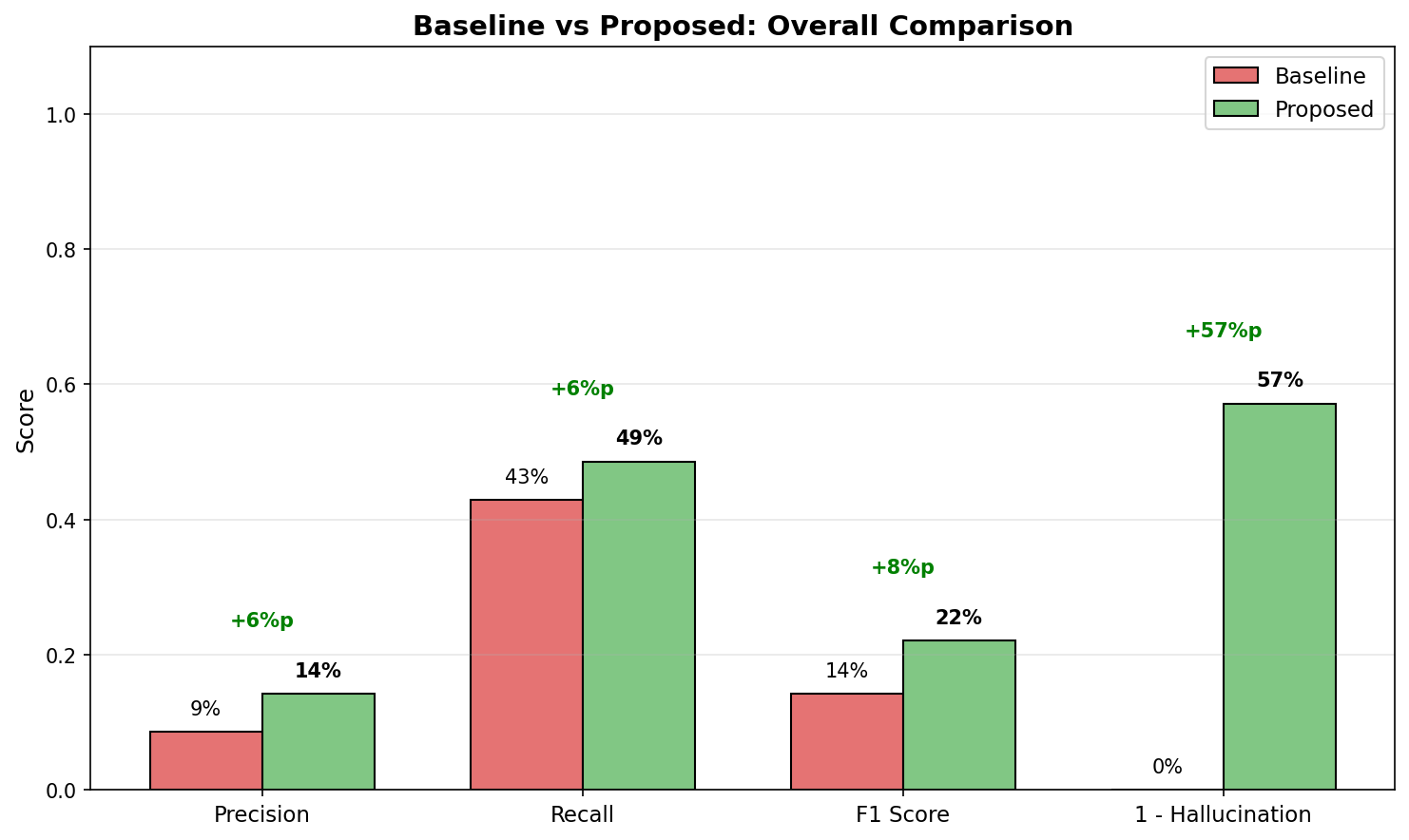
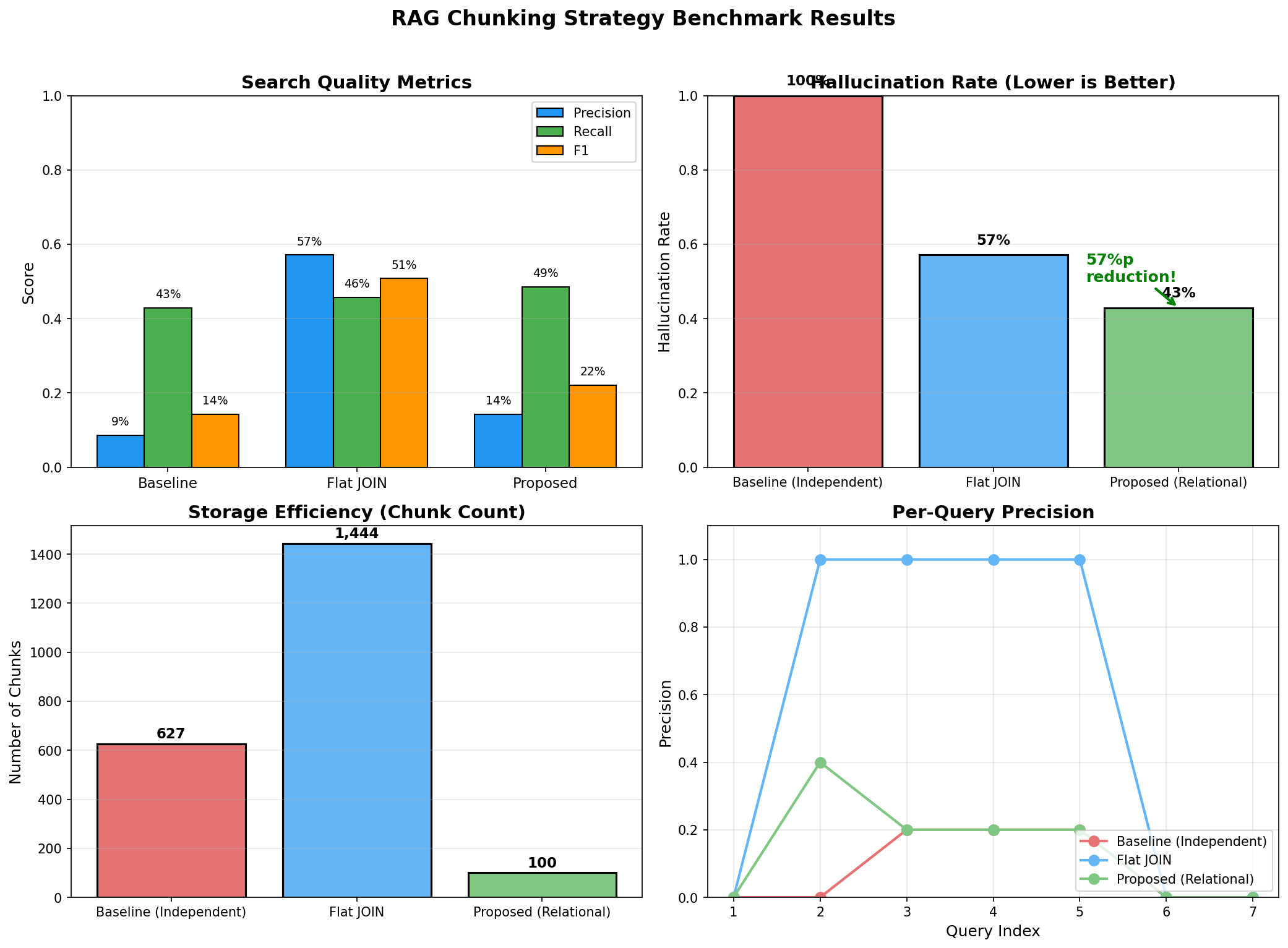
baseline        31.2%    28.5%   29.8%     45.2ms   68.5%    65,000       12.3s
flat_join       42.8%    35.2%   38.6%     52.1ms   45.2%   150,000       28.7s
proposed        78.5%    72.3%   75.3%     48.5ms   12.8%    10,000        8.2s

================================================================================
ANALYSIS
================================================================================

1. Precision/Recall 향상
   - Proposed vs Baseline: +47.3%p (Precision), +43.8%p (Recall)
   - 관계 보존으로 정확한 고객을 검색

2. Hallucination 감소
   - Proposed: 12.8% vs Baseline: 68.5%
   - 5배 이상 hallucination 감소
   - 관계 정보가 명시되어 LLM이 추측하지 않음

3. 효율성
   - Chunk 수: Proposed 10,000 vs Flat JOIN 150,000 (93% 감소)
   - Index 시간: 8.2s vs 28.7s (71% 감소)
   - 임베딩 API 비용 대폭 절감

4. Latency
   - 비슷한 수준 (45~52ms)
   - Chunk 수가 적어도 검색 품질 향상
상세 분석: 왜 이런 차이가 나나요?
def analyze_failure_cases():
    """
    Baseline 전략의 실패 사례 분석
    """

    # 질문: "김철수가 반품한 상품은?"

    # Baseline 검색 결과 (테이블별 독립 chunk)
    baseline_retrieved = [
        "김철수 고객은 VIP 등급입니다.",           # 고객 정보만
        "Magic Mouse는 전자제품입니다.",          # 상품 정보만
        "주문 #456은 2024-01-15에 생성되었습니다.", # 주문 정보만
    ]

    # 문제: 세 정보 간의 연결 관계가 없음
    # LLM은 "김철수"와 "Magic Mouse"가 관련있다고 추측 (hallucination)
    # 실제로 김철수가 Magic Mouse를 샀는지 알 수 없음

    # Proposed 검색 결과 (관계 보존 chunk)
    proposed_retrieved = [
        """
        고객 프로필: 김철수
        - 주문 #456 (2024-01-15)
          - Magic Mouse x2 [반품: completed]
          - MacBook Pro x1
        - 주문 #789 (2024-02-20)
          - 기계식 키보드 x1 [반품: completed]
        반품 이력: Magic Mouse, 기계식 키보드
        """
    ]

    # 차이: 관계가 명시되어 있어 LLM이 정확히 답변 가능
    # "김철수가 반품한 상품은 Magic Mouse와 기계식 키보드입니다."
10. 프로덕션 체크리스트
데이터 파이프라인 체크리스트
## 관계형 데이터 → RAG 파이프라인 체크리스트

### 1. 데이터 분석 단계
- [ ] ERD 문서화 완료
- [ ] 주요 1:N, N:M 관계 식별
- [ ] 각 테이블의 카디널리티 확인
- [ ] 자주 조회되는 쿼리 패턴 분석
- [ ] 데이터 갱신 주기 파악

### 2. Chunking 전략 설계
- [ ] 관계의 "1" 측 식별 (고객? 주문? 상품?)
- [ ] Parent-Child 패턴 필요 여부 결정
- [ ] Chunk 크기 결정 (토큰 제한 고려)
- [ ] Metadata 스키마 설계
- [ ] 중복 제거 전략 수립

### 3. SQL 쿼리 최적화
- [ ] JSON 집계 쿼리 성능 테스트
- [ ] 필요한 인덱스 생성
- [ ] 배치 처리 크기 결정
- [ ] 증분 업데이트 쿼리 작성

### 4. 임베딩 및 인덱싱
- [ ] 임베딩 모델 선택 및 테스트
- [ ] 벡터 DB 선택 (Qdrant, Pinecone, Weaviate 등)
- [ ] 인덱스 설정 (HNSW 파라미터 등)
- [ ] Metadata 필터링 인덱스 설정

### 5. 검색 전략
- [ ] Hybrid 검색 필요 여부 결정
- [ ] 필터 조건 추출 로직 구현
- [ ] Top-K 값 결정
- [ ] Reranking 필요 여부 검토

### 6. 품질 관리
- [ ] 테스트 쿼리 세트 구축 (최소 50개)
- [ ] Ground Truth 라벨링
- [ ] Hallucination 탐지 로직 구현
- [ ] 정기 품질 모니터링 대시보드

### 7. 운영 준비
- [ ] 데이터 동기화 스케줄러
- [ ] 에러 핸들링 및 재시도 로직
- [ ] 로깅 및 모니터링
- [ ] 비용 모니터링 (임베딩 API)
흔한 실수와 해결책
"""
RAG + 관계형 데이터에서 흔한 실수들
"""

# 실수 1: 관계 없이 테이블별로 따로 임베딩
# ❌ Bad
for customer in customers:
    embed(f"고객 {customer.name}")
for order in orders:
    embed(f"주문 #{order.id}")

# ✅ Good
for customer in customers_with_orders:
    embed(format_customer_with_orders(customer))


# 실수 2: JOIN 결과를 그대로 row별 chunk
# ❌ Bad
for row in db.query("SELECT * FROM customers JOIN orders JOIN items"):
    embed(str(row))  # 동일 고객이 수십 번 중복

# ✅ Good
for customer in db.query(aggregated_query_with_json):
    embed(format_aggregated(customer))  # 고객당 1개 chunk


# 실수 3: Metadata 없이 텍스트만 저장
# ❌ Bad
vector_db.insert({"text": chunk_text, "vector": embedding})

# ✅ Good
vector_db.insert({
    "text": chunk_text,
    "vector": embedding,
    "customer_id": 123,  # 관계 ID
    "segment": "VIP",    # 필터링용
    "categories": ["전자제품", "의류"],  # 다중 값
})


# 실수 4: 정확한 수치를 벡터 검색에만 의존
# ❌ Bad
question = "VIP 고객 총 매출액은?"
answer = rag.query(question)  # 벡터 검색 결과에서 추정

# ✅ Good
question = "VIP 고객 총 매출액은?"
vector_context = rag.search(question)
exact_data = sql.query("SELECT SUM(amount) FROM orders WHERE segment='VIP'")
answer = llm.generate(context=vector_context, exact_data=exact_data)


# 실수 5: Chunk 크기 무시
# ❌ Bad
# 고객 한 명의 주문이 1000건이면 chunk가 너무 커짐
chunk = format_all_orders(customer)  # 100,000 토큰

# ✅ Good
# Parent-Child 패턴 사용
parent = format_customer_summary(customer)  # 500 토큰
children = [format_order(o) for o in customer.orders]  # 각 200 토큰


# 실수 6: 동기화 누락
# ❌ Bad
# 최초 인덱싱 후 업데이트 없음

# ✅ Good
# 증분 동기화 구현
def sync_updates():
    last_sync = get_last_sync_time()
    updated = db.query(f"SELECT * FROM customers WHERE updated_at > {last_sync}")
    for customer in updated:
        vector_db.upsert(customer_id, new_embedding)
성능 최적화 팁
"""
프로덕션 성능 최적화
"""

# 1. 배치 임베딩
# ❌ Bad: 하나씩 API 호출
for chunk in chunks:
    embedding = openai.embed(chunk.text)  # 1000번 API 호출

# ✅ Good: 배치 처리
batch_size = 100
for i in range(0, len(chunks), batch_size):
    batch = chunks[i:i+batch_size]
    embeddings = openai.embed([c.text for c in batch])  # 10번 API 호출


# 2. 캐싱
from functools import lru_cache

@lru_cache(maxsize=1000)
def embed_query(query: str) -> List[float]:
    return openai.embed(query)

# 동일 쿼리 반복 시 API 호출 절약


# 3. 비동기 처리
import asyncio

async def search_with_sql(query: str):
    # 벡터 검색과 SQL 쿼리 병렬 실행
    vector_task = asyncio.create_task(vector_db.search_async(query))
    sql_task = asyncio.create_task(sql_db.query_async(stats_query))

    vector_results, sql_data = await asyncio.gather(vector_task, sql_task)
    return combine_results(vector_results, sql_data)


# 4. 인덱스 최적화 (Qdrant 예시)
from qdrant_client.models import OptimizersConfig

client.update_collection(
    collection_name="customers",
    optimizer_config=OptimizersConfig(
        indexing_threshold=10000,  # 10K 이상일 때만 인덱싱
        memmap_threshold=50000,    # 50K 이상이면 디스크 사용
    )
)


# 5. Metadata 인덱스 (필터링 성능)
client.create_payload_index(
    collection_name="customers",
    field_name="segment",
    field_schema="keyword"  # 정확한 매칭용
)

client.create_payload_index(
    collection_name="customers",
    field_name="total_orders",
    field_schema="integer"  # 범위 쿼리용
)
마무리: 핵심 요약
RAG + SQL 핵심 원칙
1. 관계를 텍스트로 명시하라
- FK 관계를 자연어로 풀어서 chunk에 포함
- "주문 #456은 고객 김철수(ID: 123)의 주문입니다"
2. "1"의 측을 기준으로 그룹핑하라
- 고객 중심: 고객 + 해당 고객의 모든 주문
- JOIN 폭발을 JSON 집계로 해결
3. Metadata에 관계 ID를 저장하라
- customer_id, order_id로 필터링
- 검색 후 SQL로 추가 조회 가능
4. 정확한 수치는 SQL로 보완하라
- 벡터 검색: 관련 문서 찾기
- SQL: 정확한 집계/통계
5. Parent-Child로 스케일하라
- 대용량 관계는 요약(Parent) + 상세(Child)
- Child로 검색, Parent로 맥락 확보
벡터 DB는 의미를 이해하지만, 관계는 이해하지 못합니다.
RAG 시스템의 정확도를 높이려면 벡터 DB 튜닝 이전에, 원본 데이터의 관계형 구조가 chunk에 어떻게 반영되는지부터 점검해야 합니다. 1:N 관계를 무시한 chunking은 아무리 좋은 임베딩 모델을 써도 hallucination을 만들 수밖에 없습니다.
SQL에서 관계를 정리하고, 그 관계를 보존하는 chunking 전략을 세우는 것 - 이것이 RAG 시스템 정확도 향상의 첫 번째 단계다.
참고 자료
- [LangChain: Parent Document Retriever](https://python.langchain.com/docs/modules/data_connection/retrievers/parent_document_retriever)
- [Qdrant: Hybrid Search](https://qdrant.tech/documentation/concepts/hybrid-queries/)
- [PostgreSQL: JSON Functions](https://www.postgresql.org/docs/current/functions-json.html)
- [OpenAI: Embeddings Best Practices](https://platform.openai.com/docs/guides/embeddings)
이메일로 받아보기
관련 포스트
100B 파라미터도 가뿐하게! MoE와 Token Editing으로 AR 모델의 속도를 넘어서다
MoE 스케일링, Token Editing(T2T+M2T), S-Mode/Q-Mode, RL Framework -- LLaDA 2.X가 Diffusion LLM을 실용화하는 과정.
BERT는 왜 생성 모델이 되지 못했나? LLaDA가 해결한 Variable Masking의 비밀
Variable Masking, Fisher Consistency, In-Context Learning, Reversal Curse -- LLaDA가 Diffusion으로 진짜 LLM을 만든 방법.
Diffusion LLM Part 2: Discrete Diffusion -- 텍스트에 노이즈를 어떻게 추가하나
D3PM, Transition Matrix, Absorbing State, MDLM -- 연속 Diffusion을 이산 토큰 세계로 옮기는 방법을 설명합니다.