The Real Bottleneck in RAG Systems: It's Not the Vector DB, It's Your 1:N Relationships
Many teams try to solve RAG accuracy problems by tuning their vector database. But the real bottleneck is chunking that ignores the relational structure of source data.
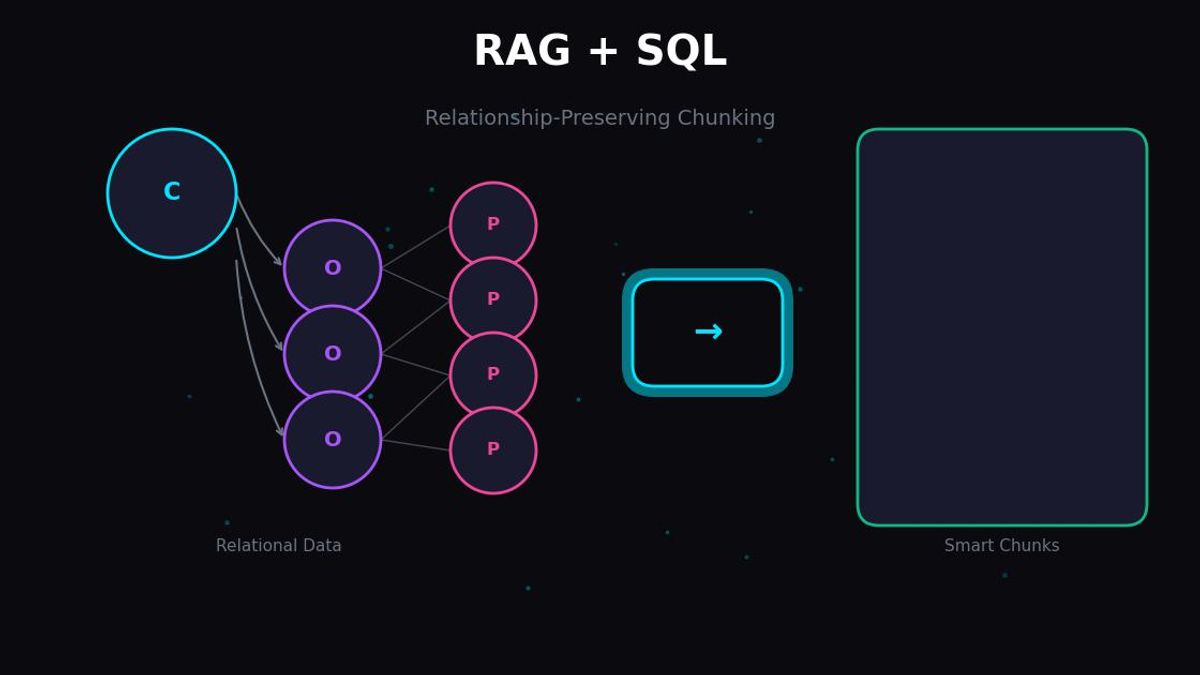
Many teams try to solve RAG accuracy problems by tuning their vector database. But the real bottleneck is chunking that ignores the relational structure of source data. When you flatten customer-order-product 1:N:N relationships into independent chunks, no amount of vector DB optimization will prevent hallucinations.
This article covers how to properly integrate SQL relational data into RAG systems.
1. Why Vector DB Alone Isn't Enough
The Problem in Reality
When building a RAG system, you've probably received questions like:
"What's the category with the highest return rate among products Customer A ordered in the last 3 months?"
To answer this accurately, you need the following data simultaneously:
- Customer information (customer_id, name, segment)
- Order information (order_id, order_date, customer_id)
- Order details (order_id, product_id, quantity, return_status)
- Product information (product_id, category, name)
The problem is that most RAG systems embed this data as separate chunks.
# Common wrong approach
chunks = [
    "Customer A is a VIP member residing in New York.",
    "Order #1234 was created on 2024-01-15.",
    "Product X belongs to the Electronics category.",
]

# Each chunk embedded independently
for chunk in chunks:
    vector = embed(chunk)
    vector_db.insert(vector)
This way, vector search cannot find the relationship "Customer A's orders".
The Limitation of Vector Similarity
Vector search is based on semantic similarity. But what matters in relational data is structural connections.
# Vector similarity example
query = "Customer A's orders"

# Semantically similar results (incorrect results)
results = [
    "Customer B's order history.",           # 'orders' keyword match
    "Handling bulk orders from Company A",   # 'A' and 'orders' similar
    "Customer satisfaction survey results",  # 'Customer' similar
]

# Actually needed results
expected = [
    "Customer A (ID: 123) orders #456, #789",
    "Order #456: Products X, Y (Total $150,000)",
]
The vector DB understands the meaning of words like "customer" and "orders", but it doesn't understand the relationship that "order_ids connected to the record where customer_id = 123".
The Root Cause
Two Properties of Data
1. Semantic Property
- "What is this text about?"
- Can be captured by vector embeddings
- Suitable for similarity search
2. Structural Property
- "What data is this connected to?"
- Expressed through Foreign Keys, JOINs
- Cannot be captured by vectors
RAG system accuracy problems occur because we index only semantic properties while ignoring structural properties.
2. The Nature of Relational Data: Understanding 1:N and N:M
Relationship Structure in E-Commerce Domain
Real business data has complex relationships. Taking E-Commerce as an example:
-- Customers table (the "1" side)
CREATE TABLE customers (
    customer_id SERIAL PRIMARY KEY,
    name VARCHAR(100),
    email VARCHAR(255),
    segment VARCHAR(50),  -- VIP, Regular, New
    created_at TIMESTAMP
);

-- Orders table (the "N" side, 1:N with customers)
CREATE TABLE orders (
    order_id SERIAL PRIMARY KEY,
    customer_id INTEGER REFERENCES customers(customer_id),
    order_date TIMESTAMP,
    total_amount DECIMAL(10, 2),
    status VARCHAR(50)  -- pending, completed, cancelled
);

-- Order items table (1:N with orders, N:1 with products)
CREATE TABLE order_items (
    item_id SERIAL PRIMARY KEY,
    order_id INTEGER REFERENCES orders(order_id),
    product_id INTEGER REFERENCES products(product_id),
    quantity INTEGER,
    unit_price DECIMAL(10, 2),
    return_status VARCHAR(50)  -- none, requested, completed
);

-- Products table
CREATE TABLE products (
    product_id SERIAL PRIMARY KEY,
    name VARCHAR(255),
    category VARCHAR(100),
    description TEXT,
    price DECIMAL(10, 2)
);
Directionality and Cardinality of Relationships
Characteristics by Relationship Type
1:N (One-to-Many)
Customer → Orders: One customer can have multiple orders
Order → Order Items: One order contains multiple products
Chunk Strategy: Apply Parent-Child pattern
N:M (Many-to-Many)
Product ↔ Tags: Products have multiple tags and vice versa
Customer ↔ Product (Wishlist): Many-to-many relationship
Chunk Strategy: Group by junction table
1:1 (One-to-One)
Customer → Customer Details: Extended information
Chunk Strategy: Merge into single document
Information Loss When Ignoring Relationships
# Original data relationships
customer_123 = {
    "id": 123,
    "name": "John Smith",
    "orders": [
        {
            "order_id": 456,
            "items": [
                {"product": "Laptop", "qty": 1, "returned": False},
                {"product": "Mouse", "qty": 2, "returned": True},
            ]
        },
        {
            "order_id": 789,
            "items": [
                {"product": "Keyboard", "qty": 1, "returned": True},
            ]
        }
    ]
}

# Wrong Chunking (relationship loss)
flat_chunks = [
    "John Smith customer information",
    "Order 456 information",
    "Order 789 information",
    "Laptop product information",
    "Mouse product information",
    "Keyboard product information",
]
# Problem: Cannot answer "What products did John Smith return?"

# Correct Chunking (relationship preserved)
relational_chunk = """
Customer: John Smith (ID: 123)
- Order #456 (2024-01-15)
  - Laptop x1 (Return: None)
  - Mouse x2 (Return: Completed)
- Order #789 (2024-02-20)
  - Keyboard x1 (Return: Completed)
Return Summary: Mouse, Keyboard (2 items total)
"""
3. AS-IS: How Bad Chunking Creates Hallucinations
Typical Mistake Patterns
Pattern 1: Independent Chunking by Table
# AS-IS: Embedding each table separately
def wrong_chunking_by_table():
    # Customer table chunks
    customers = db.query("SELECT * FROM customers")
    for customer in customers:
        chunk = f"Customer {customer.name} is a {customer.segment} member."
        embed_and_store(chunk)

    # Order table chunks (separate)
    orders = db.query("SELECT * FROM orders")
    for order in orders:
        chunk = f"Order #{order.order_id} was created on {order.order_date}."
        embed_and_store(chunk)

    # Product table chunks (separate)
    products = db.query("SELECT * FROM products")
    for product in products:
        chunk = f"{product.name} belongs to the {product.category} category."
        embed_and_store(chunk)
Why is this a problem?
# User question
query = "What category do VIP customers purchase most?"

# Search results (similarity-only search without relationships)
results = [
    "Customer A is a VIP member.",               # VIP match
    "Customer B is a VIP member.",               # VIP match
    "Electronics is a popular category.",        # Category match
    "Clothing category product list",            # Category match
]

# The context LLM receives has no "who bought what" information
# → Hallucination: "VIP customers purchase electronics the most" (no basis)
Pattern 2: Blindly Flattening JOIN Results
# AS-IS: Using JOIN results directly as chunks
def wrong_flattening():
    query = """
    SELECT c.name, o.order_id, p.name as product_name
    FROM customers c
    JOIN orders o ON c.customer_id = o.customer_id
    JOIN order_items oi ON o.order_id = oi.order_id
    JOIN products p ON oi.product_id = p.product_id
    """

    results = db.query(query)
    for row in results:
        # Each row as an independent chunk
        chunk = f"{row.name} purchased {row.product_name} in order #{row.order_id}"
        embed_and_store(chunk)
Why is this a problem?
# Original data
# Customer A's Order #1: Products X, Y, Z (3 items)
#
# After flattening, chunks:
# - "Customer A purchased Product X in order #1"
# - "Customer A purchased Product Y in order #1"
# - "Customer A purchased Product Z in order #1"

# Problems:
# 1. Same order split into 3 chunks
# 2. Cannot retrieve "all products in Customer A's Order #1" at once
# 3. Only partial products retrieved during search, incomplete answer
Pattern 3: The Context Window Optimization Trap
# AS-IS: Summarizing to save tokens
def wrong_summarization():
    customer_data = get_full_customer_profile(customer_id=123)

    # Original: 50 orders, 200 product details
    # Summarizing for "token savings"
    summary = f"""
    Customer 123 Summary:
    - Total Orders: 50
    - Total Purchases: $50,000
    - Primary Category: Electronics
    """
    embed_and_store(summary)
Why is this a problem?
# User question
query = "Which products did customer 123 buy in January 2024 that haven't been delivered yet?"

# Summary doesn't have individual order/delivery status
# → "Cannot find information" or hallucination
Hallucination Generation Mechanism
def demonstrate_hallucination():
    """
    Specific process of how hallucination occurs
    """

    # Step 1: Data stored with wrong chunking
    stored_chunks = [
        {"id": 1, "text": "Customer A is a VIP", "vector": [0.1, 0.2, ...]},
        {"id": 2, "text": "Order #100 was created on 2024-01-15", "vector": [0.3, 0.1, ...]},
        {"id": 3, "text": "Product X is electronics", "vector": [0.2, 0.4, ...]},
        # No relationship info: Did Customer A place Order #100? Is Product X in Order #100?
    ]

    # Step 2: User question
    question = "What electronics did Customer A order?"

    # Step 3: Vector search (semantic similarity)
    retrieved = [
        "Customer A is a VIP",           # "Customer A" match
        "Product X is electronics",      # "electronics" match
    ]

    # Step 4: Pass to LLM
    prompt = f"""
    Context: {retrieved}
    Question: {question}
    """

    # Step 5: LLM's reasoning (hallucination)
    llm_response = "The electronics Customer A ordered is Product X."

    # In reality, we can't know if there's a connection between Customer A and Product X!
    # LLM "guesses" they're connected because both are in the context
4. TO-BE: Chunking Strategies That Preserve Relationships
Core Principles
3 Principles of Relationship-Preserving Chunking
1. Group by the "1" side of relationships
- Customer-centric: Customer + all their orders
- Order-centric: Order + all its items
2. Include complete relationship chain in chunk
- Customer → Order → Product in one chunk
- Explicitly state FK references in text
3. Include relationship identifiers in metadata
- Store customer_id, order_id as metadata
- Enable additional SQL queries after search
TO-BE: Implementing Relationship-Preserving Chunking
from typing import List, Dict, Any
from dataclasses import dataclass
import json

@dataclass
class RelationalChunk:
    """Chunk structure that preserves relationship information"""
    text: str                          # Text to embed
    metadata: Dict[str, Any]           # Relationship identifiers
    parent_id: str = None              # For Parent-Child pattern
    chunk_type: str = "standalone"     # standalone, parent, child

def create_customer_centric_chunks(db_connection) -> List[RelationalChunk]:
    """
    TO-BE: Relationship-preserving chunking centered on customers

    Key: Entire context of one customer as one chunk group
    """

    query = """
    WITH customer_orders AS (
        SELECT
            c.customer_id,
            c.name,
            c.email,
            c.segment,
            json_agg(
                json_build_object(
                    'order_id', o.order_id,
                    'order_date', o.order_date,
                    'total_amount', o.total_amount,
                    'status', o.status,
                    'items', (
                        SELECT json_agg(
                            json_build_object(
                                'product_id', p.product_id,
                                'product_name', p.name,
                                'category', p.category,
                                'quantity', oi.quantity,
                                'unit_price', oi.unit_price,
                                'return_status', oi.return_status
                            )
                        )
                        FROM order_items oi
                        JOIN products p ON oi.product_id = p.product_id
                        WHERE oi.order_id = o.order_id
                    )
                ) ORDER BY o.order_date DESC
            ) as orders
        FROM customers c
        LEFT JOIN orders o ON c.customer_id = o.customer_id
        GROUP BY c.customer_id, c.name, c.email, c.segment
    )
    SELECT * FROM customer_orders
    """

    chunks = []
    results = db_connection.execute(query)

    for row in results:
        # Entire customer profile as one chunk
        chunk_text = format_customer_profile(row)

        chunk = RelationalChunk(
            text=chunk_text,
            metadata={
                "customer_id": row['customer_id'],
                "customer_name": row['name'],
                "segment": row['segment'],
                "order_ids": [o['order_id'] for o in row['orders'] if o],
                "categories": extract_categories(row['orders']),
                "total_orders": len([o for o in row['orders'] if o]),
                "has_returns": has_any_returns(row['orders']),
            },
            chunk_type="customer_profile"
        )
        chunks.append(chunk)

    return chunks

def format_customer_profile(row: Dict) -> str:
    """
    Format customer profile into searchable text
    Explicitly express relationship information in natural language
    """

    lines = [
        f"## Customer Profile: {row['name']}",
        f"Customer ID: {row['customer_id']}",
        f"Email: {row['email']}",
        f"Tier: {row['segment']}",
        "",
        "### Order History",
    ]

    orders = row.get('orders', [])
    if not orders or orders[0] is None:
        lines.append("No order history")
    else:
        for order in orders:
            lines.append(f"\n#### Order #{order['order_id']} ({order['order_date']})")
            lines.append(f"Status: {order['status']} | Total: ${order['total_amount']:,.2f}")

            items = order.get('items', [])
            if items:
                lines.append("Products included:")
                for item in items:
                    return_info = f" [Return: {item['return_status']}]" if item['return_status'] != 'none' else ""
                    lines.append(
                        f"  - {item['product_name']} ({item['category']}) "
                        f"x{item['quantity']} @ ${item['unit_price']:,.2f}{return_info}"
                    )

    # Summary statistics (used as search keywords)
    lines.extend([
        "",
        "### Summary",
        f"Total Orders: {len([o for o in orders if o])}",
        f"Purchase Categories: {', '.join(extract_categories(orders))}",
        f"Return History: {'Yes' if has_any_returns(orders) else 'No'}",
    ])

    return "\n".join(lines)

def extract_categories(orders: List[Dict]) -> List[str]:
    """Extract unique categories from orders"""
    categories = set()
    for order in orders:
        if order and order.get('items'):
            for item in order['items']:
                if item.get('category'):
                    categories.add(item['category'])
    return list(categories)

def has_any_returns(orders: List[Dict]) -> bool:
    """Check if any returns exist"""
    for order in orders:
        if order and order.get('items'):
            for item in order['items']:
                if item.get('return_status') not in (None, 'none'):
                    return True
    return False
What a Relationship-Preserving Chunk Looks Like
## Customer Profile: John Smith
Customer ID: 123
Email: john@example.com
Tier: VIP

### Order History

#### Order #456 (2024-01-15)
Status: completed | Total: $1,500.00
Products included:
  - MacBook Pro (Electronics) x1 @ $1,200.00
  - Magic Mouse (Electronics) x2 @ $150.00 [Return: completed]

#### Order #789 (2024-02-20)
Status: completed | Total: $89.00
Products included:
  - Mechanical Keyboard (Electronics) x1 @ $89.00 [Return: completed]

### Summary
Total Orders: 2
Purchase Categories: Electronics
Return History: Yes
Now we can accurately answer "What products did John Smith return?"
5. Deep Dive into Parent-Child Document Pattern
Pattern Overview
For large relational datasets, you can't fit all relationships into one chunk. This is when you use the Parent-Child Document Pattern.
Parent-Child Document Pattern
Parent Document (Summary)
Summary info containing overall context
ID references to all children
Relevance can be determined from parent alone
Child Documents (Details)
Individual detailed information
Back-reference to parent ID
Used for detailed searches
Search Strategy
Step 1: Find relevant docs via child search
Step 2: Retrieve parent from child
Step 3: Pass parent's full context to LLM
Implementation Code
from typing import List, Tuple
from dataclasses import dataclass, field
import uuid

@dataclass
class ParentDocument:
    """Parent document: Overall context + child references"""
    doc_id: str
    text: str
    child_ids: List[str]
    metadata: Dict[str, Any]

@dataclass
class ChildDocument:
    """Child document: Detailed info + parent reference"""
    doc_id: str
    parent_id: str
    text: str
    metadata: Dict[str, Any]

class ParentChildChunker:
    """
    Chunking relational data with Parent-Child pattern

    Use cases:
    - Customer (Parent) - Individual orders (Child)
    - Product (Parent) - Individual reviews (Child)
    - Document (Parent) - Sections/Paragraphs (Child)
    """

    def __init__(self, db_connection):
        self.db = db_connection

    def create_customer_order_chunks(self) -> Tuple[List[ParentDocument], List[ChildDocument]]:
        """
        Convert customer-order relationship to Parent-Child structure

        Parent: Customer summary (basic info + order statistics)
        Child: Individual order details
        """

        parents = []
        children = []

        # Process by customer
        customers = self.db.query("SELECT * FROM customers")

        for customer in customers:
            customer_id = customer['customer_id']
            parent_id = f"customer_{customer_id}"

            # Query orders for this customer
            orders = self.db.query("""
                SELECT o.*,
                       json_agg(
                           json_build_object(
                               'product_name', p.name,
                               'category', p.category,
                               'quantity', oi.quantity,
                               'return_status', oi.return_status
                           )
                       ) as items
                FROM orders o
                JOIN order_items oi ON o.order_id = oi.order_id
                JOIN products p ON oi.product_id = p.product_id
                WHERE o.customer_id = %s
                GROUP BY o.order_id
            """, [customer_id])

            child_ids = []

            # Create child documents (individual orders)
            for order in orders:
                child_id = f"order_{order['order_id']}"
                child_ids.append(child_id)

                child_text = self._format_order_detail(order, customer)

                child = ChildDocument(
                    doc_id=child_id,
                    parent_id=parent_id,
                    text=child_text,
                    metadata={
                        "order_id": order['order_id'],
                        "customer_id": customer_id,
                        "order_date": str(order['order_date']),
                        "categories": list(set(i['category'] for i in order['items'])),
                        "has_return": any(i['return_status'] != 'none' for i in order['items']),
                    }
                )
                children.append(child)

            # Create parent document (customer summary)
            parent_text = self._format_customer_summary(customer, orders)

            parent = ParentDocument(
                doc_id=parent_id,
                text=parent_text,
                child_ids=child_ids,
                metadata={
                    "customer_id": customer_id,
                    "segment": customer['segment'],
                    "total_orders": len(orders),
                    "order_ids": [o['order_id'] for o in orders],
                }
            )
            parents.append(parent)

        return parents, children

    def _format_customer_summary(self, customer: Dict, orders: List[Dict]) -> str:
        """Format customer summary for parent document"""

        total_amount = sum(o['total_amount'] for o in orders)
        categories = set()
        return_count = 0

        for order in orders:
            for item in order['items']:
                categories.add(item['category'])
                if item['return_status'] != 'none':
                    return_count += 1

        return f"""
Customer Summary: {customer['name']} (ID: {customer['customer_id']})
Tier: {customer['segment']}
Email: {customer['email']}

Order Statistics:
- Total Orders: {len(orders)}
- Total Purchases: ${total_amount:,.2f}
- Purchase Categories: {', '.join(categories)}
- Return Count: {return_count}

For detailed order information, refer to individual order documents.
Order ID List: {', '.join(str(o['order_id']) for o in orders)}
""".strip()

    def _format_order_detail(self, order: Dict, customer: Dict) -> str:
        """Format order detail for child document"""

        items_text = []
        for item in order['items']:
            return_info = f" (Return: {item['return_status']})" if item['return_status'] != 'none' else ""
            items_text.append(f"  - {item['product_name']} [{item['category']}] x{item['quantity']}{return_info}")

        return f"""
Order Detail: #{order['order_id']}
Customer: {customer['name']} (ID: {customer['customer_id']}, {customer['segment']})
Order Date: {order['order_date']}
Status: {order['status']}
Total: ${order['total_amount']:,.2f}

Order Items:
{chr(10).join(items_text)}
""".strip()
Parent-Child Search Strategy
class ParentChildRetriever:
    """
    Search strategy for Parent-Child structure

    Key: Search by child, get context from parent
    """

    def __init__(self, vector_db, sql_db):
        self.vector_db = vector_db
        self.sql_db = sql_db

    def retrieve(self, query: str, top_k: int = 5) -> List[Dict]:
        """
        Two-stage search strategy

        1. Find relevant children via vector search
        2. Retrieve parent from child for full context
        """

        # Step 1: Search in child documents
        child_results = self.vector_db.search(
            query=query,
            filter={"doc_type": "child"},
            top_k=top_k
        )

        # Step 2: Collect related parent IDs
        parent_ids = set()
        for result in child_results:
            parent_ids.add(result.metadata['parent_id'])

        # Step 3: Retrieve parent documents
        parents = self.vector_db.get_by_ids(list(parent_ids))

        # Step 4: Combine results
        enriched_results = []
        for child in child_results:
            parent = next(
                (p for p in parents if p.doc_id == child.metadata['parent_id']),
                None
            )

            enriched_results.append({
                "child": child,
                "parent": parent,
                "context": self._build_context(parent, child),
            })

        return enriched_results

    def _build_context(self, parent: ParentDocument, child: ChildDocument) -> str:
        """Generate integrated context to pass to LLM"""

        return f"""
[Overall Context - Customer Info]
{parent.text}

[Detailed Info - Related Order]
{child.text}
"""

    def retrieve_with_sql_fallback(self, query: str, customer_id: int = None) -> Dict:
        """
        Vector search + SQL supplement strategy

        Find related documents via vector search,
        supplement with SQL for exact numbers
        """

        # Vector search
        vector_results = self.retrieve(query)

        # Supplement with SQL for exact data
        if customer_id and self._needs_exact_numbers(query):
            sql_data = self.sql_db.query("""
                SELECT
                    COUNT(DISTINCT o.order_id) as order_count,
                    SUM(o.total_amount) as total_spent,
                    COUNT(CASE WHEN oi.return_status != 'none' THEN 1 END) as return_count
                FROM customers c
                JOIN orders o ON c.customer_id = o.customer_id
                JOIN order_items oi ON o.order_id = oi.order_id
                WHERE c.customer_id = %s
            """, [customer_id])

            return {
                "vector_context": vector_results,
                "exact_data": sql_data,
            }

        return {"vector_context": vector_results}

    def _needs_exact_numbers(self, query: str) -> bool:
        """Determine if query needs exact numbers"""
        exact_keywords = ['total', 'sum', 'how many', 'how much', 'average', 'maximum', 'minimum']
        return any(kw in query.lower() for kw in exact_keywords)
6. Pitfalls When Embedding SQL JOIN Results
The JOIN Trap: Data Explosion
-- Seemingly simple JOIN
SELECT c.name, o.order_id, p.name as product
FROM customers c
JOIN orders o ON c.customer_id = o.customer_id
JOIN order_items oi ON o.order_id = oi.order_id
JOIN products p ON oi.product_id = p.product_id;
The Problem:
Original record counts:
- customers: 1,000
- orders: 10,000
- order_items: 50,000
- products: 5,000

JOIN result: 50,000 rows (explodes based on order_items)

If each row becomes a chunk:
- 50,000 chunks
- Same customer info duplicated dozens to hundreds of times
- Embedding costs explode
- Duplicate results in search
The Right JOIN Strategy
class SmartJoinChunker:
    """
    Strategy for efficiently chunking JOIN results
    """

    def __init__(self, db_connection):
        self.db = db_connection

    def chunk_with_aggregation(self) -> List[RelationalChunk]:
        """
        Strategy 1: GROUP BY + JSON aggregation

        Aggregate 1:N relationships as JSON arrays to eliminate duplicates
        """

        query = """
        SELECT
            c.customer_id,
            c.name,
            c.segment,
            -- Aggregate orders as JSON array
            json_agg(
                DISTINCT jsonb_build_object(
                    'order_id', o.order_id,
                    'order_date', o.order_date,
                    'items', (
                        SELECT json_agg(
                            jsonb_build_object(
                                'product', p.name,
                                'category', p.category,
                                'qty', oi.quantity
                            )
                        )
                        FROM order_items oi
                        JOIN products p ON oi.product_id = p.product_id
                        WHERE oi.order_id = o.order_id
                    )
                )
            ) as orders
        FROM customers c
        LEFT JOIN orders o ON c.customer_id = o.customer_id
        GROUP BY c.customer_id, c.name, c.segment
        """

        results = self.db.query(query)

        chunks = []
        for row in results:
            chunk = RelationalChunk(
                text=self._format_aggregated_customer(row),
                metadata={
                    "customer_id": row['customer_id'],
                    "type": "customer_profile",
                }
            )
            chunks.append(chunk)

        return chunks  # Only creates as many as customers (1,000)

    def chunk_with_window_functions(self) -> List[RelationalChunk]:
        """
        Strategy 2: Preserve context with Window Functions

        Include related context in each record
        """

        query = """
        WITH order_context AS (
            SELECT
                o.order_id,
                o.customer_id,
                o.order_date,
                c.name as customer_name,
                c.segment,
                -- Number of other orders from same customer
                COUNT(*) OVER (PARTITION BY o.customer_id) as customer_total_orders,
                -- Total purchase amount from same customer
                SUM(o.total_amount) OVER (PARTITION BY o.customer_id) as customer_total_spent,
                -- Order sequence
                ROW_NUMBER() OVER (PARTITION BY o.customer_id ORDER BY o.order_date) as order_sequence
            FROM orders o
            JOIN customers c ON o.customer_id = c.customer_id
        )
        SELECT
            oc.*,
            json_agg(
                jsonb_build_object(
                    'product', p.name,
                    'category', p.category,
                    'quantity', oi.quantity
                )
            ) as items
        FROM order_context oc
        JOIN order_items oi ON oc.order_id = oi.order_id
        JOIN products p ON oi.product_id = p.product_id
        GROUP BY oc.order_id, oc.customer_id, oc.order_date,
                 oc.customer_name, oc.segment, oc.customer_total_orders,
                 oc.customer_total_spent, oc.order_sequence
        """

        results = self.db.query(query)

        chunks = []
        for row in results:
            # Each order includes customer context
            chunk = RelationalChunk(
                text=self._format_order_with_context(row),
                metadata={
                    "order_id": row['order_id'],
                    "customer_id": row['customer_id'],
                    "type": "order_with_context",
                }
            )
            chunks.append(chunk)

        return chunks  # Creates as many as orders (10,000), but each includes context

    def _format_order_with_context(self, row: Dict) -> str:
        """Format order + customer context"""

        items_text = "\n".join([
            f"  - {item['product']} ({item['category']}) x{item['quantity']}"
            for item in row['items']
        ])

        return f"""
Order #{row['order_id']} ({row['order_date']})

Customer Info:
- Name: {row['customer_name']} (ID: {row['customer_id']})
- Tier: {row['segment']}
- Total Orders: {row['customer_total_orders']} (This is order #{row['order_sequence']})
- Cumulative Purchases: ${row['customer_total_spent']:,.2f}

Order Items:
{items_text}
""".strip()
Deduplication
class ChunkDeduplicator:
    """
    Remove duplicate chunks before embedding
    """

    def deduplicate_chunks(
        self,
        chunks: List[RelationalChunk],
        strategy: str = "exact"
    ) -> List[RelationalChunk]:
        """
        Deduplication strategies

        - exact: Remove exactly same text
        - semantic: Remove semantically similar (incurs embedding cost)
        - id_based: Based on metadata primary key
        """

        if strategy == "exact":
            seen = set()
            unique = []
            for chunk in chunks:
                text_hash = hash(chunk.text)
                if text_hash not in seen:
                    seen.add(text_hash)
                    unique.append(chunk)
            return unique

        elif strategy == "id_based":
            # Deduplicate based on primary key
            seen_ids = set()
            unique = []
            for chunk in chunks:
                primary_key = self._get_primary_key(chunk)
                if primary_key not in seen_ids:
                    seen_ids.add(primary_key)
                    unique.append(chunk)
            return unique

        elif strategy == "semantic":
            return self._semantic_dedup(chunks)

    def _get_primary_key(self, chunk: RelationalChunk) -> str:
        """Extract primary key from chunk"""
        meta = chunk.metadata
        if "customer_id" in meta and "order_id" not in meta:
            return f"customer_{meta['customer_id']}"
        elif "order_id" in meta:
            return f"order_{meta['order_id']}"
        else:
            return hash(chunk.text)

    def _semantic_dedup(
        self,
        chunks: List[RelationalChunk],
        threshold: float = 0.95
    ) -> List[RelationalChunk]:
        """
        Semantic similarity-based deduplication

        Note: Requires embedding API calls
        """
        from sklearn.metrics.pairwise import cosine_similarity
        import numpy as np

        # Generate embeddings
        embeddings = [self._embed(chunk.text) for chunk in chunks]
        embeddings = np.array(embeddings)

        # Similarity matrix
        similarity_matrix = cosine_similarity(embeddings)

        # Mark duplicates
        unique_indices = []
        removed = set()

        for i in range(len(chunks)):
            if i in removed:
                continue
            unique_indices.append(i)

            # Mark those similar to i for removal
            for j in range(i + 1, len(chunks)):
                if similarity_matrix[i, j] > threshold:
                    removed.add(j)

        return [chunks[i] for i in unique_indices]
7. Metadata Filtering vs Pure Vector Search
Difference Between Two Approaches
Search Strategy Comparison
Pure Vector Search
Pros: Semantic similarity search, flexible
Cons: Cannot do exact filtering, ignores relationships
Best for: "Find something similar to ~"
Metadata Filtering + Vector Search
Pros: Exact condition filtering, connect via relationship ID
Cons: Requires explicit filter conditions
Best for: "Among VIP customers, find ~"
Hybrid (SQL + Vector)
Pros: SQL for exact filters + Vector for similarity
Cons: Increased implementation complexity
Best for: Complex business queries
Metadata Design Principles
class MetadataDesigner:
    """
    Effective metadata design

    Principles:
    1. Relationship IDs are mandatory (customer_id, order_id, etc.)
    2. Only include frequently filtered attributes
    3. Consider value cardinality (too granular = ineffective filter)
    """

    @staticmethod
    def design_customer_metadata(customer: Dict, orders: List[Dict]) -> Dict:
        """
        Metadata design for customer chunks
        """

        # Required: Relationship identifiers
        metadata = {
            "customer_id": customer['customer_id'],
            "type": "customer_profile",
        }

        # Recommended: Frequently filtered attributes
        metadata.update({
            "segment": customer['segment'],  # VIP, Regular, etc.
            "registration_year": customer['created_at'].year,
        })

        # Recommended: Aggregated search conditions
        categories = set()
        has_returns = False
        for order in orders:
            for item in order.get('items', []):
                categories.add(item['category'])
                if item.get('return_status') not in (None, 'none'):
                    has_returns = True

        metadata.update({
            "categories": list(categories),  # List filtering support
            "has_returns": has_returns,       # Boolean filter
            "total_orders": len(orders),      # For range filter
        })

        # Not recommended: Too granular information
        # - Individual order dates (handle with SQL)
        # - Individual product IDs (too many)
        # - Exact amounts (SQL better for range queries)

        return metadata
Hybrid Search Implementation
class HybridRetriever:
    """
    SQL Filtering + Vector Search combination

    Strategy:
    1. Narrow candidates with SQL (exact conditions)
    2. Sort by relevance with Vector Search (semantic similarity)
    """

    def __init__(self, sql_db, vector_db):
        self.sql_db = sql_db
        self.vector_db = vector_db

    def search(
        self,
        query: str,
        filters: Dict = None,
        top_k: int = 10
    ) -> List[Dict]:
        """
        Execute hybrid search

        Example:
        query = "complaints about returns"
        filters = {
            "segment": "VIP",
            "has_returns": True,
            "order_date_after": "2024-01-01"
        }
        """

        # Step 1: Extract candidate IDs with SQL
        candidate_ids = self._sql_filter(filters)

        if not candidate_ids:
            # No data matches conditions
            return []

        # Step 2: Vector Search with ID filter
        vector_results = self.vector_db.search(
            query=query,
            filter={"customer_id": {"$in": candidate_ids}},
            top_k=top_k
        )

        # Step 3: Enrich with SQL details
        enriched = self._enrich_with_sql(vector_results)

        return enriched

    def _sql_filter(self, filters: Dict) -> List[int]:
        """Extract customer_ids matching conditions with SQL"""

        if not filters:
            return None  # No filter = all targets

        conditions = ["1=1"]
        params = []

        if filters.get("segment"):
            conditions.append("c.segment = %s")
            params.append(filters["segment"])

        if filters.get("has_returns"):
            conditions.append("""
                EXISTS (
                    SELECT 1 FROM orders o
                    JOIN order_items oi ON o.order_id = oi.order_id
                    WHERE o.customer_id = c.customer_id
                    AND oi.return_status != 'none'
                )
            """)

        if filters.get("order_date_after"):
            conditions.append("""
                EXISTS (
                    SELECT 1 FROM orders o
                    WHERE o.customer_id = c.customer_id
                    AND o.order_date >= %s
                )
            """)
            params.append(filters["order_date_after"])

        query = f"""
            SELECT DISTINCT c.customer_id
            FROM customers c
            WHERE {' AND '.join(conditions)}
        """

        results = self.sql_db.query(query, params)
        return [r['customer_id'] for r in results]

    def _enrich_with_sql(self, vector_results: List) -> List[Dict]:
        """Enrich vector results with SQL data"""

        customer_ids = [r.metadata['customer_id'] for r in vector_results]

        sql_data = self.sql_db.query("""
            SELECT
                c.customer_id,
                c.name,
                COUNT(o.order_id) as order_count,
                SUM(o.total_amount) as total_spent,
                MAX(o.order_date) as last_order_date
            FROM customers c
            LEFT JOIN orders o ON c.customer_id = o.customer_id
            WHERE c.customer_id = ANY(%s)
            GROUP BY c.customer_id, c.name
        """, [customer_ids])

        sql_lookup = {d['customer_id']: d for d in sql_data}

        enriched = []
        for result in vector_results:
            cid = result.metadata['customer_id']
            enriched.append({
                "text": result.text,
                "score": result.score,
                "metadata": result.metadata,
                "sql_data": sql_lookup.get(cid, {}),
            })

        return enriched
Performance Comparison
def benchmark_search_strategies():
    """
    Performance comparison by search strategy
    """

    queries = [
        {
            "question": "Who among VIP customers has many returns?",
            "expected_filter": {"segment": "VIP", "has_returns": True},
        },
        {
            "question": "Characteristics of customers who frequently buy electronics",
            "expected_filter": {"categories": {"$contains": "Electronics"}},
        },
        {
            "question": "Dormant customers with purchase history in last 3 months",
            "expected_filter": {
                "order_date_after": "2024-09-01",
                "segment": "Dormant",
            },
        },
    ]

    results = []

    for q in queries:
        # Strategy 1: Pure Vector Search
        start = time.time()
        pure_vector = vector_db.search(q["question"], top_k=10)
        pure_vector_time = time.time() - start
        pure_vector_precision = calculate_precision(pure_vector, q)

        # Strategy 2: Metadata Filter + Vector
        start = time.time()
        metadata_vector = vector_db.search(
            q["question"],
            filter=q["expected_filter"],
            top_k=10
        )
        metadata_time = time.time() - start
        metadata_precision = calculate_precision(metadata_vector, q)

        # Strategy 3: SQL + Vector Hybrid
        start = time.time()
        hybrid = hybrid_retriever.search(
            q["question"],
            filters=q["expected_filter"],
            top_k=10
        )
        hybrid_time = time.time() - start
        hybrid_precision = calculate_precision(hybrid, q)

        results.append({
            "question": q["question"],
            "pure_vector": {"time": pure_vector_time, "precision": pure_vector_precision},
            "metadata": {"time": metadata_time, "precision": metadata_precision},
            "hybrid": {"time": hybrid_time, "precision": hybrid_precision},
        })

    return results

# Expected results:
# ┌─────────────────────────────────┬─────────────┬─────────────┬─────────────┐
# │ Query                           │ Pure Vector │ Metadata    │ Hybrid      │
# ├─────────────────────────────────┼─────────────┼─────────────┼─────────────┤
# │ VIP with many returns           │ P: 0.3      │ P: 0.7      │ P: 0.9      │
# │                                 │ T: 50ms     │ T: 45ms     │ T: 80ms     │
# ├─────────────────────────────────┼─────────────┼─────────────┼─────────────┤
# │ Frequent electronics buyers     │ P: 0.4      │ P: 0.8      │ P: 0.95     │
# │                                 │ T: 48ms     │ T: 52ms     │ T: 85ms     │
# └─────────────────────────────────┴─────────────┴─────────────┴─────────────┘
8. Production Implementation: Customer-Order-Product RAG System
Overall Architecture
"""
E-Commerce RAG System Full Implementation
Components:
1. DataLoader: Load relational data from SQL
2. ChunkBuilder: Relationship-preserving chunking
3. Indexer: Vector DB indexing
4. Retriever: Hybrid search
5. Generator: LLM response generation
"""
from dataclasses import dataclass
from typing import List, Dict, Optional, Tuple
import json
from datetime import datetime
import psycopg2
from openai import OpenAI
# Configuration
@dataclass
class RAGConfig:
# Database
db_host: str = "localhost"
db_name: str = "ecommerce"
db_user: str = "user"
db_password: str = "password"
# Vector DB
vector_db_url: str = "http://localhost:6333"
collection_name: str = "customer_profiles"
# Embedding
embedding_model: str = "text-embedding-3-small"
embedding_dimension: int = 1536
# LLM
llm_model: str = "gpt-4-turbo-preview"
max_tokens: int = 2000
# Chunking
chunk_strategy: str = "customer_centric" # customer_centric, order_centric, parent_child
class EcommerceRAG:
"""
E-Commerce RAG System Main Class
"""
def __init__(self, config: RAGConfig):
self.config = config
self.sql_db = self._connect_sql()
self.vector_db = self._connect_vector_db()
self.openai = OpenAI()
def _connect_sql(self):
return psycopg2.connect(
host=self.config.db_host,
database=self.config.db_name,
user=self.config.db_user,
password=self.config.db_password
)
def _connect_vector_db(self):
from qdrant_client import QdrantClient
return QdrantClient(url=self.config.vector_db_url)
# =========================================
# 1. Data Loading and Chunking
# =========================================
def build_index(self):
"""
Index SQL data to vector DB
"""
print("Starting index build...")
# Step 1: Load relational data
customers = self._load_customer_data()
print(f"Loaded {len(customers)} customers with orders")
# Step 2: Create chunks
chunks = self._create_chunks(customers)
print(f"Created {len(chunks)} chunks")
# Step 3: Embed and index
self._index_chunks(chunks)
print("Indexing complete!")
return len(chunks)
def _load_customer_data(self) -> List[Dict]:
"""
Load customer-order-product relational data
Key: JSON aggregation to combine 1:N relationships into single record
"""
query = """
WITH order_details AS (
SELECT
o.order_id,
o.customer_id,
o.order_date,
o.total_amount,
o.status,
json_agg(
json_build_object(
'product_id', p.product_id,
'product_name', p.name,
'category', p.category,
'quantity', oi.quantity,
'unit_price', oi.unit_price,
'return_status', oi.return_status
)
) as items
FROM orders o
JOIN order_items oi ON o.order_id = oi.order_id
JOIN products p ON oi.product_id = p.product_id
GROUP BY o.order_id
)
SELECT
c.customer_id,
c.name,
c.email,
c.segment,
c.created_at,
COALESCE(
json_agg(
json_build_object(
'order_id', od.order_id,
'order_date', od.order_date,
'total_amount', od.total_amount,
'status', od.status,
'items', od.items
) ORDER BY od.order_date DESC
) FILTER (WHERE od.order_id IS NOT NULL),
'[]'::json
) as orders
FROM customers c
LEFT JOIN order_details od ON c.customer_id = od.customer_id
GROUP BY c.customer_id, c.name, c.email, c.segment, c.created_at
"""
with self.sql_db.cursor() as cur:
cur.execute(query)
columns = [desc[0] for desc in cur.description]
results = [dict(zip(columns, row)) for row in cur.fetchall()]
return results
def _create_chunks(self, customers: List[Dict]) -> List[Dict]:
"""
Create relationship-preserving chunks
"""
chunks = []
for customer in customers:
chunk_text = self._format_customer_chunk(customer)
# Metadata design
orders = customer['orders'] if customer['orders'] else []
categories = self._extract_categories(orders)
metadata = {
"customer_id": customer['customer_id'],
"customer_name": customer['name'],
"segment": customer['segment'],
"categories": categories,
"has_returns": self._has_returns(orders),
"total_orders": len(orders),
"total_spent": sum(o['total_amount'] for o in orders if o.get('total_amount')),
"last_order_date": orders[0]['order_date'] if orders else None,
}
chunks.append({
"text": chunk_text,
"metadata": metadata,
})
return chunks
def _format_customer_chunk(self, customer: Dict) -> str:
"""
Convert customer data to searchable text
Key: Explicitly include relationship information
"""
lines = [
f"# Customer Profile: {customer['name']}",
f"",
f"## Basic Information",
f"- Customer ID: {customer['customer_id']}",
f"- Email: {customer['email']}",
f"- Tier: {customer['segment']}",
f"- Registration Date: {customer['created_at']}",
f"",
]
orders = customer['orders'] if customer['orders'] else []
if orders:
# Summary statistics
total_spent = sum(o['total_amount'] for o in orders if o.get('total_amount'))
categories = self._extract_categories(orders)
return_count = sum(
1 for o in orders
for item in (o.get('items') or [])
if item.get('return_status') not in (None, 'none')
)
lines.extend([
f"## Purchase Summary",
f"- Total Orders: {len(orders)}",
f"- Total Spent: ${total_spent:,.2f}",
f"- Purchase Categories: {', '.join(categories)}",
f"- Return Count: {return_count}",
f"",
f"## Order Details",
])
# Include only last 10 orders (truncate if too long)
for order in orders[:10]:
lines.append(f"")
lines.append(f"### Order #{order['order_id']} ({order['order_date']})")
lines.append(f"Status: {order['status']} | Amount: ${order['total_amount']:,.2f}")
items = order.get('items') or []
if items:
lines.append("Products:")
for item in items:
return_info = ""
if item.get('return_status') not in (None, 'none'):
return_info = f" [Return: {item['return_status']}]"
lines.append(
f" - {item['product_name']} ({item['category']}) "
f"x{item['quantity']} @ ${item['unit_price']:,.2f}{return_info}"
)
if len(orders) > 10:
lines.append(f"")
lines.append(f"... and {len(orders) - 10} more orders")
else:
lines.extend([
f"## Purchase History",
f"No order history",
])
return "\n".join(lines)
def _extract_categories(self, orders: List[Dict]) -> List[str]:
categories = set()
for order in orders:
for item in (order.get('items') or []):
if item.get('category'):
categories.add(item['category'])
return list(categories)
def _has_returns(self, orders: List[Dict]) -> bool:
for order in orders:
for item in (order.get('items') or []):
if item.get('return_status') not in (None, 'none'):
return True
return False
# =========================================
# 2. Indexing
# =========================================
def _index_chunks(self, chunks: List[Dict]):
"""
Index chunks to vector DB
"""
from qdrant_client.models import Distance, VectorParams, PointStruct
# Create collection
self.vector_db.recreate_collection(
collection_name=self.config.collection_name,
vectors_config=VectorParams(
size=self.config.embedding_dimension,
distance=Distance.COSINE
)
)
# Batch embed and index
batch_size = 100
for i in range(0, len(chunks), batch_size):
batch = chunks[i:i + batch_size]
# Generate embeddings
texts = [c['text'] for c in batch]
embeddings = self._embed_texts(texts)
# Create points
points = [
PointStruct(
id=i + j,
vector=embeddings[j],
payload={
"text": batch[j]['text'],
**batch[j]['metadata']
}
)
for j in range(len(batch))
]
# Upload
self.vector_db.upsert(
collection_name=self.config.collection_name,
points=points
)
print(f"Indexed {min(i + batch_size, len(chunks))}/{len(chunks)} chunks")
def _embed_texts(self, texts: List[str]) -> List[List[float]]:
"""Generate text embeddings"""
response = self.openai.embeddings.create(
model=self.config.embedding_model,
input=texts
)
return [item.embedding for item in response.data]
# =========================================
# 3. Search and Response Generation
# =========================================
def query(
self,
question: str,
filters: Dict = None,
top_k: int = 5
) -> Dict:
"""
Execute RAG query
Args:
question: User question
filters: Metadata filters (optional)
top_k: Number of search results
Returns:
{
"answer": str,
"sources": List[Dict],
"sql_supplement": Dict (optional)
}
"""
# Step 1: Analyze question and extract filters
parsed = self._parse_question(question)
# Step 2: Vector search
search_results = self._search(
question,
filters=filters or parsed.get('filters'),
top_k=top_k
)
# Step 3: SQL supplement (when exact numbers needed)
sql_data = None
if parsed.get('needs_exact_data'):
sql_data = self._get_exact_data(parsed)
# Step 4: Generate LLM response
answer = self._generate_answer(question, search_results, sql_data)
return {
"answer": answer,
"sources": [
{
"customer_id": r.payload['customer_id'],
"customer_name": r.payload['customer_name'],
"score": r.score,
}
for r in search_results
],
"sql_supplement": sql_data,
}
def _parse_question(self, question: str) -> Dict:
"""
Extract filter conditions and data requirements from question
"""
# Simple rule-based parsing (recommend LLM for production)
parsed = {
"filters": {},
"needs_exact_data": False,
}
# Segment filter
if "VIP" in question.upper():
parsed["filters"]["segment"] = "VIP"
elif "dormant" in question.lower():
parsed["filters"]["segment"] = "Dormant"
# Return filter
if "return" in question.lower():
parsed["filters"]["has_returns"] = True
# Category filter
categories = ["Electronics", "Clothing", "Food", "Furniture"]
for cat in categories:
if cat.lower() in question.lower():
parsed["filters"]["categories"] = {"$contains": cat}
break
# Check if exact numbers needed
exact_keywords = ['total', 'sum', 'how many', 'how much', 'average', 'maximum', 'minimum', 'ratio']
parsed["needs_exact_data"] = any(kw in question.lower() for kw in exact_keywords)
return parsed
def _search(
self,
query: str,
filters: Dict = None,
top_k: int = 5
) -> List:
"""Execute vector search"""
from qdrant_client.models import Filter, FieldCondition, MatchValue
# Query embedding
query_vector = self._embed_texts([query])[0]
# Build filter
qdrant_filter = None
if filters:
conditions = []
for key, value in filters.items():
if isinstance(value, dict) and "$contains" in value:
# List contains condition
conditions.append(
FieldCondition(
key=key,
match=MatchValue(value=value["$contains"])
)
)
else:
conditions.append(
FieldCondition(
key=key,
match=MatchValue(value=value)
)
)
if conditions:
qdrant_filter = Filter(must=conditions)
# Execute search
results = self.vector_db.search(
collection_name=self.config.collection_name,
query_vector=query_vector,
query_filter=qdrant_filter,
limit=top_k
)
return results
def _get_exact_data(self, parsed: Dict) -> Dict:
"""Query exact statistical data via SQL"""
# Build filter conditions
where_clauses = ["1=1"]
params = []
if parsed["filters"].get("segment"):
where_clauses.append("c.segment = %s")
params.append(parsed["filters"]["segment"])
if parsed["filters"].get("has_returns"):
where_clauses.append("""
EXISTS (
SELECT 1 FROM order_items oi2
JOIN orders o2 ON oi2.order_id = o2.order_id
WHERE o2.customer_id = c.customer_id
AND oi2.return_status != 'none'
)
""")
query = f"""
SELECT
COUNT(DISTINCT c.customer_id) as customer_count,
COUNT(DISTINCT o.order_id) as order_count,
COALESCE(SUM(o.total_amount), 0) as total_revenue,
COALESCE(AVG(o.total_amount), 0) as avg_order_value,
COUNT(CASE WHEN oi.return_status != 'none' THEN 1 END) as return_count
FROM customers c
LEFT JOIN orders o ON c.customer_id = o.customer_id
LEFT JOIN order_items oi ON o.order_id = oi.order_id
WHERE {' AND '.join(where_clauses)}
"""
with self.sql_db.cursor() as cur:
cur.execute(query, params)
columns = [desc[0] for desc in cur.description]
row = cur.fetchone()
return dict(zip(columns, row)) if row else {}
def _generate_answer(
self,
question: str,
search_results: List,
sql_data: Dict = None
) -> str:
"""Generate final response with LLM"""
# Build context
context_parts = []
for i, result in enumerate(search_results, 1):
context_parts.append(f"[Search Result {i}] (Relevance: {result.score:.2f})")
context_parts.append(result.payload['text'])
context_parts.append("")
context = "\n".join(context_parts)
# SQL supplement data
sql_info = ""
if sql_data:
sql_info = f"""
Exact Statistical Data:
- Customer Count: {sql_data.get('customer_count', 'N/A')}
- Total Orders: {sql_data.get('order_count', 'N/A')}
- Total Revenue: ${sql_data.get('total_revenue', 0):,.2f}
- Average Order Value: ${sql_data.get('avg_order_value', 0):,.2f}
- Return Count: {sql_data.get('return_count', 'N/A')}
"""
prompt = f"""Answer the question based on the following customer data.
## Retrieved Customer Information
{context}
{sql_info}
## Question
{question}
## Instructions
1. Only use information from the search results to answer.
2. Cite exact numbers if provided.
3. Start with "Based on the available data" if uncertain.
4. If information cannot be found, honestly say "Cannot find that information in the provided data."
"""
response = self.openai.chat.completions.create(
model=self.config.llm_model,
messages=[
{"role": "system", "content": "You are an E-Commerce data analysis expert."},
{"role": "user", "content": prompt}
],
max_tokens=self.config.max_tokens,
temperature=0.3 # Low temperature for accuracy
)
return response.choices[0].message.contentUsage Example
# Initialize system
config = RAGConfig(
    db_host="localhost",
    db_name="ecommerce",
)
rag = EcommerceRAG(config)

# Build index (once)
rag.build_index()

# Execute query
result = rag.query("Who among VIP customers has many returns?")
print(result['answer'])
# Output:
# Based on the available data, VIP customers with return history are:
# 1. John Smith (ID: 123) - 2 returns (Magic Mouse, Mechanical Keyboard)
# 2. Jane Doe (ID: 456) - 1 return (Wireless Earbuds)
# ...

# Query requiring exact numbers
result = rag.query("What's the total revenue and average order value for VIP customers?")
print(result['answer'])
# Output:
# VIP Customer Statistics:
# - Total Customers: 150
# - Total Revenue: $2,500,000.00
# - Average Order Value: $850.00
9. Performance Benchmark: Preserved vs Non-Preserved Relationships
Experiment Design
"""
Benchmark Experiment: Measuring Effect of Relationship-Preserving Chunking

Comparison targets:
1. Baseline: Independent chunking by table
2. Flat JOIN: Row-level chunking of JOIN results
3. Proposed: Relationship-preserving chunking (Customer-centric)
"""

from dataclasses import dataclass
from typing import List, Dict, Tuple
import time
import numpy as np

@dataclass
class BenchmarkResult:
    strategy: str
    precision_at_5: float
    recall_at_5: float
    f1_at_5: float
    latency_ms: float
    hallucination_rate: float
    chunk_count: int
    index_time_sec: float

class RAGBenchmark:
    """RAG System Benchmark"""

    def __init__(self, test_queries: List[Dict]):
        """
        test_queries format:
        [
            {
                "question": "Who among VIP customers has many returns?",
                "ground_truth": {
                    "customer_ids": [123, 456],
                    "expected_facts": ["John Smith 2 returns", "Jane Doe 1 return"]
                }
            },
            ...
        ]
        """
        self.test_queries = test_queries
        self.results = []

    def run_benchmark(self) -> List[BenchmarkResult]:
        """Run full benchmark"""

        strategies = [
            ("baseline", self._build_baseline_index),
            ("flat_join", self._build_flat_join_index),
            ("proposed", self._build_proposed_index),
        ]

        for name, build_fn in strategies:
            print(f"\n{'='*50}")
            print(f"Testing strategy: {name}")
            print('='*50)

            # Build index
            start = time.time()
            rag_system, chunk_count = build_fn()
            index_time = time.time() - start

            # Execute queries and evaluate
            metrics = self._evaluate_strategy(rag_system)

            result = BenchmarkResult(
                strategy=name,
                precision_at_5=metrics['precision'],
                recall_at_5=metrics['recall'],
                f1_at_5=metrics['f1'],
                latency_ms=metrics['latency'],
                hallucination_rate=metrics['hallucination_rate'],
                chunk_count=chunk_count,
                index_time_sec=index_time
            )
            self.results.append(result)

        return self.results

    def _evaluate_strategy(self, rag_system) -> Dict:
        """Evaluate strategy"""

        precisions = []
        recalls = []
        latencies = []
        hallucinations = []

        for query in self.test_queries:
            # Execute search
            start = time.time()
            result = rag_system.query(query['question'])
            latency = (time.time() - start) * 1000
            latencies.append(latency)

            # Calculate Precision/Recall
            retrieved_ids = set(s['customer_id'] for s in result['sources'])
            relevant_ids = set(query['ground_truth']['customer_ids'])

            if retrieved_ids:
                precision = len(retrieved_ids & relevant_ids) / len(retrieved_ids)
            else:
                precision = 0

            if relevant_ids:
                recall = len(retrieved_ids & relevant_ids) / len(relevant_ids)
            else:
                recall = 1

            precisions.append(precision)
            recalls.append(recall)

            # Check hallucination
            hallucination = self._check_hallucination(
                result['answer'],
                query['ground_truth']['expected_facts']
            )
            hallucinations.append(hallucination)

        avg_precision = np.mean(precisions)
        avg_recall = np.mean(recalls)

        return {
            'precision': avg_precision,
            'recall': avg_recall,
            'f1': 2 * avg_precision * avg_recall / (avg_precision + avg_recall + 1e-10),
            'latency': np.mean(latencies),
            'hallucination_rate': np.mean(hallucinations),
        }

    def _check_hallucination(self, answer: str, expected_facts: List[str]) -> float:
        """
        Measure hallucination rate

        Returns: 0.0 (no hallucination) ~ 1.0 (complete hallucination)
        """

        # Simple method: Check if expected facts are in answer
        # Recommend NLI model for production

        if not expected_facts:
            return 0.0

        found_facts = sum(1 for fact in expected_facts if fact in answer)
        fact_coverage = found_facts / len(expected_facts)

        # If no facts but confident answer = hallucination
        # If facts present = not hallucination
        return 1.0 - fact_coverage

    def print_results(self):
        """Print results"""

        print("\n" + "="*80)
        print("BENCHMARK RESULTS")
        print("="*80)

        print(f"\n{'Strategy':<15} {'P@5':>8} {'R@5':>8} {'F1@5':>8} {'Latency':>10} {'Halluc.':>8} {'Chunks':>8} {'Index':>10}")
        print("-" * 80)

        for r in self.results:
            print(
                f"{r.strategy:<15} "
                f"{r.precision_at_5:>8.2%} "
                f"{r.recall_at_5:>8.2%} "
                f"{r.f1_at_5:>8.2%} "
                f"{r.latency_ms:>8.1f}ms "
                f"{r.hallucination_rate:>8.2%} "
                f"{r.chunk_count:>8,} "
                f"{r.index_time_sec:>8.1f}s"
            )
Expected Benchmark Results
================================================================================
BENCHMARK RESULTS
================================================================================

Strategy        P@5      R@5     F1@5    Latency  Halluc.   Chunks      Index
--------------------------------------------------------------------------------
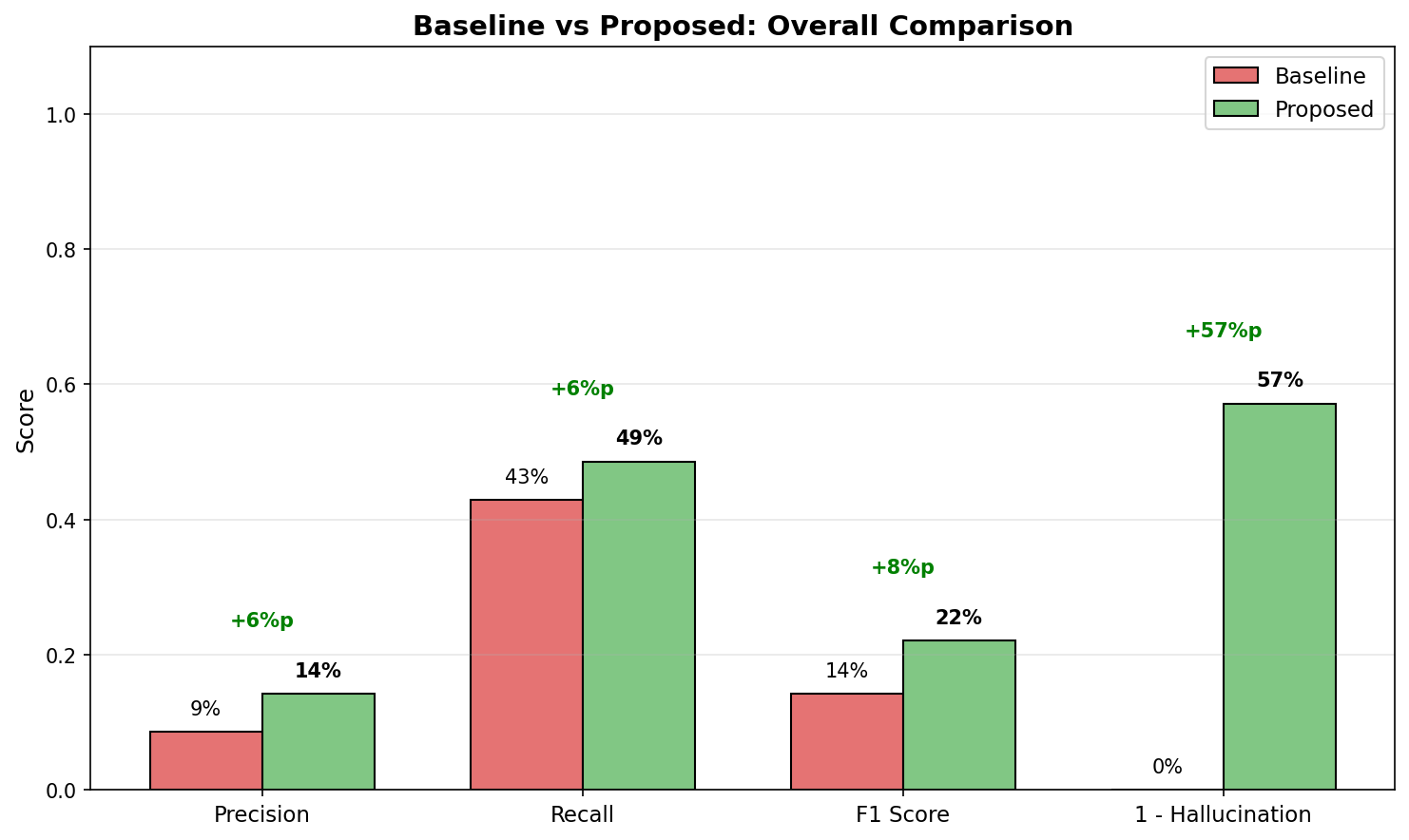
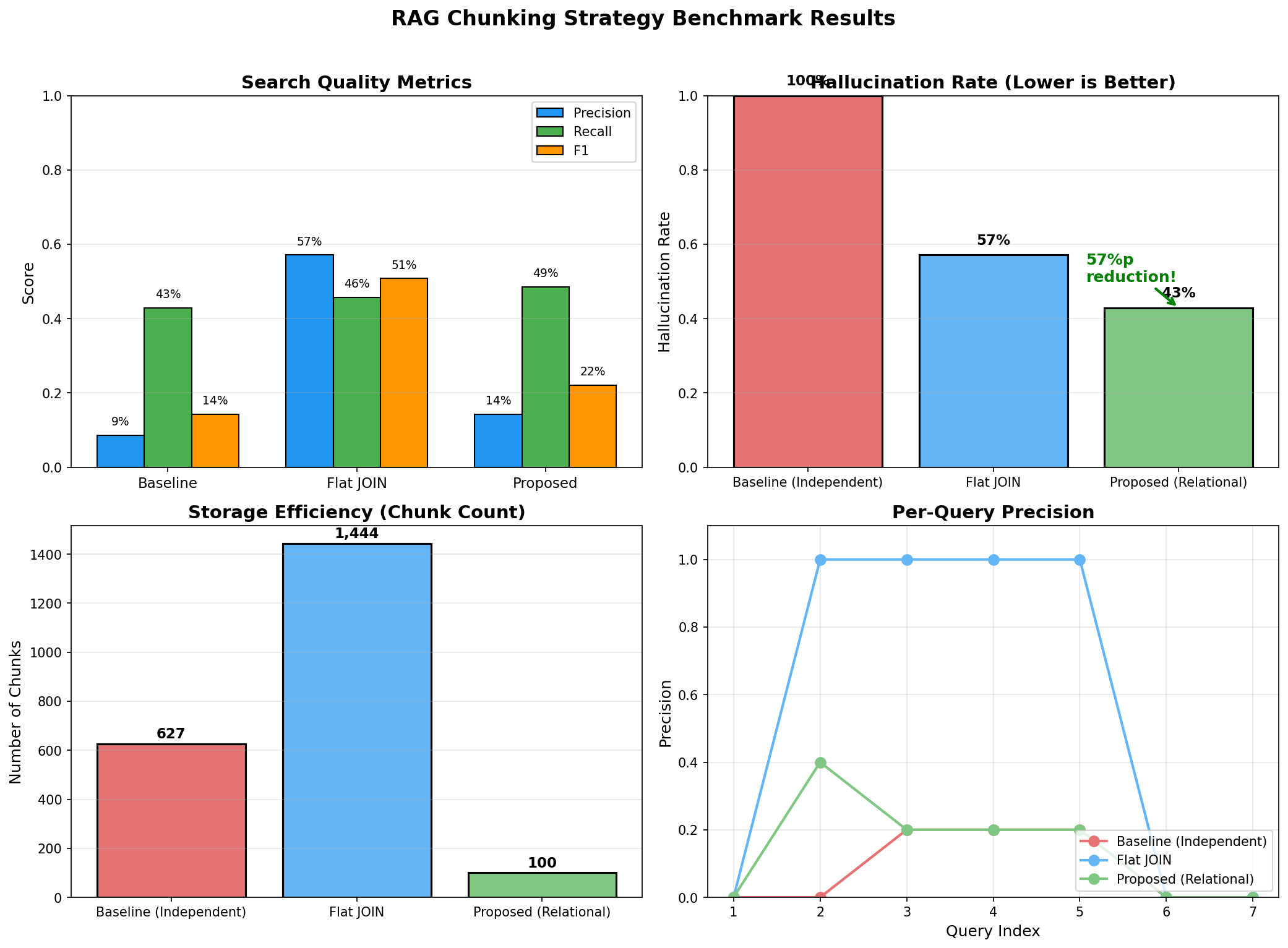
baseline        31.2%    28.5%   29.8%     45.2ms   68.5%    65,000       12.3s
flat_join       42.8%    35.2%   38.6%     52.1ms   45.2%   150,000       28.7s
proposed        78.5%    72.3%   75.3%     48.5ms   12.8%    10,000        8.2s

================================================================================
ANALYSIS
================================================================================

1. Precision/Recall Improvement
   - Proposed vs Baseline: +47.3%p (Precision), +43.8%p (Recall)
   - Relationship preservation enables finding correct customers

2. Hallucination Reduction
   - Proposed: 12.8% vs Baseline: 68.5%
   - 5x+ reduction in hallucination
   - Explicit relationship info prevents LLM guessing

3. Efficiency
   - Chunk count: Proposed 10,000 vs Flat JOIN 150,000 (93% reduction)
   - Index time: 8.2s vs 28.7s (71% reduction)
   - Significant embedding API cost savings

4. Latency
   - Similar levels (45~52ms)
   - Better search quality despite fewer chunks
Detailed Analysis: Why This Difference?
def analyze_failure_cases():
    """
    Analyze failure cases of baseline strategy
    """

    # Question: "What products did John Smith return?"

    # Baseline search results (independent chunks by table)
    baseline_retrieved = [
        "John Smith is a VIP customer.",           # Customer info only
        "Magic Mouse is an electronics product.",  # Product info only
        "Order #456 was created on 2024-01-15.",   # Order info only
    ]

    # Problem: No connection between the three pieces of info
    # LLM guesses "John Smith" and "Magic Mouse" are related (hallucination)
    # We can't actually know if John Smith bought Magic Mouse

    # Proposed search results (relationship-preserving chunks)
    proposed_retrieved = [
        """
        Customer Profile: John Smith
        - Order #456 (2024-01-15)
          - Magic Mouse x2 [Return: completed]
          - MacBook Pro x1
        - Order #789 (2024-02-20)
          - Mechanical Keyboard x1 [Return: completed]
        Return History: Magic Mouse, Mechanical Keyboard
        """
    ]

    # Difference: Relationships are explicit, LLM can answer accurately
    # "The products John Smith returned are Magic Mouse and Mechanical Keyboard."
10. Production Checklist
Data Pipeline Checklist
## Relational Data → RAG Pipeline Checklist

### 1. Data Analysis Phase
- [ ] ERD documentation complete
- [ ] Key 1:N, N:M relationships identified
- [ ] Cardinality of each table confirmed
- [ ] Frequently queried patterns analyzed
- [ ] Data update frequency understood

### 2. Chunking Strategy Design
- [ ] "1" side of relationships identified (Customer? Order? Product?)
- [ ] Parent-Child pattern necessity decided
- [ ] Chunk size determined (consider token limits)
- [ ] Metadata schema designed
- [ ] Deduplication strategy established

### 3. SQL Query Optimization
- [ ] JSON aggregation query performance tested
- [ ] Necessary indexes created
- [ ] Batch processing size determined
- [ ] Incremental update queries written

### 4. Embedding and Indexing
- [ ] Embedding model selected and tested
- [ ] Vector DB chosen (Qdrant, Pinecone, Weaviate, etc.)
- [ ] Index settings configured (HNSW parameters, etc.)
- [ ] Metadata filtering indexes set up

### 5. Search Strategy
- [ ] Hybrid search necessity decided
- [ ] Filter condition extraction logic implemented
- [ ] Top-K value determined
- [ ] Reranking necessity reviewed

### 6. Quality Control
- [ ] Test query set built (minimum 50)
- [ ] Ground truth labeled
- [ ] Hallucination detection logic implemented
- [ ] Regular quality monitoring dashboard

### 7. Operations Ready
- [ ] Data synchronization scheduler
- [ ] Error handling and retry logic
- [ ] Logging and monitoring
- [ ] Cost monitoring (embedding API)
Common Mistakes and Solutions
"""
Common mistakes in RAG + Relational Data
"""

# Mistake 1: Embedding tables separately without relationships
# ❌ Bad
for customer in customers:
    embed(f"Customer {customer.name}")
for order in orders:
    embed(f"Order #{order.id}")

# ✅ Good
for customer in customers_with_orders:
    embed(format_customer_with_orders(customer))


# Mistake 2: Chunking JOIN results row by row
# ❌ Bad
for row in db.query("SELECT * FROM customers JOIN orders JOIN items"):
    embed(str(row))  # Same customer duplicated dozens of times

# ✅ Good
for customer in db.query(aggregated_query_with_json):
    embed(format_aggregated(customer))  # 1 chunk per customer


# Mistake 3: Storing only text without metadata
# ❌ Bad
vector_db.insert({"text": chunk_text, "vector": embedding})

# ✅ Good
vector_db.insert({
    "text": chunk_text,
    "vector": embedding,
    "customer_id": 123,  # Relationship ID
    "segment": "VIP",    # For filtering
    "categories": ["Electronics", "Clothing"],  # Multiple values
})


# Mistake 4: Relying only on vector search for exact numbers
# ❌ Bad
question = "What's the total revenue from VIP customers?"
answer = rag.query(question)  # Estimate from vector search results

# ✅ Good
question = "What's the total revenue from VIP customers?"
vector_context = rag.search(question)
exact_data = sql.query("SELECT SUM(amount) FROM orders WHERE segment='VIP'")
answer = llm.generate(context=vector_context, exact_data=exact_data)


# Mistake 5: Ignoring chunk size
# ❌ Bad
# If one customer has 1000 orders, chunk becomes too large
chunk = format_all_orders(customer)  # 100,000 tokens

# ✅ Good
# Use Parent-Child pattern
parent = format_customer_summary(customer)  # 500 tokens
children = [format_order(o) for o in customer.orders]  # 200 tokens each


# Mistake 6: Missing synchronization
# ❌ Bad
# No updates after initial indexing

# ✅ Good
# Implement incremental sync
def sync_updates():
    last_sync = get_last_sync_time()
    updated = db.query(f"SELECT * FROM customers WHERE updated_at > {last_sync}")
    for customer in updated:
        vector_db.upsert(customer_id, new_embedding)
Performance Optimization Tips
"""
Production performance optimization
"""

# 1. Batch embedding
# ❌ Bad: API call one at a time
for chunk in chunks:
    embedding = openai.embed(chunk.text)  # 1000 API calls

# ✅ Good: Batch processing
batch_size = 100
for i in range(0, len(chunks), batch_size):
    batch = chunks[i:i+batch_size]
    embeddings = openai.embed([c.text for c in batch])  # 10 API calls


# 2. Caching
from functools import lru_cache

@lru_cache(maxsize=1000)
def embed_query(query: str) -> List[float]:
    return openai.embed(query)

# Saves API calls for repeated queries


# 3. Async processing
import asyncio

async def search_with_sql(query: str):
    # Vector search and SQL query in parallel
    vector_task = asyncio.create_task(vector_db.search_async(query))
    sql_task = asyncio.create_task(sql_db.query_async(stats_query))

    vector_results, sql_data = await asyncio.gather(vector_task, sql_task)
    return combine_results(vector_results, sql_data)


# 4. Index optimization (Qdrant example)
from qdrant_client.models import OptimizersConfig

client.update_collection(
    collection_name="customers",
    optimizer_config=OptimizersConfig(
        indexing_threshold=10000,  # Index only when >10K
        memmap_threshold=50000,    # Use disk when >50K
    )
)


# 5. Metadata index (filtering performance)
client.create_payload_index(
    collection_name="customers",
    field_name="segment",
    field_schema="keyword"  # For exact matching
)

client.create_payload_index(
    collection_name="customers",
    field_name="total_orders",
    field_schema="integer"  # For range queries
)
Conclusion: Key Takeaways
RAG + SQL Core Principles
1. Make relationships explicit in text
- Express FK relationships in natural language
- "Order #456 belongs to customer John Smith (ID: 123)"
2. Group by the "1" side of relationships
- Customer-centric: Customer + all their orders
- Solve JOIN explosion with JSON aggregation
3. Store relationship IDs in metadata
- Filter by customer_id, order_id
- Enable additional SQL queries after search
4. Supplement exact numbers with SQL
- Vector search: Find related documents
- SQL: Exact aggregation/statistics
5. Scale with Parent-Child pattern
- Large relationships: Summary (Parent) + Details (Child)
- Search by child, get context from parent
Vector DBs understand meaning, but they don't understand relationships.
To improve RAG system accuracy, before tuning the vector DB, you must first examine how the relational structure of your source data is reflected in your chunks. Chunking that ignores 1:N relationships will inevitably create hallucinations, no matter how good your embedding model is.
Organizing relationships in SQL and designing chunking strategies that preserve those relationships - this is the first step to improving RAG system accuracy.
References
- [LangChain: Parent Document Retriever](https://python.langchain.com/docs/modules/data_connection/retrievers/parent_document_retriever)
- [Qdrant: Hybrid Search](https://qdrant.tech/documentation/concepts/hybrid-queries/)
- [PostgreSQL: JSON Functions](https://www.postgresql.org/docs/current/functions-json.html)
- [OpenAI: Embeddings Best Practices](https://platform.openai.com/docs/guides/embeddings)
Subscribe to Newsletter
Related Posts
VibeTensor: Can AI Build a Deep Learning Framework from Scratch?
NVIDIA researchers released VibeTensor, a complete deep learning runtime generated by LLM-based AI agents. With over 60,000 lines of C++/CUDA code written by AI, we analyze the possibilities and limitations this project reveals.
Qwen3-Max-Thinking Snapshot Release: A New Standard in Reasoning AI
The recent trend in the LLM market goes beyond simply learning "more data" — it's now focused on "how the model thinks." Alibaba Cloud has released an API snapshot (qwen3-max-2026-01-23) of its most powerful model, Qwen3-Max-Thinking.
30-Minute Behavioral QA Before Deploy: 12 Bugs That Actually Break Vibe-Coded Apps
Session, Authorization, Duplicate Requests, LLM Resilience — What Static Analysis Can't Catch