One Wrong JOIN and Your Revenue Doubles — The Complete Guide to Accurate Revenue Aggregation
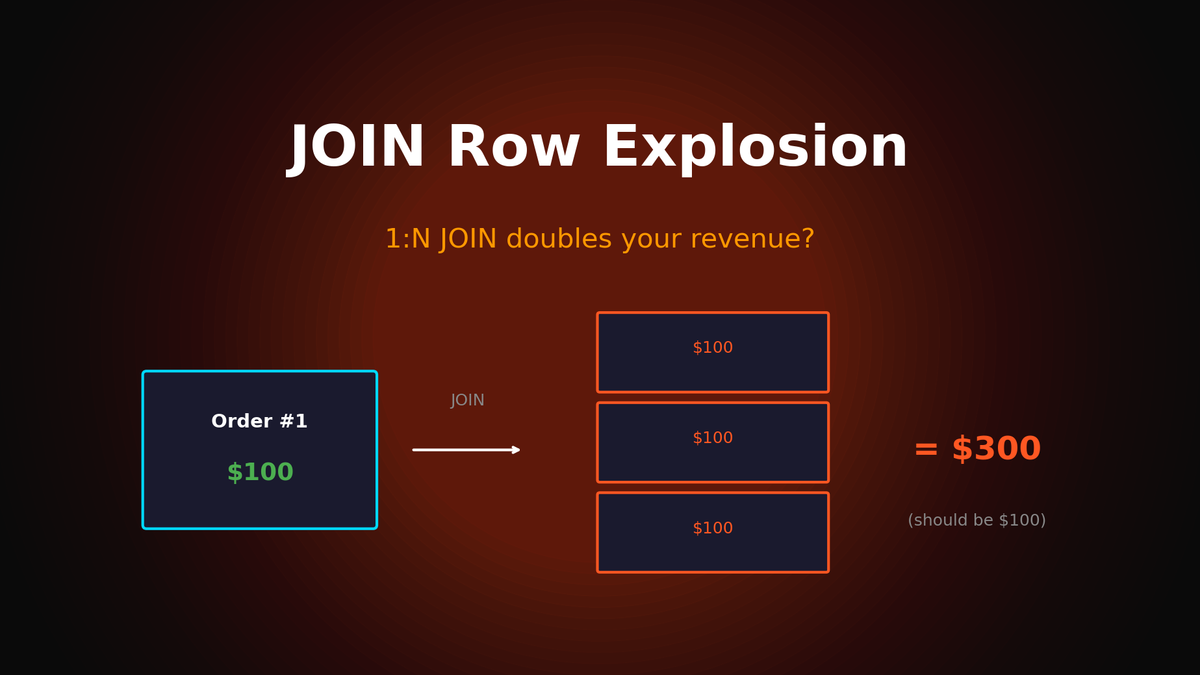
Row Explosion in 1:N JOINs and how to aggregate revenue correctly
One Wrong JOIN and Your Revenue Doubles — The Complete Guide to Accurate Revenue Aggregation
Pivot Table 30 Min vs SQL 30 Sec, But Why Don't the Numbers Match?
"Huh, that's weird. Why is revenue so high?"
Ever discovered your revenue numbers are 2x off from the finance team's report right before presenting? This problem—caused by JOIN results inflating due to 1:N relationships—happens to almost every analyst at least once.
This guide doesn't just show query patterns. We'll deeply cover how to diagnose why revenue gets inflated and techniques for accurate aggregation without duplicates.
1. The Problem: Why Is My Query Result 2x Off?
You're trying to calculate monthly revenue from order data:
SELECT
    strftime('%Y-%m', o.order_date) as month,
    SUM(o.total_amount) as revenue
FROM orders o
JOIN order_items oi ON o.order_id = oi.order_id
GROUP BY strftime('%Y-%m', o.order_date);
Result:
| month | revenue |
|---|---|
| 2024-01 | 156,234,000 |
| 2024-02 | 178,456,000 |
Finance team's report:
| month | revenue |
|---|---|
| 2024-01 | 52,078,000 |
| 2024-02 | 59,485,333 |
Exactly 3x difference. Why did this happen?
2. The Cause: Row Explosion in 1:N JOINs
Understanding the Data Structure
orders table (parent)
┌──────────┬─────────────┐
│ order_id │ total_amount│
├──────────┼─────────────┤
│ 100      │ 50,000      │
└──────────┴─────────────┘

order_items table (child) - multiple items per order
┌──────────┬────────────┬───────────┐
│ order_id │ product_id │ unit_price│
├──────────┼────────────┼───────────┤
│ 100      │ A          │ 20,000    │
│ 100      │ B          │ 15,000    │
│ 100      │ C          │ 15,000    │
└──────────┴────────────┴───────────┘
JOIN Result — Here's Where the Problem Occurs
SELECT o.order_id, o.total_amount, oi.product_id
FROM orders o
JOIN order_items oi ON o.order_id = oi.order_id
WHERE o.order_id = 100;
Result:
| order_id | total_amount | product_id |
|---|---|---|
| 100 | **50,000** | A |
| 100 | **50,000** | B |
| 100 | **50,000** | C |
`total_amount` 50,000 appears 3 times!
SELECT SUM(total_amount) FROM ... -- 150,000 (3x inflation!)This is Row Explosion. Parent table values get duplicated by the number of child table rows.
3. Solution 1: Don't JOIN at All
The most reliable method — just use the orders table:
-- ✅ Accurate revenue: using only orders
SELECT
    strftime('%Y-%m', order_date) as month,
    COUNT(*) as order_count,
    SUM(total_amount) as revenue
FROM orders
WHERE status = 'completed'
GROUP BY strftime('%Y-%m', order_date);
Result:
| month | order_count | revenue |
|---|---|---|
| 2024-01 | 1,234 | 52,078,000 |
| 2024-02 | 1,456 | 59,485,333 |
Principle: When aggregating parent table values like revenue, don't JOIN with child tables.
4. Solution 2: Aggregate Each Table Separately, Then JOIN
Need product info too? Aggregate each table first, then combine:
WITH order_summary AS (
    -- orders level aggregation (No Row Explosion)
    SELECT
        strftime('%Y-%m', order_date) as month,
        COUNT(*) as order_count,
        COUNT(DISTINCT customer_id) as customer_count,
        SUM(total_amount) as revenue
    FROM orders
    WHERE status = 'completed'
    GROUP BY strftime('%Y-%m', order_date)
),
item_summary AS (
    -- order_items level aggregation
    SELECT
        strftime('%Y-%m', o.order_date) as month,
        SUM(oi.quantity) as units_sold,
        COUNT(DISTINCT oi.product_id) as unique_products
    FROM order_items oi
    JOIN orders o ON oi.order_id = o.order_id
    WHERE o.status = 'completed'
    GROUP BY strftime('%Y-%m', o.order_date)
)
SELECT
    os.month,
    os.order_count,
    os.customer_count,
    os.revenue,
    ROUND(os.revenue / os.order_count, 0) as aov,  -- Average Order Value
    its.units_sold,
    its.unique_products
FROM order_summary os
JOIN item_summary its ON os.month = its.month
ORDER BY os.month;
Result:
| month | orders | customers | revenue | aov | units | products |
|---|---|---|---|---|---|---|
| 2024-01 | 1,234 | 987 | 52,078,000 | 42,202 | 3,567 | 234 |
| 2024-02 | 1,456 | 1,123 | 59,485,333 | 40,855 | 4,123 | 256 |
5. Common Traps in Revenue Aggregation
Trap 1: Including Cancelled/Refunded Orders
-- ❌ All orders included (including cancelled!)
SELECT SUM(total_amount) as revenue FROM orders;

-- ✅ Only completed orders
SELECT SUM(total_amount) as revenue
FROM orders
WHERE status = 'completed';

-- ✅ More accurate: Subtract refunds
SELECT
    SUM(CASE WHEN status = 'completed' THEN total_amount ELSE 0 END) as gross_revenue,
    SUM(CASE WHEN status = 'refunded' THEN total_amount ELSE 0 END) as refunds,
    SUM(CASE WHEN status = 'completed' THEN total_amount ELSE 0 END) -
    SUM(CASE WHEN status = 'refunded' THEN total_amount ELSE 0 END) as net_revenue
FROM orders;
Result:
| gross_revenue | refunds | net_revenue |
|---|---|---|
| 52,078,000 | 2,345,000 | 49,733,000 |
Trap 2: Missing Discounts in order_items
-- ❌ Ignoring discounts
SELECT SUM(quantity * unit_price) as revenue FROM order_items;

-- ✅ Including discounts
SELECT
    SUM(quantity * unit_price) as gross_revenue,
    SUM(discount_amount) as total_discount,
    SUM(quantity * unit_price - discount_amount) as net_revenue
FROM order_items;
Trap 3: Timezone Issues
-- ❌ Using UTC directly (9 hour difference from KST)
SELECT
    strftime('%Y-%m-%d', order_date) as date,
    SUM(total_amount) as revenue
FROM orders
GROUP BY strftime('%Y-%m-%d', order_date);

-- ✅ Converting to local timezone
SELECT
    strftime('%Y-%m-%d', datetime(order_date, '+9 hours')) as date_kst,
    SUM(total_amount) as revenue
FROM orders
GROUP BY strftime('%Y-%m-%d', datetime(order_date, '+9 hours'));
Orders near midnight getting counted on the wrong day throws off daily revenue.
6. Practical: Repurchase Rate and LTV Analysis
Calculating Repurchase Rate
WITH customer_orders AS (
    SELECT
        customer_id,
        COUNT(*) as order_count,
        SUM(total_amount) as total_spent,
        MIN(order_date) as first_order,
        MAX(order_date) as last_order
    FROM orders
    WHERE status = 'completed'
    GROUP BY customer_id
)
SELECT
    COUNT(*) as total_customers,
    SUM(CASE WHEN order_count = 1 THEN 1 ELSE 0 END) as one_time_buyers,
    SUM(CASE WHEN order_count > 1 THEN 1 ELSE 0 END) as repeat_buyers,
    ROUND(100.0 * SUM(CASE WHEN order_count > 1 THEN 1 ELSE 0 END) / COUNT(*), 1) as repurchase_rate,
    ROUND(AVG(order_count), 2) as avg_orders_per_customer,
    ROUND(AVG(total_spent), 0) as avg_ltv
FROM customer_orders;
Result:
| total_customers | one_time | repeat | repurchase_rate | avg_orders | avg_ltv |
|---|---|---|---|---|---|
| 5,432 | 3,245 | 2,187 | 40.3% | 2.34 | 156,789 |
Repurchase Rate by Customer Segment
WITH customer_orders AS (
    SELECT
        c.segment,
        o.customer_id,
        COUNT(*) as order_count,
        SUM(o.total_amount) as total_spent
    FROM orders o
    JOIN customers c ON o.customer_id = c.customer_id
    WHERE o.status = 'completed'
    GROUP BY c.segment, o.customer_id
)
SELECT
    segment,
    COUNT(*) as customers,
    SUM(CASE WHEN order_count > 1 THEN 1 ELSE 0 END) as repeat_buyers,
    ROUND(100.0 * SUM(CASE WHEN order_count > 1 THEN 1 ELSE 0 END) / COUNT(*), 1) as repurchase_rate,
    ROUND(AVG(total_spent), 0) as avg_ltv
FROM customer_orders
GROUP BY segment
ORDER BY repurchase_rate DESC;
Result:
| segment | customers | repeat_buyers | repurchase_rate | avg_ltv |
|---|---|---|---|---|
| vip | 234 | 198 | 84.6% | 892,345 |
| regular | 3,456 | 1,567 | 45.3% | 178,234 |
| new | 1,742 | 422 | 24.2% | 67,890 |
7. Month-over-Month Growth Rate (MoM)
WITH monthly_revenue AS (
    SELECT
        strftime('%Y-%m', order_date) as month,
        SUM(total_amount) as revenue,
        COUNT(*) as orders,
        COUNT(DISTINCT customer_id) as customers
    FROM orders
    WHERE status = 'completed'
    GROUP BY strftime('%Y-%m', order_date)
)
SELECT
    month,
    revenue,
    orders,
    LAG(revenue) OVER (ORDER BY month) as prev_month_revenue,
    ROUND((revenue - LAG(revenue) OVER (ORDER BY month)) * 100.0 /
        LAG(revenue) OVER (ORDER BY month), 1) as mom_growth
FROM monthly_revenue
ORDER BY month DESC
LIMIT 6;
Result:
| month | revenue | orders | prev_revenue | mom_growth |
|---|---|---|---|---|
| 2024-06 | 67,234,000 | 1,678 | 59,485,333 | +13.0% |
| 2024-05 | 59,485,333 | 1,456 | 54,234,000 | +9.7% |
| 2024-04 | 54,234,000 | 1,345 | 52,078,000 | +4.1% |
| 2024-03 | 52,078,000 | 1,234 | 48,765,000 | +6.8% |
8. Category Revenue Analysis — Avoiding Row Explosion
Be careful when calculating revenue by product category too:
-- ❌ Wrong method: Using orders.total_amount for category revenue
-- If one order has multiple categories, total_amount gets counted multiple times

-- ✅ Correct method: Calculate at order_items level
SELECT
    p.category,
    COUNT(DISTINCT o.order_id) as order_count,
    SUM(oi.quantity) as units_sold,
    SUM(oi.quantity * oi.unit_price - oi.discount_amount) as revenue,
    ROUND(SUM(oi.quantity * oi.unit_price - oi.discount_amount) * 100.0 /
          SUM(SUM(oi.quantity * oi.unit_price - oi.discount_amount)) OVER (), 1) as revenue_share
FROM order_items oi
JOIN orders o ON oi.order_id = o.order_id
JOIN products p ON oi.product_id = p.product_id
WHERE o.status = 'completed'
  AND o.order_date >= DATE('now', '-30 days')
GROUP BY p.category
ORDER BY revenue DESC;
Result:
| category | orders | units | revenue | share |
|---|---|---|---|---|
| Electronics | 567 | 1,234 | 23,456,000 | 34.9% |
| Clothing | 789 | 2,345 | 18,234,000 | 27.1% |
| Home | 456 | 987 | 15,678,000 | 23.3% |
| Food | 345 | 1,567 | 9,876,000 | 14.7% |
9. Cohort Analysis: Retention by First Purchase Month
WITH customer_cohort AS (
    -- Customer's first purchase month (cohort definition)
    SELECT
        customer_id,
        strftime('%Y-%m', MIN(order_date)) as cohort_month
    FROM orders
    WHERE status = 'completed'
    GROUP BY customer_id
),
monthly_activity AS (
    -- Customer's activity months
    SELECT DISTINCT
        o.customer_id,
        cc.cohort_month,
        strftime('%Y-%m', o.order_date) as activity_month
    FROM orders o
    JOIN customer_cohort cc ON o.customer_id = cc.customer_id
    WHERE o.status = 'completed'
)
SELECT
    cohort_month,
    COUNT(DISTINCT CASE WHEN activity_month = cohort_month THEN customer_id END) as M0,
    COUNT(DISTINCT CASE WHEN activity_month =
        strftime('%Y-%m', DATE(cohort_month || '-01', '+1 month')) THEN customer_id END) as M1,
    COUNT(DISTINCT CASE WHEN activity_month =
        strftime('%Y-%m', DATE(cohort_month || '-01', '+2 month')) THEN customer_id END) as M2,
    COUNT(DISTINCT CASE WHEN activity_month =
        strftime('%Y-%m', DATE(cohort_month || '-01', '+3 month')) THEN customer_id END) as M3
FROM monthly_activity
WHERE cohort_month >= strftime('%Y-%m', DATE('now', '-6 months'))
GROUP BY cohort_month
ORDER BY cohort_month;
Result:
| cohort | M0 | M1 | M2 | M3 |
|---|---|---|---|---|
| 2024-01 | 234 | 89 | 67 | 52 |
| 2024-02 | 267 | 102 | 78 | - |
| 2024-03 | 298 | 115 | - | - |
M1 Retention = 89/234 = 38.0%
10. Revenue Report Checklist
Before Writing Your Query
- [ ] Clarify revenue definition (Gross vs Net, tax/shipping inclusion)
- [ ] Confirm order status filter (completed, shipped, paid - which one?)
- [ ] Verify date range and timezone (UTC vs Local)
- [ ] Check 1:N relationships (Row Explosion risk)
- [ ] Confirm refund/cancellation handling
After Running Your Query
- [ ] Does row count match expectations?
- [ ] Does total revenue match finance team's data?
- [ ] Are 0 and NULL handled as expected?
- [ ] Are outliers distorting results?
Key Takeaways: 3 Principles for Accurate Revenue Aggregation
- Guard Against Row Explosion: Aggregating parent table values after 1:N JOIN inflates results
- Clarify Revenue Definition: Agree with your team on Gross vs Net, status filters, tax/shipping inclusion
- Make Verification a Habit: Cross-check query results against finance team data or other sources
Follow these three principles and you'll confidently answer "Is this number right?"
In the next article, we'll cover Window Functions for cleanly handling month-over-month comparisons, cumulative totals, and rankings.
Subscribe to Newsletter
Related Posts
Automating Data Quality Checks: SQL Templates for NULL, Duplicates, and Consistency
SQL checklist to catch data quality issues early. NULL checks, duplicates, referential integrity, range validation.
Anomaly Detection in SQL: Finding Outliers with Z-Score and IQR
Automatically detect abnormal data with SQL. Implement Z-Score, IQR, and percentile-based outlier detection.
Time Series Analysis in SQL: Mastering Moving Averages, YoY, and MoM Trends
Can't see the revenue trend? How to implement moving averages, YoY, and MoM comparisons in SQL.