Why Does Your SQL Query Take 10 Minutes? — From EXPLAIN QUERY PLAN to Index Design
EXPLAIN, indexes, WHERE vs HAVING — diagnose and optimize slow queries yourself
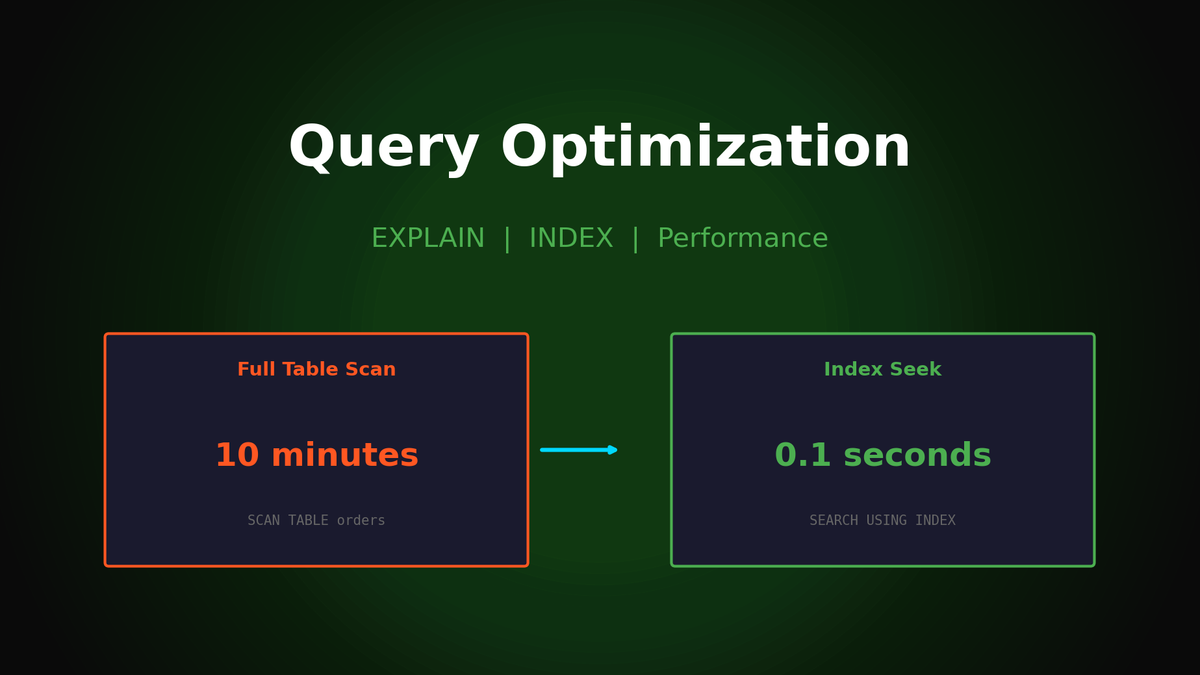
Why Does Your SQL Query Take 10 Minutes? — From EXPLAIN QUERY PLAN to Index Design
Excel 3 Hours vs SQL 3 Seconds, But Why Do Some Queries Take 10 Minutes?
"Can you pull this CS ticket data?" Every time this request comes in, are you spending 30 minutes wrestling with Excel filters and VLOOKUP? Or have you learned SQL but given up because queries run forever?
"Knowing" SQL and "using it well" are completely different things. The same result can take 3 seconds or 10 minutes depending on how you write the query. In this guide, we'll cover how to diagnose slow queries and the fundamentals of writing fast queries from the start.
1. "Why Am I Getting This Error?" — The Secret of SQL Execution Order
When learning SQL, you first learn this syntax order:
SELECT → FROM → WHERE → GROUP BY → HAVING → ORDER BY → LIMITBut this is just the writing order. The order the database actually executes is completely different.
Actual Execution Order
FROM → WHERE → GROUP BY → HAVING → SELECT → ORDER BY → LIMITWithout knowing this order, you can't find the cause of errors like this:
SELECT
    ticket_id,
    JULIANDAY(resolved_at) - JULIANDAY(created_at) AS resolution_days
FROM tickets
WHERE resolution_days > 1;Error: no such column: resolution_daysWhy the error? resolution_days is an alias created in SELECT, but WHERE executes before SELECT. You're referencing a column that doesn't exist yet.
Solution
-- Method 1: Write the expression directly in WHERE
WHERE JULIANDAY(resolved_at) - JULIANDAY(created_at) > 1

-- Method 2: Wrap in a subquery
SELECT * FROM (
    SELECT ticket_id,
           JULIANDAY(resolved_at) - JULIANDAY(created_at) AS resolution_days
    FROM tickets
) sub
WHERE resolution_days > 1;
Pro Tip: MySQL and SQLite allow aliases in HAVING, but PostgreSQL doesn't. If you work with multiple databases, use the original expression instead of aliases.
2. "Why Is My Query So Slow?" — Diagnosing with EXPLAIN
When queries are slow, most people think "the data is too large." But the real cause is not using indexes properly.
10 Minutes vs 0.02 Seconds — The Real Difference
Let's say you're searching for urgent tickets in 1 million ticket records:
-- Query A: Search on non-indexed column
SELECT * FROM tickets WHERE description LIKE '%error%';

-- Query B: Search on indexed column
SELECT * FROM tickets WHERE priority = 'urgent';
Check with EXPLAIN:
EXPLAIN QUERY PLAN SELECT * FROM tickets WHERE description LIKE '%error%';
-- Result: SCAN tickets
-- Meaning: Checking all 1 million rows one by one (Full Table Scan)
-- Estimated time: 8.5 seconds

EXPLAIN QUERY PLAN SELECT * FROM tickets WHERE priority = 'urgent';
-- Result: SEARCH tickets USING INDEX idx_tickets_priority
-- Meaning: Jump directly via index (Index Scan)
-- Estimated time: 0.02 seconds
Same data, same result, 400x difference.
Reading EXPLAIN Results
SCAN tickets          → Full Table Scan (slow 🐌)
SEARCH ... USING INDEX → Index Scan (fast 🚀)
USING COVERING INDEX   → Index Only Scan (fastest ⚡)
3. "I Created an Index, Why Isn't It Being Used?" — 5 Situations Where Indexes Are Ignored
Even with indexes, the database may ignore them depending on how you write your query.
Situation 1: Function Applied to Column
-- ❌ Index ignored
SELECT * FROM tickets WHERE YEAR(created_at) = 2024;
-- Result: SCAN tickets (Full Table Scan)

-- ✅ Index used
SELECT * FROM tickets
WHERE created_at >= '2024-01-01' AND created_at < '2025-01-01';
-- Result: SEARCH tickets USING INDEX idx_tickets_created_at
To calculate YEAR(created_at), every row's created_at must be checked, so the index can't be used.
Situation 2: Leading Wildcard in LIKE
-- ❌ Index ignored (% at the start)
SELECT * FROM tickets WHERE category LIKE '%billing%';

-- ✅ Index usable (% only at the end)
SELECT * FROM tickets WHERE category LIKE 'billing%';
An index is like a sorted table of contents. You can find "starts with billing" in a table of contents, but "contains billing" requires searching everything.
Situation 3: Wrong Order in Composite Index
-- Composite index: (category, status)
CREATE INDEX idx_cat_status ON tickets(category, status);

-- ✅ First column included → Index used
SELECT * FROM tickets WHERE category = 'billing';
SELECT * FROM tickets WHERE category = 'billing' AND status = 'open';

-- ❌ First column missing → Index ignored
SELECT * FROM tickets WHERE status = 'open';
Composite indexes must be used from left to right in order. Like a phone book where you can search by name, but not by the last 4 digits of a phone number.
Situation 4: Type Mismatch
-- ❌ ticket_id is INTEGER but compared as string
SELECT * FROM tickets WHERE ticket_id = '12345';

-- ✅ Type matches
SELECT * FROM tickets WHERE ticket_id = 12345;
Implicit type conversion can prevent index usage.
Situation 5: Multiple OR Conditions
-- ❌ OR condition → Reduced index efficiency
SELECT * FROM tickets
WHERE priority = 'urgent' OR priority = 'high';

-- ✅ IN condition → More efficient
SELECT * FROM tickets
WHERE priority IN ('urgent', 'high');
4. Why GROUP BY Is Slow — Hash vs Sort
Why does GROUP BY on large data take so long? Understanding what happens inside the database shows the optimization path.
Two Aggregation Methods
Hash Aggregation (when memory is sufficient)
- Stores each group in a hash table
- Fast O(n) processing in memory
- Drawback: Uses lots of memory
Sort Aggregation (when memory is low or sorting needed)
- First sorts by group key
- Iterates through sorted data to aggregate
- Relatively slow at O(n log n)
- Advantage: Can use disk, beneficial when combined with ORDER BY
Practical Query Example
-- Ticket statistics by category
SELECT
    category,
    COUNT(*) as total_tickets,
    COUNT(DISTINCT customer_id) as unique_customers,
    ROUND(AVG(satisfaction_score), 2) as avg_satisfaction
FROM tickets
WHERE created_at >= '2024-01-01'
GROUP BY category
ORDER BY total_tickets DESC;
Sample Result:
| category | total_tickets | unique_customers | avg_satisfaction |
|---|---|---|---|
| technical | 3,412 | 2,891 | 3.8 |
| billing | 2,876 | 2,543 | 4.1 |
| general | 2,456 | 2,102 | 4.3 |
| refund | 1,567 | 1,234 | 3.2 |
Optimization Tip: An index on GROUP BY columns reduces sorting cost in Sort Aggregation.
5. WHERE vs HAVING — When to Use Which?
Both are "filtering," but there's a big difference in execution timing and performance.
| WHERE | HAVING | |
|---|---|---|
| **Timing** | Before GROUP BY | After GROUP BY |
| **Target** | Individual rows | Groups |
| **Aggregate Functions** | Cannot use | Can use |
| **Performance** | Fast (reduces data first) | Slow (aggregates everything, then filters) |
Bad Example
-- ❌ Inefficient: Aggregates all data then filters
SELECT agent_id, COUNT(*) as ticket_count
FROM tickets
GROUP BY agent_id
HAVING agent_id IN (1, 2, 3, 4, 5);
This query counts all agents' tickets then keeps only 5.
Good Example
-- ✅ Efficient: Filters first then aggregates
SELECT agent_id, COUNT(*) as ticket_count
FROM tickets
WHERE agent_id IN (1, 2, 3, 4, 5)  -- Filter first!
GROUP BY agent_id;
This query only counts 5 agents' tickets, making it much faster.
When HAVING Is Needed
Use HAVING when filtering by aggregate results:
-- "Agents who handled 50+ tickets with 4.0+ avg satisfaction"
SELECT
    agent_id,
    COUNT(*) as ticket_count,
    ROUND(AVG(satisfaction_score), 2) as avg_score
FROM tickets
WHERE created_at >= '2024-01-01'    -- Row filter (WHERE)
  AND status = 'resolved'
GROUP BY agent_id
HAVING COUNT(*) >= 50               -- Group filter (HAVING)
   AND AVG(satisfaction_score) >= 4.0
ORDER BY avg_score DESC;
6. 7 Common Mistakes That Hurt Performance
Mistake 1: SELECT *
-- ❌ Select all columns
SELECT * FROM tickets WHERE status = 'open';

-- ✅ Only needed columns
SELECT ticket_id, category, priority, created_at
FROM tickets WHERE status = 'open';
Problems:
- Wastes network bandwidth
- Can't use Covering Index
- Risk of errors when schema changes
Mistake 2: Using = for NULL Comparison
-- ❌ Always returns 0 rows
SELECT * FROM tickets WHERE resolved_at = NULL;

-- ✅ Use IS NULL
SELECT * FROM tickets WHERE resolved_at IS NULL;
In SQL, NULL = NULL is not TRUE but NULL (Unknown).
Mistake 3: Unnecessary DISTINCT
-- ❌ ticket_id is already PK, so unique
SELECT DISTINCT ticket_id FROM tickets WHERE status = 'open';

-- ✅ DISTINCT unnecessary
SELECT ticket_id FROM tickets WHERE status = 'open';
DISTINCT costs sorting/hashing. Don't use it on already-unique values.
Mistake 4: Ignoring NULL in COUNT
SELECT
    COUNT(*) as total_rows,           -- Total row count
    COUNT(resolved_at) as resolved,   -- Excludes NULL (only resolved tickets)
    COUNT(satisfaction_score) as rated -- Only rated ones
FROM tickets;| total_rows | resolved | rated |
|---|---|---|
| 10,000 | 7,500 | 4,200 |
Know the difference between COUNT(*) and COUNT(column).
Mistake 5: Subquery vs JOIN
-- ❌ Slow: Subquery executes for each row (Correlated Subquery)
SELECT t.*
FROM tickets t
WHERE t.agent_id IN (
    SELECT agent_id FROM agents WHERE department = 'support'
);

-- ✅ Fast: JOIN once
SELECT t.*
FROM tickets t
JOIN agents a ON t.agent_id = a.agent_id
WHERE a.department = 'support';
Mistake 6: Date Functions in Range Search
-- ❌ Index ignored
WHERE DATE(created_at) = '2024-06-15'

-- ✅ Index used
WHERE created_at >= '2024-06-15' AND created_at < '2024-06-16'
Mistake 7: Mass Query Without LIMIT
-- ❌ Query 1 million rows at once
SELECT * FROM tickets;

-- ✅ Pagination
SELECT * FROM tickets ORDER BY ticket_id LIMIT 100 OFFSET 0;
7. Production-Ready Query Patterns
Pattern 1: Daily KPI Dashboard
SELECT
    DATE(created_at) as date,
    COUNT(*) as new_tickets,
    SUM(CASE WHEN status IN ('resolved', 'closed') THEN 1 ELSE 0 END) as closed,
    ROUND(AVG(satisfaction_score), 2) as avg_satisfaction
FROM tickets
WHERE created_at >= DATE('now', '-30 days')
GROUP BY DATE(created_at)
ORDER BY date DESC;
Result:
| date | new_tickets | closed | avg_satisfaction |
|---|---|---|---|
| 2024-06-15 | 234 | 198 | 4.2 |
| 2024-06-14 | 256 | 241 | 4.0 |
| 2024-06-13 | 223 | 215 | 4.1 |
Pattern 2: Agent Performance Analysis
SELECT
    agent_id,
    COUNT(*) as total_tickets,
    SUM(CASE WHEN status = 'resolved' THEN 1 ELSE 0 END) as resolved,
    ROUND(100.0 * SUM(CASE WHEN status = 'resolved' THEN 1 ELSE 0 END) / COUNT(*), 1) as resolution_rate,
    ROUND(AVG(JULIANDAY(resolved_at) - JULIANDAY(created_at)) * 24, 1) as avg_hours,
    ROUND(AVG(satisfaction_score), 2) as avg_score
FROM tickets
WHERE created_at >= DATE('now', '-30 days')
GROUP BY agent_id
HAVING COUNT(*) >= 10
ORDER BY resolution_rate DESC, avg_score DESC;
Result:
| agent_id | total_tickets | resolved | resolution_rate | avg_hours | avg_score |
|---|---|---|---|---|---|
| 42 | 156 | 148 | 94.9 | 2.3 | 4.6 |
| 17 | 134 | 125 | 93.3 | 3.1 | 4.4 |
| 23 | 178 | 162 | 91.0 | 4.2 | 4.2 |
Pattern 3: SLA Compliance Analysis
WITH sla_check AS (
    SELECT
        priority,
        ticket_id,
        CASE
            WHEN resolved_at IS NULL THEN 'pending'
            WHEN priority = 'urgent' AND
                 (JULIANDAY(resolved_at) - JULIANDAY(created_at)) * 24 <= 4 THEN 'met'
            WHEN priority = 'high' AND
                 (JULIANDAY(resolved_at) - JULIANDAY(created_at)) * 24 <= 24 THEN 'met'
            WHEN priority = 'medium' AND
                 (JULIANDAY(resolved_at) - JULIANDAY(created_at)) * 24 <= 72 THEN 'met'
            WHEN priority = 'low' AND
                 (JULIANDAY(resolved_at) - JULIANDAY(created_at)) * 24 <= 168 THEN 'met'
            ELSE 'breached'
        END as sla_status
    FROM tickets
    WHERE created_at >= DATE('now', '-30 days')
)
SELECT
    priority,
    COUNT(*) as total,
    SUM(CASE WHEN sla_status = 'met' THEN 1 ELSE 0 END) as met,
    SUM(CASE WHEN sla_status = 'breached' THEN 1 ELSE 0 END) as breached,
    ROUND(100.0 * SUM(CASE WHEN sla_status = 'met' THEN 1 ELSE 0 END) /
          NULLIF(SUM(CASE WHEN sla_status != 'pending' THEN 1 ELSE 0 END), 0), 1) as compliance_rate
FROM sla_check
GROUP BY priority
ORDER BY
    CASE priority WHEN 'urgent' THEN 1 WHEN 'high' THEN 2
                  WHEN 'medium' THEN 3 WHEN 'low' THEN 4 END;
Result:
| priority | total | met | breached | compliance_rate |
|---|---|---|---|---|
| urgent | 89 | 78 | 8 | 90.7 |
| high | 234 | 198 | 21 | 90.4 |
| medium | 567 | 489 | 52 | 90.4 |
| low | 312 | 287 | 12 | 96.0 |
Key Takeaways: 3 Principles for Fast Queries
- Remember the Execution Order: FROM → WHERE → GROUP BY → HAVING → SELECT → ORDER BY
- Make EXPLAIN a Habit: When you see
SCAN, there's an index problem - Leverage Indexes: No functions on columns, no leading % in LIKE, composite indexes from left to right
Remember these three things, and you'll be able to answer "why is my query slow?" on your own.
In the next article, we'll cover the problem where JOIN doubles your revenue and accurate aggregation methods.
Subscribe to Newsletter
Related Posts

Data Analysis Cookbook: Master Data Analysis with SQL and Pandas
Learn data analysis with dual tracks: SQL (BigQuery) and Pandas. 85 interview prep problems.
Automating Data Quality Checks: SQL Templates for NULL, Duplicates, and Consistency
SQL checklist to catch data quality issues early. NULL checks, duplicates, referential integrity, range validation.
Anomaly Detection in SQL: Finding Outliers with Z-Score and IQR
Automatically detect abnormal data with SQL. Implement Z-Score, IQR, and percentile-based outlier detection.