"Can SQL Do This?" — Escaping Subquery Hell with Window Functions
LAG, LEAD, RANK for month-over-month, rankings, and running totals
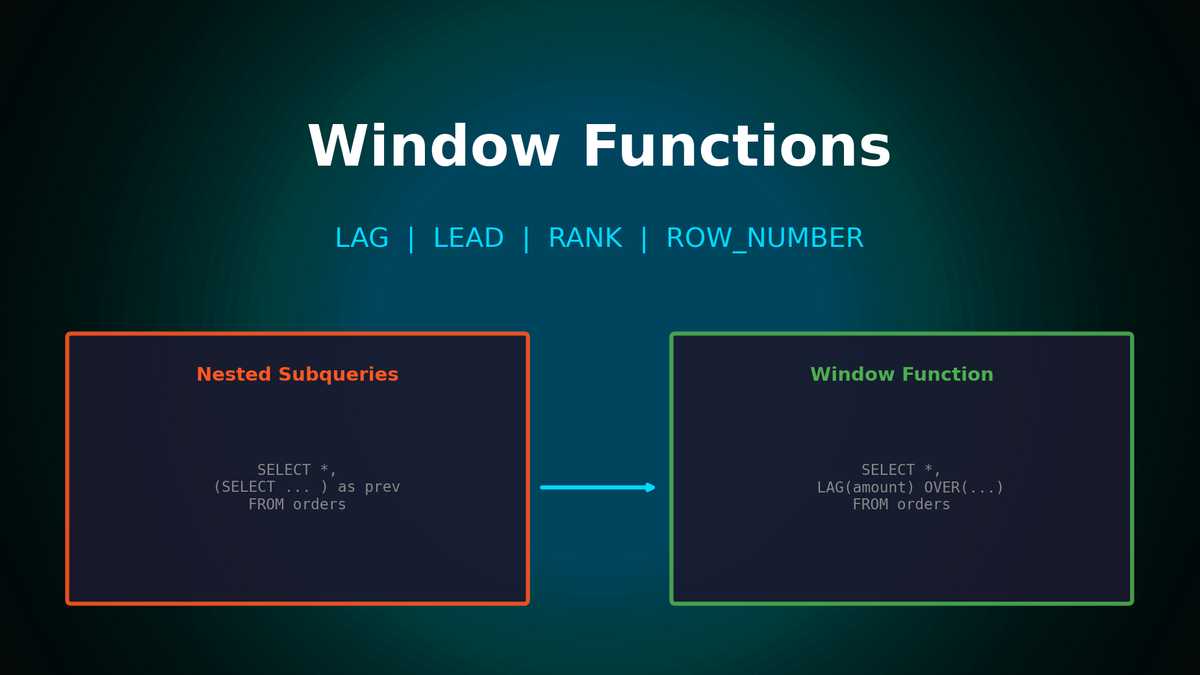
"Can SQL Do This?" — Escaping Subquery Hell with Window Functions
Escaping Subquery Hell
"Get me month-over-month growth rate", "Top 3 products in each category", "Cohort retention analysis"...
Ever received these requests and ended up nesting subqueries inside subqueries, inside more subqueries, until you created a query even you couldn't understand? Master Window functions properly, and complex analytical queries become clean and fast.
1. What Are Window Functions? — 1 Minute Explanation
Subquery Approach vs Window Function Approach
"Show me each employee's salary alongside their department average salary"
With subquery:
SELECT
    e.name,
    e.department,
    e.salary,
    (SELECT AVG(salary) FROM employees e2
     WHERE e2.department = e.department) as dept_avg
FROM employees e;
The subquery executes for every row. 10,000 rows means 10,000 executions.
With Window function:
SELECT
    name,
    department,
    salary,
    AVG(salary) OVER (PARTITION BY department) as dept_avg
FROM employees;
Calculated once. Same result, much faster.
Key Difference
| GROUP BY | Window Function | |
|---|---|---|
| **Result rows** | Reduced to group count | Original rows preserved |
| **Original columns** | Can't use if not in GROUP BY | All columns available |
| **Aggregate values** | 1 per group | Added to every row |
2. OVER() Clause Breakdown
The core of Window functions is the OVER() clause. It has three parts:
SUM(revenue) OVER (
    PARTITION BY category    -- Within which group?
    ORDER BY date            -- In what order?
    ROWS BETWEEN             -- Over what range?
        UNBOUNDED PRECEDING
        AND CURRENT ROW
)
PARTITION BY — Dividing Groups
-- Each product's share of total and category revenue
SELECT
    product_name,
    revenue,
    revenue * 100.0 / SUM(revenue) OVER () as total_share,           -- vs Total
    revenue * 100.0 / SUM(revenue) OVER (PARTITION BY category) as category_share  -- vs Category
FROM products;
Result:
| product | revenue | total_share | category_share |
|---|---|---|---|
| iPhone | 500,000 | 25.0% | 45.5% |
| Galaxy | 400,000 | 20.0% | 36.4% |
| Pixel | 200,000 | 10.0% | 18.1% |
| Nike Shoes | 300,000 | 15.0% | 42.9% |
| Adidas Shoes | 400,000 | 20.0% | 57.1% |
ORDER BY — Setting the Order
Adding ORDER BY enables cumulative calculations:
-- Daily cumulative revenue
SELECT
    date,
    daily_revenue,
    SUM(daily_revenue) OVER (ORDER BY date) as cumulative_revenue
FROM daily_sales;
Result:
| date | daily_revenue | cumulative_revenue |
|---|---|---|
| 2024-01-01 | 100,000 | 100,000 |
| 2024-01-02 | 150,000 | 250,000 |
| 2024-01-03 | 120,000 | 370,000 |
| 2024-01-04 | 180,000 | 550,000 |
3. LAG/LEAD — The Core of Month-over-Month Calculations
Basic Usage
LAG(column, N, default)  -- Value N rows back (default 1)
LEAD(column, N, default) -- Value N rows forward (default 1)
Month-over-Month Growth Rate (MoM)
WITH monthly_revenue AS (
    SELECT
        strftime('%Y-%m', order_date) as month,
        SUM(total_amount) as revenue
    FROM orders
    WHERE status = 'completed'
    GROUP BY strftime('%Y-%m', order_date)
)
SELECT
    month,
    revenue,
    LAG(revenue) OVER (ORDER BY month) as prev_month,
    revenue - LAG(revenue) OVER (ORDER BY month) as diff,
    ROUND((revenue - LAG(revenue) OVER (ORDER BY month)) * 100.0 /
          LAG(revenue) OVER (ORDER BY month), 1) as growth_pct
FROM monthly_revenue
ORDER BY month;
Result:
| month | revenue | prev_month | diff | growth_pct |
|---|---|---|---|---|
| 2024-01 | 52,000,000 | NULL | NULL | NULL |
| 2024-02 | 59,000,000 | 52,000,000 | 7,000,000 | 13.5% |
| 2024-03 | 54,000,000 | 59,000,000 | -5,000,000 | -8.5% |
| 2024-04 | 61,000,000 | 54,000,000 | 7,000,000 | 13.0% |
Week-over-Week Same Day (WoW)
SELECT
    date,
    revenue,
    LAG(revenue, 7) OVER (ORDER BY date) as same_day_last_week,
    ROUND((revenue - LAG(revenue, 7) OVER (ORDER BY date)) * 100.0 /
          LAG(revenue, 7) OVER (ORDER BY date), 1) as wow_growth
FROM daily_sales
WHERE date >= DATE('now', '-14 days');
4. The Ranking Trio — When to Use Which?
ROW_NUMBER vs RANK vs DENSE_RANK
SELECT
    product_name,
    revenue,
    ROW_NUMBER() OVER (ORDER BY revenue DESC) as row_num,
    RANK() OVER (ORDER BY revenue DESC) as rank,
    DENSE_RANK() OVER (ORDER BY revenue DESC) as dense_rank
FROM products;
Result (with ties):
| product | revenue | ROW_NUMBER | RANK | DENSE_RANK |
|---|---|---|---|---|
| A | 1,000,000 | 1 | 1 | 1 |
| B | 900,000 | 2 | 2 | 2 |
| C | 900,000 | 3 | 2 | 2 |
| D | 800,000 | 4 | **4** | **3** |
Differences:
ROW_NUMBER: Always sequential numbers (ignores ties)RANK: Ties get same rank, next rank skipped (1,2,2,4)DENSE_RANK: Ties get same rank, next rank not skipped (1,2,2,3)
When to Use Which?
ROW_NUMBER — When you need exactly N items
-- Top 3 products per category (exactly 3)
WITH ranked AS (
    SELECT
        category,
        product_name,
        revenue,
        ROW_NUMBER() OVER (PARTITION BY category ORDER BY revenue DESC) as rn
    FROM products
)
SELECT * FROM ranked WHERE rn <= 3;
RANK — When you want to include all tied entries
-- Top 10, but include all if 10th place has ties
WITH ranked AS (
    SELECT product_name, revenue,
           RANK() OVER (ORDER BY revenue DESC) as rank
    FROM products
)
SELECT * FROM ranked WHERE rank <= 10;
-- Returns 12 rows if 3 items are tied for 10th
DENSE_RANK — When you want no gaps in ranking numbers
-- 1st, 2nd, 3rd... without skipping
SELECT product_name, revenue,
       DENSE_RANK() OVER (ORDER BY revenue DESC) as rank
FROM products;
5. Moving Averages and Cumulative Totals
7-Day Moving Average
SELECT
    date,
    daily_revenue,
    ROUND(AVG(daily_revenue) OVER (
        ORDER BY date
        ROWS BETWEEN 6 PRECEDING AND CURRENT ROW
    ), 0) as ma7
FROM daily_sales;
Result:
| date | daily_revenue | ma7 |
|---|---|---|
| 2024-01-01 | 100,000 | 100,000 |
| 2024-01-02 | 150,000 | 125,000 |
| 2024-01-03 | 120,000 | 123,333 |
| ... | ... | ... |
| 2024-01-07 | 140,000 | 130,000 |
| 2024-01-08 | 160,000 | 135,714 |
Monthly Cumulative Revenue (Reset Each Month)
SELECT
    date,
    daily_revenue,
    SUM(daily_revenue) OVER (
        PARTITION BY strftime('%Y-%m', date)  -- Reset monthly
        ORDER BY date
    ) as mtd_revenue  -- Month-to-Date
FROM daily_sales;
Result:
| date | daily_revenue | mtd_revenue |
|---|---|---|
| 2024-01-01 | 100,000 | 100,000 |
| 2024-01-02 | 150,000 | 250,000 |
| 2024-01-31 | 120,000 | 4,500,000 |
| 2024-02-01 | 140,000 | **140,000** ← Reset! |
| 2024-02-02 | 160,000 | 300,000 |
6. ROWS vs RANGE — Subtle but Important Difference
Different Behavior with Duplicate Dates
-- Data: Multiple orders on same date
-- | date       | amount |
-- |------------|--------|
-- | 2024-01-01 | 100    |
-- | 2024-01-01 | 150    |  ← Same date
-- | 2024-01-02 | 200    |

-- ROWS: By physical row order
SELECT date, amount,
       SUM(amount) OVER (ORDER BY date ROWS UNBOUNDED PRECEDING) as rows_sum
FROM orders;
-- Result: 100, 250, 450

-- RANGE: Groups same values together
SELECT date, amount,
       SUM(amount) OVER (ORDER BY date RANGE UNBOUNDED PRECEDING) as range_sum
FROM orders;
-- Result: 250, 250, 450  ← Same dates get same total!
Pro Tip: In most cases, ROWS is more intuitive. Use RANGE only when you need "same values processed together."
7. Practical: Cohort Retention Analysis
Group customers by their first purchase month and analyze how many repurchased in subsequent months:
WITH customer_cohort AS (
    -- Customer's first purchase month
    SELECT
        customer_id,
        strftime('%Y-%m', MIN(order_date)) as cohort_month
    FROM orders WHERE status = 'completed'
    GROUP BY customer_id
),
monthly_activity AS (
    -- Customer activity by month
    SELECT DISTINCT
        o.customer_id,
        cc.cohort_month,
        strftime('%Y-%m', o.order_date) as activity_month
    FROM orders o
    JOIN customer_cohort cc ON o.customer_id = cc.customer_id
    WHERE o.status = 'completed'
)
SELECT
    cohort_month,
    COUNT(DISTINCT customer_id) as M0,
    COUNT(DISTINCT CASE WHEN activity_month =
        strftime('%Y-%m', DATE(cohort_month || '-01', '+1 month')) THEN customer_id END) as M1,
    COUNT(DISTINCT CASE WHEN activity_month =
        strftime('%Y-%m', DATE(cohort_month || '-01', '+2 month')) THEN customer_id END) as M2,
    COUNT(DISTINCT CASE WHEN activity_month =
        strftime('%Y-%m', DATE(cohort_month || '-01', '+3 month')) THEN customer_id END) as M3
FROM monthly_activity
GROUP BY cohort_month
ORDER BY cohort_month;
Result:
| cohort | M0 | M1 | M2 | M3 |
|---|---|---|---|---|
| 2024-01 | 234 | 89 (38%) | 67 (29%) | 52 (22%) |
| 2024-02 | 267 | 102 (38%) | 78 (29%) | - |
| 2024-03 | 298 | 115 (39%) | - | - |
8. Organizing Complex Queries with CTEs
Subquery Hell
SELECT * FROM (
    SELECT * FROM (
        SELECT customer_id, SUM(amount) as total
        FROM orders GROUP BY customer_id
    ) WHERE total > 100000
) WHERE customer_id IN (SELECT customer_id FROM vip_list);
Hard to read, right?
Organized with CTEs
WITH customer_totals AS (
    SELECT customer_id, SUM(amount) as total
    FROM orders
    GROUP BY customer_id
),
high_value AS (
    SELECT * FROM customer_totals
    WHERE total > 100000
)
SELECT hv.*
FROM high_value hv
WHERE hv.customer_id IN (SELECT customer_id FROM vip_list);
Naming each step makes it easier to read and debug.
9. Practical Example: Daily KPI Dashboard
WITH daily_metrics AS (
    SELECT
        DATE(order_date) as date,
        SUM(total_amount) as revenue,
        COUNT(*) as orders,
        COUNT(DISTINCT customer_id) as customers
    FROM orders
    WHERE status = 'completed'
      AND order_date >= DATE('now', '-30 days')
    GROUP BY DATE(order_date)
)
SELECT
    date,
    revenue,
    orders,
    customers,

    -- Day-over-day
    LAG(revenue) OVER (ORDER BY date) as prev_day_revenue,
    ROUND((revenue - LAG(revenue) OVER (ORDER BY date)) * 100.0 /
          LAG(revenue) OVER (ORDER BY date), 1) as dod_growth,

    -- Week-over-week (same day)
    LAG(revenue, 7) OVER (ORDER BY date) as week_ago_revenue,
    ROUND((revenue - LAG(revenue, 7) OVER (ORDER BY date)) * 100.0 /
          LAG(revenue, 7) OVER (ORDER BY date), 1) as wow_growth,

    -- 7-day moving average
    ROUND(AVG(revenue) OVER (
        ORDER BY date ROWS BETWEEN 6 PRECEDING AND CURRENT ROW
    ), 0) as ma7

FROM daily_metrics
ORDER BY date DESC
LIMIT 14;
Result:
| date | revenue | dod | wow | ma7 |
|---|---|---|---|---|
| 06-15 | 2,340,000 | +5.2% | +12.3% | 2,156,000 |
| 06-14 | 2,225,000 | -3.1% | +8.7% | 2,098,000 |
| 06-13 | 2,296,000 | +8.4% | +15.2% | 2,045,000 |
10. Performance Tips: When Window Functions Are Slow
Problem: Multiple Different ORDER BYs Are Slow
-- ❌ Different sort each time → Slow
SELECT
    SUM(revenue) OVER (ORDER BY date) as sum1,
    AVG(revenue) OVER (ORDER BY category) as avg1,  -- Different sort
    LAG(revenue) OVER (ORDER BY product_id) as lag1 -- Another different sort
FROM sales;
Solution: Reuse the Same OVER Clause
-- ✅ Same sort shared → Fast
SELECT
    SUM(revenue) OVER w as running_sum,
    AVG(revenue) OVER w as running_avg,
    LAG(revenue) OVER w as prev_revenue
FROM sales
WINDOW w AS (ORDER BY date);  -- Named Window
Use Indexes
-- Index on PARTITION BY + ORDER BY columns
CREATE INDEX idx_sales_cat_date ON sales(category, date);

-- This query becomes faster
SELECT
    category,
    date,
    SUM(revenue) OVER (PARTITION BY category ORDER BY date) as cumsum
FROM sales;
Key Takeaways: 3 Principles of Window Functions
- Aggregate While Preserving Rows: GROUP BY reduces rows, Window Functions preserve them
- OVER() Is the Core: PARTITION BY for groups, ORDER BY for order, ROWS/RANGE for scope
- LAG/LEAD for Comparisons: Month-over-month, week-over-week time series comparisons use LAG/LEAD
Remember these three things, and you can confidently answer "Yes" to "Can SQL do this?"
Appendix: Window Function Quick Reference
| Function | Purpose | Example Use |
|---|---|---|
| ROW_NUMBER() | Sequential numbers | TOP N, deduplication |
| RANK() | Ranking (skips on ties) | 1,2,2,4 |
| DENSE_RANK() | Ranking (no skipping) | 1,2,2,3 |
| LAG(col, n) | Value n rows back | Month-over-month |
| LEAD(col, n) | Value n rows forward | Next month forecast comparison |
| SUM() OVER | Cumulative/moving sum | Running total |
| AVG() OVER | Moving average | 7-day MA |
| FIRST_VALUE() | First value in partition | Category leader |
| NTILE(n) | Divide into n groups | Top 25% customers |
Subscribe to Newsletter
Related Posts
Automating Data Quality Checks: SQL Templates for NULL, Duplicates, and Consistency
SQL checklist to catch data quality issues early. NULL checks, duplicates, referential integrity, range validation.
Anomaly Detection in SQL: Finding Outliers with Z-Score and IQR
Automatically detect abnormal data with SQL. Implement Z-Score, IQR, and percentile-based outlier detection.
Time Series Analysis in SQL: Mastering Moving Averages, YoY, and MoM Trends
Can't see the revenue trend? How to implement moving averages, YoY, and MoM comparisons in SQL.