Claude Code in Practice (2): Automating Workflows with Hooks
What if Claude automatically ran lint, tests, and security scans every time it generated code? Learn how to automate team workflows with Hooks.
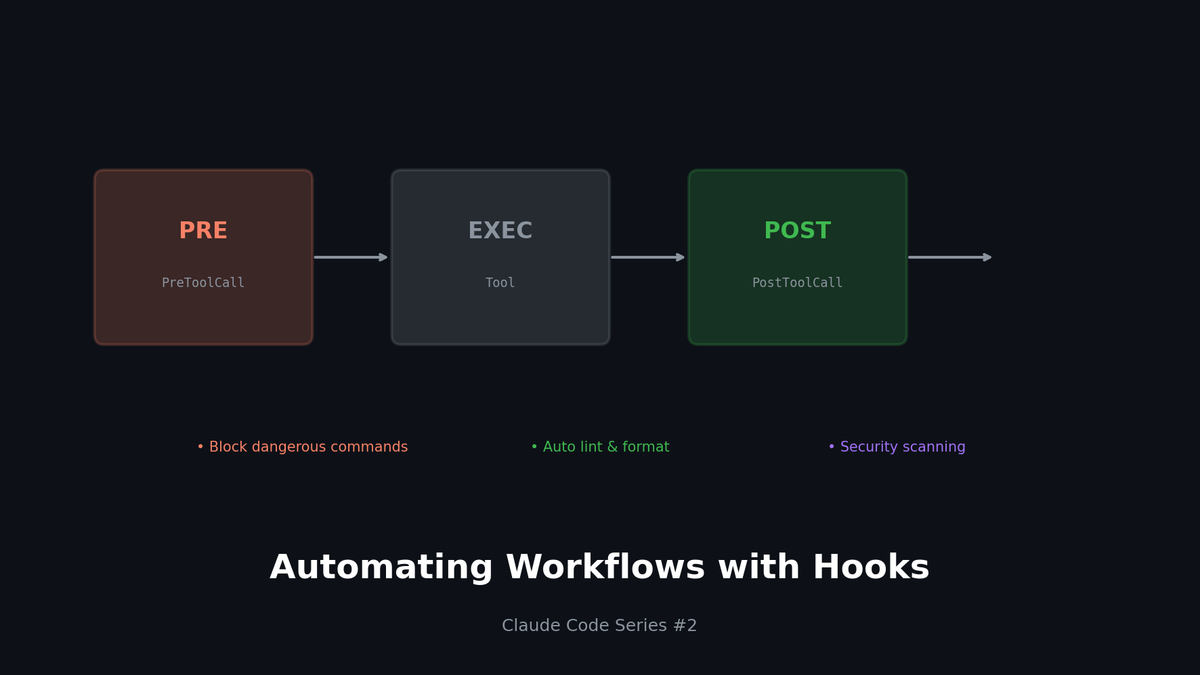
Claude Code in Practice (2): Automating Workflows with Hooks
What if Claude automatically ran lint, tests, and security scans every time it generated code? Learn how to automate team workflows with Hooks.
TL;DR
- Hooks: Automatically run scripts before/after Claude Code tool execution
- PreToolCall: Confirm before risky operations, protect sensitive files
- PostToolCall: Auto lint/format after code generation, security scans
- Notification: Real-time team updates via Slack/Discord
1. What Are Hooks?
The Problem with Manual Workflows
- Claude completes code
- Developer manually runs
npm run lint - Finds 10 lint errors
- "Claude, fix these"
- Runs lint again manually... infinite loop
With Hooks
- Claude completes code
- Hook auto-runs lint → finds errors → feeds back to Claude
- Claude fixes lint errors automatically
- Hook runs lint again → passes
Hooks are automation scripts that connect to Claude's tool execution.
2. Hook Types and Timing
Four Hook Types
| Hook | Timing | Primary Use |
|---|---|---|
| `PreToolCall` | Before tool execution | Block risky operations, request confirmation |
| `PostToolCall` | After tool execution | Auto validation, formatting |
| `Notification` | On events | External alerts (Slack, etc.) |
| `Stop` | Session end | Cleanup, report generation |
Hook Configuration Location
project/
├── .claude/
│   └── settings.json    # Project-specific Hooks
└── ~/.claude/
    └── settings.json    # Global Hooks
3. Practical Examples: PostToolCall
Example 1: Auto Lint + Format
`.claude/settings.json`
{
  "hooks": {
    "PostToolCall": [
      {
        "matcher": "Edit|Write",
        "command": "npm run lint:fix -- $CLAUDE_FILE_PATH",
        "description": "Auto-fix lint errors after file changes"
      }
    ]
  }
}
How it works:
- Claude uses
EditorWritetool - Hook runs
npm run lint:fixon that file - Results feed back to Claude
Example 2: Security Scan (Trivy)
{
  "hooks": {
    "PostToolCall": [
      {
        "matcher": "Edit|Write",
        "pattern": "*.tf|*.yaml|Dockerfile",
        "command": "trivy config $CLAUDE_FILE_PATH --severity HIGH,CRITICAL",
        "description": "Security scan for IaC files"
      }
    ]
  }
}
Automatic security vulnerability scanning on infrastructure code changes!
Example 3: TypeScript Type Check
{
  "hooks": {
    "PostToolCall": [
      {
        "matcher": "Edit|Write",
        "pattern": "*.ts|*.tsx",
        "command": "npx tsc --noEmit $CLAUDE_FILE_PATH 2>&1 | head -20",
        "description": "Type check TypeScript files"
      }
    ]
  }
}
4. Practical Examples: PreToolCall
Example 1: Protect Sensitive Files
{
  "hooks": {
    "PreToolCall": [
      {
        "matcher": "Edit|Write",
        "pattern": "*.env*|*secret*|*credential*",
        "command": "echo '⚠️ BLOCKED: Attempting to modify sensitive file' && exit 1",
        "description": "Prevent modification of sensitive files"
      }
    ]
  }
}
Automatically blocks attempts to modify `.env` files!
Example 2: Block Dangerous Bash Commands
{
  "hooks": {
    "PreToolCall": [
      {
        "matcher": "Bash",
        "command": "scripts/check-dangerous-commands.sh \"$CLAUDE_BASH_COMMAND\"",
        "description": "Block dangerous bash commands"
      }
    ]
  }
}
`check-dangerous-commands.sh`
#!/bin/bash
COMMAND="$1"

# Check for dangerous patterns
DANGEROUS_PATTERNS=(
  "rm -rf /"
  "rm -rf ~"
  ":(){ :|:& };:"  # fork bomb
  "> /dev/sda"
  "mkfs."
  "dd if=/dev/zero"
)

for pattern in "${DANGEROUS_PATTERNS[@]}"; do
  if [[ "$COMMAND" == *"$pattern"* ]]; then
    echo "🚫 BLOCKED: Dangerous command detected: $pattern"
    exit 1
  fi
done

exit 0
5. Practical Examples: Notification
Slack Notification Setup
{
  "hooks": {
    "Notification": [
      {
        "event": "TaskComplete",
        "command": "scripts/notify-slack.sh \"$CLAUDE_TASK_SUMMARY\"",
        "description": "Notify Slack when task completes"
      }
    ]
  }
}
`notify-slack.sh`
#!/bin/bash
MESSAGE="$1"
WEBHOOK_URL="${SLACK_WEBHOOK_URL}"

curl -X POST -H 'Content-type: application/json' \
  --data "{\"text\":\"🤖 Claude completed: ${MESSAGE}\"}" \
  "$WEBHOOK_URL"
Discord Notification
#!/bin/bash
MESSAGE="$1"
WEBHOOK_URL="${DISCORD_WEBHOOK_URL}"

curl -X POST -H 'Content-type: application/json' \
  --data "{\"content\":\"🤖 Claude completed: ${MESSAGE}\"}" \
  "$WEBHOOK_URL"
6. Team-Specific Hook Configurations
Frontend Team
{
  "hooks": {
    "PostToolCall": [
      {
        "matcher": "Edit|Write",
        "pattern": "*.tsx|*.ts",
        "command": "npm run lint:fix -- $CLAUDE_FILE_PATH && npm run format -- $CLAUDE_FILE_PATH",
        "description": "Lint and format TypeScript files"
      },
      {
        "matcher": "Edit|Write",
        "pattern": "*.css|*.scss",
        "command": "npx stylelint --fix $CLAUDE_FILE_PATH",
        "description": "Lint CSS files"
      }
    ],
    "PreToolCall": [
      {
        "matcher": "Write",
        "pattern": "src/components/ui/*",
        "command": "echo '⚠️ Please refer to the design system guide when creating UI components' && exit 0",
        "description": "Warn about UI component creation"
      }
    ]
  }
}
Backend Team
{
  "hooks": {
    "PostToolCall": [
      {
        "matcher": "Edit|Write",
        "pattern": "*.py",
        "command": "black $CLAUDE_FILE_PATH && ruff check --fix $CLAUDE_FILE_PATH",
        "description": "Format and lint Python files"
      },
      {
        "matcher": "Edit|Write",
        "pattern": "*.sql",
        "command": "sqlfluff fix $CLAUDE_FILE_PATH",
        "description": "Format SQL files"
      }
    ],
    "PreToolCall": [
      {
        "matcher": "Bash",
        "pattern": "*migrate*|*migration*",
        "command": "echo '⚠️ DB migrations must be reviewed before execution' && exit 0",
        "description": "Warn about migrations"
      }
    ]
  }
}
DevOps Team
{
  "hooks": {
    "PostToolCall": [
      {
        "matcher": "Edit|Write",
        "pattern": "*.tf",
        "command": "terraform fmt $CLAUDE_FILE_PATH && terraform validate",
        "description": "Format and validate Terraform"
      },
      {
        "matcher": "Edit|Write",
        "pattern": "*.yaml|*.yml",
        "command": "yamllint $CLAUDE_FILE_PATH",
        "description": "Lint YAML files"
      },
      {
        "matcher": "Edit|Write",
        "pattern": "Dockerfile*|*.dockerfile",
        "command": "hadolint $CLAUDE_FILE_PATH",
        "description": "Lint Dockerfiles"
      }
    ],
    "PreToolCall": [
      {
        "matcher": "Bash",
        "pattern": "*kubectl*delete*|*terraform*destroy*",
        "command": "echo '🚨 This is a destructive command for production resources. Are you sure?' && exit 1",
        "description": "Block destructive commands"
      }
    ]
  }
}
7. Hook Debugging Tips
1) Test Commands First
Test your commands before setting up hooks:
# Simulate environment variables
CLAUDE_FILE_PATH="src/components/Button.tsx"
npm run lint:fix -- $CLAUDE_FILE_PATH
2) Add Logging
{
  "hooks": {
    "PostToolCall": [
      {
        "matcher": "Edit",
        "command": "echo \"[$(date)] Edited: $CLAUDE_FILE_PATH\" >> ~/.claude/hook.log && npm run lint:fix -- $CLAUDE_FILE_PATH",
        "description": "Log and lint"
      }
    ]
  }
}
3) Understand Exit Codes
exit 0: Success, Claude continuesexit 1: Failure, error fed back to Claude- Output content is passed to Claude
8. Environment Variable Reference
Available environment variables in Hooks:
| Variable | Description | Available In |
|---|---|---|
| `CLAUDE_FILE_PATH` | Target file path | Edit, Write, Read |
| `CLAUDE_BASH_COMMAND` | Bash command to execute | Bash |
| `CLAUDE_TOOL_NAME` | Tool name used | All Hooks |
| `CLAUDE_TASK_SUMMARY` | Task summary | Notification |
| `CLAUDE_SESSION_ID` | Session ID | All Hooks |
9. Real Scenario: CI/CD Pipeline Integration
Auto-Check on PR Creation
{
  "hooks": {
    "PostToolCall": [
      {
        "matcher": "Bash",
        "pattern": "*git push*|*gh pr create*",
        "command": "scripts/pre-push-checks.sh",
        "description": "Run checks before push"
      }
    ]
  }
}
`pre-push-checks.sh`
#!/bin/bash
set -e

echo "🔍 Running pre-push checks..."

# 1. Lint
echo "  → Lint check..."
npm run lint

# 2. Type check
echo "  → Type check..."
npm run typecheck

# 3. Tests
echo "  → Running tests..."
npm run test

# 4. Build verification
echo "  → Build check..."
npm run build

echo "✅ All checks passed!"
Conclusion
Hooks aren't just automation.
They're a way to enforce team quality standards as code.
| Hook Type | Primary Use |
|---|---|
| PreToolCall | Risk prevention, guidance |
| PostToolCall | Auto validation, formatting |
| Notification | Team communication |
| Stop | Session reports |
In the next part, we'll cover how to create team-specific standard commands using Custom Skills.
Series Index
- Context is Everything
- Automating Workflows with Hooks (This post)
- Building Team Standards with Custom Skills
- Building MCP Servers
- Model Mix Strategy
Subscribe to Newsletter
Related Posts
I Wanted Claude Code Running 24/7 on a Server — So I Built VibeCheck
Close your laptop, Claude Code dies. VibeCheck runs it headlessly on your server so you can access from any browser, anywhere. MIT open source.
I Closed My Laptop. The Session Died. That's Not Remote.
Claude Code Remote Control sounds great until you close your laptop. Honest review of what it actually is, Anthropic's cloud alternative, and the third option I built.
Google Stitch MCP API: Generate UI Designs via AI Agents
Google Labs Stitch now supports MCP servers, allowing AI tools like Claude Code and Cursor to generate UI designs through API calls. Note: Some details in this article are from unofficial sources and may change.