Claude Code 실전 (4): MCP 서버 구축하기
Claude가 Jira 티켓을 읽고, Slack에 메시지를 보내고, 데이터베이스를 조회한다면? MCP 서버로 Claude의 손과 발을 만드는 법.
Claude Code 실전 (4): MCP 서버 구축하기
Claude가 Jira 티켓을 읽고, Slack에 메시지를 보내고, 데이터베이스를 조회한다면? MCP 서버로 Claude의 손과 발을 만드는 법.
TL;DR
- MCP (Model Context Protocol): Claude가 외부 시스템과 통신하는 표준 프로토콜
- Tool vs Resource: Tool은 액션, Resource는 데이터 조회
- 실전 활용: Jira, Slack, DB, GitHub 연동
- 보안: 최소 권한 원칙 적용
1. MCP란?
Claude의 한계
기본 Claude Code는:
- 로컬 파일만 읽고 쓸 수 있음
- 외부 API 호출 불가
- 데이터베이스 직접 접근 불가
- 내부 시스템 연동 불가
MCP로 확장
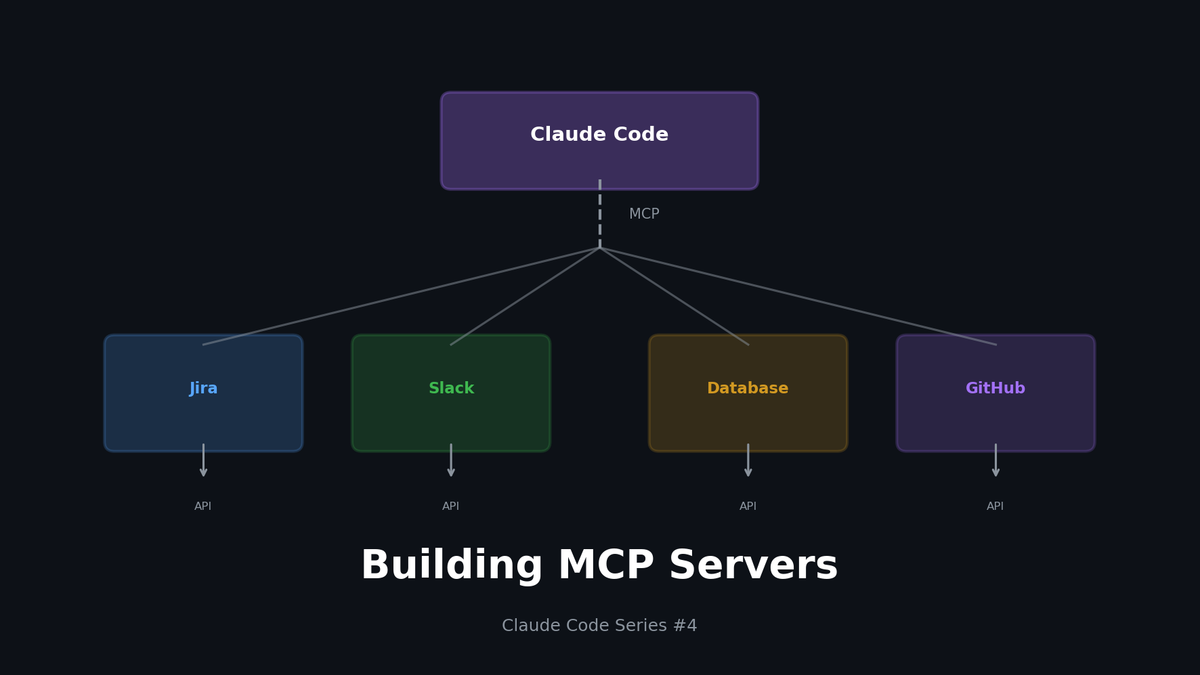
MCP(Model Context Protocol)를 통해 Claude Code를 외부 시스템에 연결할 수 있습니다:
- Jira Server → Jira API
- Slack Server → Slack API
- DB Server → PostgreSQL
- GitHub Server → GitHub API
MCP는 Claude가 외부 세계와 소통하는 표준 인터페이스입니다.
2. MCP 아키텍처
핵심 개념
| 개념 | 설명 | 예시 |
|---|---|---|
| **Server** | MCP 프로토콜을 구현한 서버 | jira-server, slack-server |
| **Tool** | Claude가 실행할 수 있는 액션 | `create_ticket`, `send_message` |
| **Resource** | Claude가 조회할 수 있는 데이터 | `jira://ticket/ABC-123` |
| **Prompt** | 미리 정의된 프롬프트 템플릿 | 버그 리포트 작성 |
Tool vs Resource
typescript
// Tool: 액션을 수행
tools: [
  {
    name: "create_ticket",
    description: "Create a new Jira ticket",
    inputSchema: { /* ... */ }
  }
]

// Resource: 데이터를 조회
resources: [
  {
    uri: "jira://ticket/{ticket_id}",
    name: "Jira Ticket",
    description: "Fetch ticket details"
  }
]
3. MCP 서버 설정
설정 파일 위치
text
~/.claude/
└── claude_desktop_config.json   # MCP 서버 설정
기본 설정 구조
json
{
  "mcpServers": {
    "jira": {
      "command": "node",
      "args": ["/path/to/jira-server/index.js"],
      "env": {
        "JIRA_URL": "https://company.atlassian.net",
        "JIRA_EMAIL": "user@company.com",
        "JIRA_API_TOKEN": "your-api-token"
      }
    },
    "slack": {
      "command": "python",
      "args": ["/path/to/slack-server/server.py"],
      "env": {
        "SLACK_BOT_TOKEN": "xoxb-your-token"
      }
    }
  }
}
4. 실전: Jira MCP 서버
프로젝트 구조
text
jira-mcp-server/
├── package.json
├── tsconfig.json
├── src/
│   ├── index.ts        # 메인 서버
│   ├── tools.ts        # Tool 정의
│   ├── resources.ts    # Resource 정의
│   └── jira-client.ts  # Jira API 클라이언트
└── .env.example
package.json
json
{
  "name": "jira-mcp-server",
  "version": "1.0.0",
  "type": "module",
  "main": "dist/index.js",
  "scripts": {
    "build": "tsc",
    "start": "node dist/index.js"
  },
  "dependencies": {
    "@modelcontextprotocol/sdk": "^0.5.0",
    "jira.js": "^3.0.0"
  },
  "devDependencies": {
    "typescript": "^5.0.0"
  }
}
src/index.ts
typescript
import { Server } from '@modelcontextprotocol/sdk/server/index.js';
import { StdioServerTransport } from '@modelcontextprotocol/sdk/server/stdio.js';
import {
  CallToolRequestSchema,
  ListToolsRequestSchema,
  ListResourcesRequestSchema,
  ReadResourceRequestSchema
} from '@modelcontextprotocol/sdk/types.js';
import { tools, handleToolCall } from './tools.js';
import { resources, handleResourceRead } from './resources.js';

const server = new Server(
  { name: 'jira-mcp-server', version: '1.0.0' },
  { capabilities: { tools: {}, resources: {} } }
);

// Tool 목록 반환
server.setRequestHandler(ListToolsRequestSchema, async () => ({
  tools
}));

// Tool 실행
server.setRequestHandler(CallToolRequestSchema, async (request) => {
  return handleToolCall(request.params.name, request.params.arguments);
});

// Resource 목록 반환
server.setRequestHandler(ListResourcesRequestSchema, async () => ({
  resources
}));

// Resource 읽기
server.setRequestHandler(ReadResourceRequestSchema, async (request) => {
  return handleResourceRead(request.params.uri);
});

// 서버 시작
async function main() {
  const transport = new StdioServerTransport();
  await server.connect(transport);
  console.error('Jira MCP Server running');
}

main().catch(console.error);
src/tools.ts
typescript
import { JiraClient } from './jira-client.js';

const jira = new JiraClient();

export const tools = [
  {
    name: 'create_ticket',
    description: 'Create a new Jira ticket',
    inputSchema: {
      type: 'object',
      properties: {
        project: { type: 'string', description: 'Project key (e.g., "DEV")' },
        summary: { type: 'string', description: 'Ticket title' },
        description: { type: 'string', description: 'Ticket description' },
        issueType: {
          type: 'string',
          enum: ['Bug', 'Task', 'Story'],
          default: 'Task'
        },
        priority: {
          type: 'string',
          enum: ['Highest', 'High', 'Medium', 'Low', 'Lowest'],
          default: 'Medium'
        }
      },
      required: ['project', 'summary']
    }
  },
  {
    name: 'update_ticket_status',
    description: 'Update the status of a Jira ticket',
    inputSchema: {
      type: 'object',
      properties: {
        ticketId: { type: 'string', description: 'Ticket ID (e.g., "DEV-123")' },
        status: {
          type: 'string',
          enum: ['To Do', 'In Progress', 'In Review', 'Done']
        }
      },
      required: ['ticketId', 'status']
    }
  },
  {
    name: 'add_comment',
    description: 'Add a comment to a Jira ticket',
    inputSchema: {
      type: 'object',
      properties: {
        ticketId: { type: 'string' },
        comment: { type: 'string' }
      },
      required: ['ticketId', 'comment']
    }
  },
  {
    name: 'search_tickets',
    description: 'Search Jira tickets using JQL',
    inputSchema: {
      type: 'object',
      properties: {
        jql: { type: 'string', description: 'JQL query' },
        maxResults: { type: 'number', default: 10 }
      },
      required: ['jql']
    }
  }
];

export async function handleToolCall(name: string, args: any) {
  switch (name) {
    case 'create_ticket':
      const ticket = await jira.createIssue({
        fields: {
          project: { key: args.project },
          summary: args.summary,
          description: args.description,
          issuetype: { name: args.issueType || 'Task' },
          priority: { name: args.priority || 'Medium' }
        }
      });
      return {
        content: [{
          type: 'text',
          text: `Created ticket: ${ticket.key}\nURL: ${process.env.JIRA_URL}/browse/${ticket.key}`
        }]
      };

    case 'update_ticket_status':
      await jira.transitionIssue(args.ticketId, args.status);
      return {
        content: [{
          type: 'text',
          text: `Updated ${args.ticketId} status to: ${args.status}`
        }]
      };

    case 'add_comment':
      await jira.addComment(args.ticketId, args.comment);
      return {
        content: [{
          type: 'text',
          text: `Added comment to ${args.ticketId}`
        }]
      };

    case 'search_tickets':
      const results = await jira.searchJql(args.jql, args.maxResults);
      return {
        content: [{
          type: 'text',
          text: JSON.stringify(results, null, 2)
        }]
      };

    default:
      throw new Error(`Unknown tool: ${name}`);
  }
}
src/resources.ts
typescript
import { JiraClient } from './jira-client.js';

const jira = new JiraClient();

export const resources = [
  {
    uri: 'jira://ticket/{ticketId}',
    name: 'Jira Ticket',
    description: 'Get details of a specific Jira ticket',
    mimeType: 'application/json'
  },
  {
    uri: 'jira://project/{projectKey}/tickets',
    name: 'Project Tickets',
    description: 'List recent tickets in a project',
    mimeType: 'application/json'
  },
  {
    uri: 'jira://my-tickets',
    name: 'My Tickets',
    description: 'List tickets assigned to current user',
    mimeType: 'application/json'
  }
];

export async function handleResourceRead(uri: string) {
  // jira://ticket/DEV-123
  if (uri.startsWith('jira://ticket/')) {
    const ticketId = uri.replace('jira://ticket/', '');
    const ticket = await jira.getIssue(ticketId);
    return {
      contents: [{
        uri,
        mimeType: 'application/json',
        text: JSON.stringify(ticket, null, 2)
      }]
    };
  }

  // jira://project/DEV/tickets
  if (uri.match(/jira:\/\/project\/\w+\/tickets/)) {
    const projectKey = uri.split('/')[2];
    const tickets = await jira.searchJql(
      `project = ${projectKey} ORDER BY updated DESC`,
      20
    );
    return {
      contents: [{
        uri,
        mimeType: 'application/json',
        text: JSON.stringify(tickets, null, 2)
      }]
    };
  }

  // jira://my-tickets
  if (uri === 'jira://my-tickets') {
    const tickets = await jira.searchJql(
      'assignee = currentUser() AND status != Done ORDER BY updated DESC',
      20
    );
    return {
      contents: [{
        uri,
        mimeType: 'application/json',
        text: JSON.stringify(tickets, null, 2)
      }]
    };
  }

  throw new Error(`Unknown resource: ${uri}`);
}
5. 실전: Slack MCP 서버 (Python)
프로젝트 구조
text
slack-mcp-server/
├── pyproject.toml
├── server.py
└── .env.example
server.py
python
import os
import json
from mcp.server import Server
from mcp.server.stdio import stdio_server
from mcp.types import Tool, TextContent
from slack_sdk import WebClient

app = Server("slack-mcp-server")
slack = WebClient(token=os.environ["SLACK_BOT_TOKEN"])

@app.list_tools()
async def list_tools():
    return [
        Tool(
            name="send_message",
            description="Send a message to a Slack channel",
            inputSchema={
                "type": "object",
                "properties": {
                    "channel": {"type": "string", "description": "Channel name or ID"},
                    "message": {"type": "string", "description": "Message text"},
                    "thread_ts": {"type": "string", "description": "Thread timestamp for replies"}
                },
                "required": ["channel", "message"]
            }
        ),
        Tool(
            name="get_channel_history",
            description="Get recent messages from a Slack channel",
            inputSchema={
                "type": "object",
                "properties": {
                    "channel": {"type": "string"},
                    "limit": {"type": "number", "default": 10}
                },
                "required": ["channel"]
            }
        ),
        Tool(
            name="search_messages",
            description="Search for messages in Slack",
            inputSchema={
                "type": "object",
                "properties": {
                    "query": {"type": "string"},
                    "count": {"type": "number", "default": 10}
                },
                "required": ["query"]
            }
        ),
        Tool(
            name="list_channels",
            description="List all public channels",
            inputSchema={
                "type": "object",
                "properties": {}
            }
        )
    ]

@app.call_tool()
async def call_tool(name: str, arguments: dict):
    if name == "send_message":
        result = slack.chat_postMessage(
            channel=arguments["channel"],
            text=arguments["message"],
            thread_ts=arguments.get("thread_ts")
        )
        return [TextContent(
            type="text",
            text=f"Message sent to {arguments['channel']}"
        )]

    elif name == "get_channel_history":
        result = slack.conversations_history(
            channel=arguments["channel"],
            limit=arguments.get("limit", 10)
        )
        messages = [
            {"user": m["user"], "text": m["text"], "ts": m["ts"]}
            for m in result["messages"]
        ]
        return [TextContent(
            type="text",
            text=json.dumps(messages, indent=2, ensure_ascii=False)
        )]

    elif name == "search_messages":
        result = slack.search_messages(
            query=arguments["query"],
            count=arguments.get("count", 10)
        )
        return [TextContent(
            type="text",
            text=json.dumps(result["messages"]["matches"], indent=2)
        )]

    elif name == "list_channels":
        result = slack.conversations_list(types="public_channel")
        channels = [
            {"id": c["id"], "name": c["name"]}
            for c in result["channels"]
        ]
        return [TextContent(
            type="text",
            text=json.dumps(channels, indent=2)
        )]

async def main():
    async with stdio_server() as (read_stream, write_stream):
        await app.run(read_stream, write_stream)

if __name__ == "__main__":
    import asyncio
    asyncio.run(main())
6. 실전: Database MCP 서버
읽기 전용 데이터베이스 조회
typescript
// db-mcp-server/src/index.ts
import { Pool } from 'pg';

const pool = new Pool({
  connectionString: process.env.DATABASE_URL
});

export const tools = [
  {
    name: 'query_database',
    description: 'Execute a read-only SQL query',
    inputSchema: {
      type: 'object',
      properties: {
        query: {
          type: 'string',
          description: 'SQL SELECT query (SELECT only, no mutations)'
        }
      },
      required: ['query']
    }
  },
  {
    name: 'list_tables',
    description: 'List all tables in the database',
    inputSchema: { type: 'object', properties: {} }
  },
  {
    name: 'describe_table',
    description: 'Get schema information for a table',
    inputSchema: {
      type: 'object',
      properties: {
        table: { type: 'string' }
      },
      required: ['table']
    }
  }
];

export async function handleToolCall(name: string, args: any) {
  switch (name) {
    case 'query_database':
      // 보안: SELECT만 허용
      const query = args.query.trim().toUpperCase();
      if (!query.startsWith('SELECT')) {
        throw new Error('Only SELECT queries are allowed');
      }

      // 보안: 위험한 키워드 차단
      const forbidden = ['DROP', 'DELETE', 'UPDATE', 'INSERT', 'ALTER', 'TRUNCATE'];
      for (const word of forbidden) {
        if (query.includes(word)) {
          throw new Error(`Query contains forbidden keyword: ${word}`);
        }
      }

      const result = await pool.query(args.query);
      return {
        content: [{
          type: 'text',
          text: JSON.stringify(result.rows, null, 2)
        }]
      };

    case 'list_tables':
      const tables = await pool.query(`
        SELECT table_name
        FROM information_schema.tables
        WHERE table_schema = 'public'
      `);
      return {
        content: [{
          type: 'text',
          text: tables.rows.map(r => r.table_name).join('\n')
        }]
      };

    case 'describe_table':
      const columns = await pool.query(`
        SELECT column_name, data_type, is_nullable
        FROM information_schema.columns
        WHERE table_name = $1
      `, [args.table]);
      return {
        content: [{
          type: 'text',
          text: JSON.stringify(columns.rows, null, 2)
        }]
      };
  }
}
7. 보안 고려사항
최소 권한 원칙
json
{
  "mcpServers": {
    "jira": {
      "env": {
        // 읽기 전용 API 토큰 사용
        "JIRA_API_TOKEN": "read-only-token"
      }
    },
    "database": {
      "env": {
        // 읽기 전용 DB 사용자
        "DATABASE_URL": "postgresql://readonly_user:***@host/db"
      }
    }
  }
}
입력 검증
typescript
// 허용된 프로젝트만
const ALLOWED_PROJECTS = ['DEV', 'PROD', 'OPS'];

if (!ALLOWED_PROJECTS.includes(args.project)) {
  throw new Error(`Project not allowed: ${args.project}`);
}

// SQL Injection 방지
const sanitizedQuery = args.query.replace(/['";]/g, '');
감사 로그
typescript
function logAction(tool: string, args: any, user: string) {
  console.log(JSON.stringify({
    timestamp: new Date().toISOString(),
    tool,
    args,
    user,
    sessionId: process.env.CLAUDE_SESSION_ID
  }));
}
8. 디버깅 팁
서버 로그 확인
bash
# 서버 직접 실행해서 로그 확인
node dist/index.js 2>&1 | tee server.log
MCP Inspector 사용
bash
# MCP Inspector 설치
npm install -g @modelcontextprotocol/inspector

# 서버 테스트
mcp-inspector node dist/index.js
환경 변수 확인
bash
# 환경 변수가 제대로 전달되는지
node -e "console.log(process.env.JIRA_URL)"
9. 공개 MCP 서버 활용
추천 공개 서버
| 서버 | 용도 | 설치 |
|---|---|---|
| `@modelcontextprotocol/server-filesystem` | 파일 시스템 | npm |
| `@modelcontextprotocol/server-github` | GitHub | npm |
| `@modelcontextprotocol/server-postgres` | PostgreSQL | npm |
| `mcp-server-sqlite` | SQLite | pip |
설치 예시
json
{
  "mcpServers": {
    "github": {
      "command": "npx",
      "args": ["-y", "@modelcontextprotocol/server-github"],
      "env": {
        "GITHUB_PERSONAL_ACCESS_TOKEN": "ghp_xxxxx"
      }
    }
  }
}
마무리
MCP는 Claude Code의 가능성을 무한히 확장합니다.
| 활용 | 효과 |
|---|---|
| Jira 연동 | 티켓 생성/조회 자동화 |
| Slack 연동 | 팀 커뮤니케이션 자동화 |
| DB 연동 | 데이터 조회 간소화 |
| GitHub 연동 | PR/Issue 관리 자동화 |
다음 편에서는 모델 믹스 전략으로 비용과 성능을 최적화하는 방법을 다룹니다.
시리즈 목차
- Context가 전부다
- Hooks로 워크플로우 자동화
- Custom Skills로 팀 표준 만들기
- MCP 서버 구축하기 (현재 글)
- 모델 믹스 전략
이메일로 받아보기
관련 포스트
AI Tools
Claude Code를 서버에서 24/7 돌리고 싶었다 — 그래서 VibeCheck을 만들었습니다
노트북 닫으면 Claude Code가 죽습니다. 서버에서 24/7 돌리고 폰으로 접속하는 VibeCheck을 만들었습니다. MIT 오픈소스.
AI Tools
소파에서 Claude에게 명령 내리고 싶었다 — Remote Control 솔직 후기
퇴근길에 폰으로 Claude Code 확인하고 싶어서 Remote Control 써봤습니다. 좋은데 노트북 닫으면 끝나더라구요. 그래서 직접 만들었습니다.
⚡️
Ops & Systems
Google Stitch MCP API: AI 에이전트로 UI 디자인 생성하기
Google Labs의 Stitch가 MCP 서버를 지원하여 Claude Code, Cursor 등에서 API를 통해 UI 디자인을 생성할 수 있습니다. 참고: 일부 내용은 비공식 소스 기반이며 변경될 수 있습니다.