Claude Code in Practice (4): Building MCP Servers
What if Claude could read Jira tickets, send Slack messages, and query your database? Learn how to extend Claude's capabilities with MCP servers.
Claude Code in Practice (4): Building MCP Servers
What if Claude could read Jira tickets, send Slack messages, and query your database? Learn how to extend Claude's capabilities with MCP servers.
TL;DR
- MCP (Model Context Protocol): Standard protocol for Claude to communicate with external systems
- Tool vs Resource: Tools perform actions, Resources provide data access
- Practical Use: Jira, Slack, DB, GitHub integrations
- Security: Apply principle of least privilege
1. What is MCP?
Claude's Limitations
Out of the box, Claude Code can:
- Read and write local files only
- Cannot call external APIs
- Cannot directly access databases
- Cannot integrate with internal systems
Extending with MCP
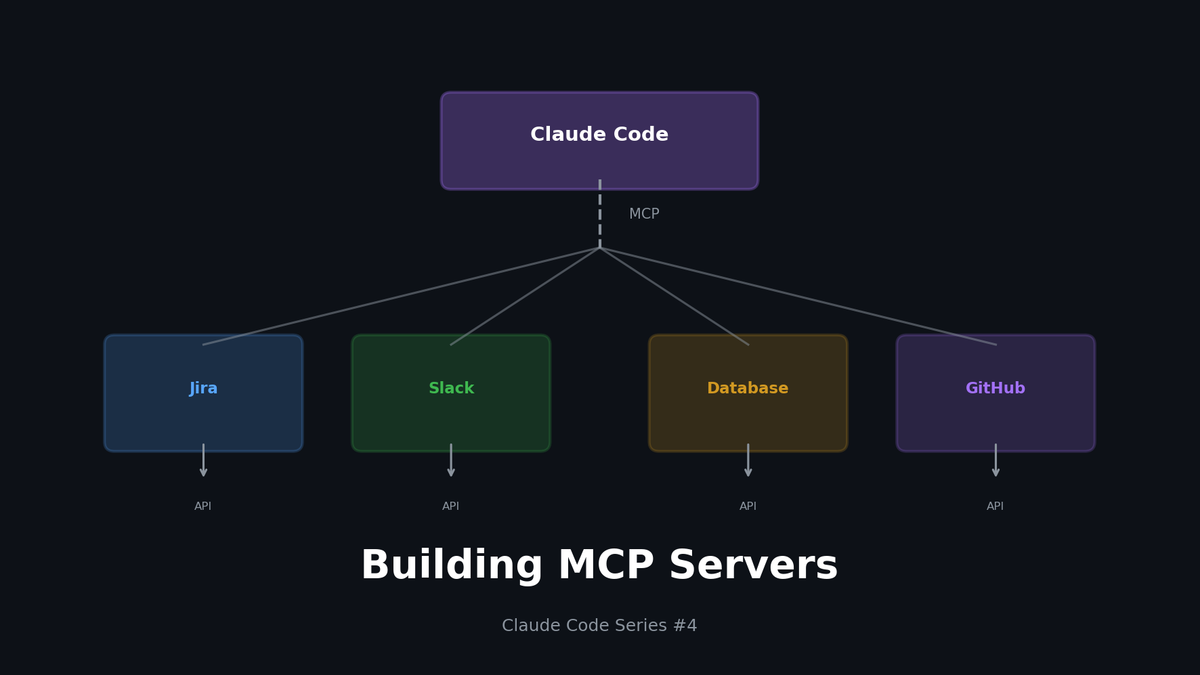
MCP (Model Context Protocol) connects Claude Code to external systems:
- Jira Server → Jira API
- Slack Server → Slack API
- DB Server → PostgreSQL
- GitHub Server → GitHub API
MCP is a standard interface for Claude to communicate with the outside world.
2. MCP Architecture
Core Concepts
| Concept | Description | Example |
|---|---|---|
| **Server** | Server implementing MCP protocol | jira-server, slack-server |
| **Tool** | Action Claude can execute | `create_ticket`, `send_message` |
| **Resource** | Data Claude can query | `jira://ticket/ABC-123` |
| **Prompt** | Predefined prompt templates | Bug report template |
Tool vs Resource
// Tool: Perform an action
tools: [
  {
    name: "create_ticket",
    description: "Create a new Jira ticket",
    inputSchema: { /* ... */ }
  }
]

// Resource: Query data
resources: [
  {
    uri: "jira://ticket/{ticket_id}",
    name: "Jira Ticket",
    description: "Fetch ticket details"
  }
]
3. MCP Server Configuration
Configuration File Location
~/.claude/
└── claude_desktop_config.json   # MCP server configuration
Basic Configuration Structure
{
  "mcpServers": {
    "jira": {
      "command": "node",
      "args": ["/path/to/jira-server/index.js"],
      "env": {
        "JIRA_URL": "https://company.atlassian.net",
        "JIRA_EMAIL": "user@company.com",
        "JIRA_API_TOKEN": "your-api-token"
      }
    },
    "slack": {
      "command": "python",
      "args": ["/path/to/slack-server/server.py"],
      "env": {
        "SLACK_BOT_TOKEN": "xoxb-your-token"
      }
    }
  }
}
4. Practical: Jira MCP Server
Project Structure
jira-mcp-server/
├── package.json
├── tsconfig.json
├── src/
│   ├── index.ts        # Main server
│   ├── tools.ts        # Tool definitions
│   ├── resources.ts    # Resource definitions
│   └── jira-client.ts  # Jira API client
└── .env.example
package.json
{
  "name": "jira-mcp-server",
  "version": "1.0.0",
  "type": "module",
  "main": "dist/index.js",
  "scripts": {
    "build": "tsc",
    "start": "node dist/index.js"
  },
  "dependencies": {
    "@modelcontextprotocol/sdk": "^0.5.0",
    "jira.js": "^3.0.0"
  },
  "devDependencies": {
    "typescript": "^5.0.0"
  }
}
src/index.ts
import { Server } from '@modelcontextprotocol/sdk/server/index.js';
import { StdioServerTransport } from '@modelcontextprotocol/sdk/server/stdio.js';
import {
  CallToolRequestSchema,
  ListToolsRequestSchema,
  ListResourcesRequestSchema,
  ReadResourceRequestSchema
} from '@modelcontextprotocol/sdk/types.js';
import { tools, handleToolCall } from './tools.js';
import { resources, handleResourceRead } from './resources.js';

const server = new Server(
  { name: 'jira-mcp-server', version: '1.0.0' },
  { capabilities: { tools: {}, resources: {} } }
);

// Return tool list
server.setRequestHandler(ListToolsRequestSchema, async () => ({
  tools
}));

// Execute tool
server.setRequestHandler(CallToolRequestSchema, async (request) => {
  return handleToolCall(request.params.name, request.params.arguments);
});

// Return resource list
server.setRequestHandler(ListResourcesRequestSchema, async () => ({
  resources
}));

// Read resource
server.setRequestHandler(ReadResourceRequestSchema, async (request) => {
  return handleResourceRead(request.params.uri);
});

// Start server
async function main() {
  const transport = new StdioServerTransport();
  await server.connect(transport);
  console.error('Jira MCP Server running');
}

main().catch(console.error);
src/tools.ts
import { JiraClient } from './jira-client.js';

const jira = new JiraClient();

export const tools = [
  {
    name: 'create_ticket',
    description: 'Create a new Jira ticket',
    inputSchema: {
      type: 'object',
      properties: {
        project: { type: 'string', description: 'Project key (e.g., "DEV")' },
        summary: { type: 'string', description: 'Ticket title' },
        description: { type: 'string', description: 'Ticket description' },
        issueType: {
          type: 'string',
          enum: ['Bug', 'Task', 'Story'],
          default: 'Task'
        },
        priority: {
          type: 'string',
          enum: ['Highest', 'High', 'Medium', 'Low', 'Lowest'],
          default: 'Medium'
        }
      },
      required: ['project', 'summary']
    }
  },
  {
    name: 'update_ticket_status',
    description: 'Update the status of a Jira ticket',
    inputSchema: {
      type: 'object',
      properties: {
        ticketId: { type: 'string', description: 'Ticket ID (e.g., "DEV-123")' },
        status: {
          type: 'string',
          enum: ['To Do', 'In Progress', 'In Review', 'Done']
        }
      },
      required: ['ticketId', 'status']
    }
  },
  {
    name: 'add_comment',
    description: 'Add a comment to a Jira ticket',
    inputSchema: {
      type: 'object',
      properties: {
        ticketId: { type: 'string' },
        comment: { type: 'string' }
      },
      required: ['ticketId', 'comment']
    }
  },
  {
    name: 'search_tickets',
    description: 'Search Jira tickets using JQL',
    inputSchema: {
      type: 'object',
      properties: {
        jql: { type: 'string', description: 'JQL query' },
        maxResults: { type: 'number', default: 10 }
      },
      required: ['jql']
    }
  }
];

export async function handleToolCall(name: string, args: any) {
  switch (name) {
    case 'create_ticket':
      const ticket = await jira.createIssue({
        fields: {
          project: { key: args.project },
          summary: args.summary,
          description: args.description,
          issuetype: { name: args.issueType || 'Task' },
          priority: { name: args.priority || 'Medium' }
        }
      });
      return {
        content: [{
          type: 'text',
          text: `Created ticket: ${ticket.key}\nURL: ${process.env.JIRA_URL}/browse/${ticket.key}`
        }]
      };

    case 'update_ticket_status':
      await jira.transitionIssue(args.ticketId, args.status);
      return {
        content: [{
          type: 'text',
          text: `Updated ${args.ticketId} status to: ${args.status}`
        }]
      };

    case 'add_comment':
      await jira.addComment(args.ticketId, args.comment);
      return {
        content: [{
          type: 'text',
          text: `Added comment to ${args.ticketId}`
        }]
      };

    case 'search_tickets':
      const results = await jira.searchJql(args.jql, args.maxResults);
      return {
        content: [{
          type: 'text',
          text: JSON.stringify(results, null, 2)
        }]
      };

    default:
      throw new Error(`Unknown tool: ${name}`);
  }
}
src/resources.ts
import { JiraClient } from './jira-client.js';

const jira = new JiraClient();

export const resources = [
  {
    uri: 'jira://ticket/{ticketId}',
    name: 'Jira Ticket',
    description: 'Get details of a specific Jira ticket',
    mimeType: 'application/json'
  },
  {
    uri: 'jira://project/{projectKey}/tickets',
    name: 'Project Tickets',
    description: 'List recent tickets in a project',
    mimeType: 'application/json'
  },
  {
    uri: 'jira://my-tickets',
    name: 'My Tickets',
    description: 'List tickets assigned to current user',
    mimeType: 'application/json'
  }
];

export async function handleResourceRead(uri: string) {
  // jira://ticket/DEV-123
  if (uri.startsWith('jira://ticket/')) {
    const ticketId = uri.replace('jira://ticket/', '');
    const ticket = await jira.getIssue(ticketId);
    return {
      contents: [{
        uri,
        mimeType: 'application/json',
        text: JSON.stringify(ticket, null, 2)
      }]
    };
  }

  // jira://project/DEV/tickets
  if (uri.match(/jira:\/\/project\/\w+\/tickets/)) {
    const projectKey = uri.split('/')[2];
    const tickets = await jira.searchJql(
      `project = ${projectKey} ORDER BY updated DESC`,
      20
    );
    return {
      contents: [{
        uri,
        mimeType: 'application/json',
        text: JSON.stringify(tickets, null, 2)
      }]
    };
  }

  // jira://my-tickets
  if (uri === 'jira://my-tickets') {
    const tickets = await jira.searchJql(
      'assignee = currentUser() AND status != Done ORDER BY updated DESC',
      20
    );
    return {
      contents: [{
        uri,
        mimeType: 'application/json',
        text: JSON.stringify(tickets, null, 2)
      }]
    };
  }

  throw new Error(`Unknown resource: ${uri}`);
}
5. Practical: Slack MCP Server (Python)
Project Structure
slack-mcp-server/
├── pyproject.toml
├── server.py
└── .env.example
server.py
import os
import json
from mcp.server import Server
from mcp.server.stdio import stdio_server
from mcp.types import Tool, TextContent
from slack_sdk import WebClient

app = Server("slack-mcp-server")
slack = WebClient(token=os.environ["SLACK_BOT_TOKEN"])

@app.list_tools()
async def list_tools():
    return [
        Tool(
            name="send_message",
            description="Send a message to a Slack channel",
            inputSchema={
                "type": "object",
                "properties": {
                    "channel": {"type": "string", "description": "Channel name or ID"},
                    "message": {"type": "string", "description": "Message text"},
                    "thread_ts": {"type": "string", "description": "Thread timestamp for replies"}
                },
                "required": ["channel", "message"]
            }
        ),
        Tool(
            name="get_channel_history",
            description="Get recent messages from a Slack channel",
            inputSchema={
                "type": "object",
                "properties": {
                    "channel": {"type": "string"},
                    "limit": {"type": "number", "default": 10}
                },
                "required": ["channel"]
            }
        ),
        Tool(
            name="search_messages",
            description="Search for messages in Slack",
            inputSchema={
                "type": "object",
                "properties": {
                    "query": {"type": "string"},
                    "count": {"type": "number", "default": 10}
                },
                "required": ["query"]
            }
        ),
        Tool(
            name="list_channels",
            description="List all public channels",
            inputSchema={
                "type": "object",
                "properties": {}
            }
        )
    ]

@app.call_tool()
async def call_tool(name: str, arguments: dict):
    if name == "send_message":
        result = slack.chat_postMessage(
            channel=arguments["channel"],
            text=arguments["message"],
            thread_ts=arguments.get("thread_ts")
        )
        return [TextContent(
            type="text",
            text=f"Message sent to {arguments['channel']}"
        )]

    elif name == "get_channel_history":
        result = slack.conversations_history(
            channel=arguments["channel"],
            limit=arguments.get("limit", 10)
        )
        messages = [
            {"user": m["user"], "text": m["text"], "ts": m["ts"]}
            for m in result["messages"]
        ]
        return [TextContent(
            type="text",
            text=json.dumps(messages, indent=2, ensure_ascii=False)
        )]

    elif name == "search_messages":
        result = slack.search_messages(
            query=arguments["query"],
            count=arguments.get("count", 10)
        )
        return [TextContent(
            type="text",
            text=json.dumps(result["messages"]["matches"], indent=2)
        )]

    elif name == "list_channels":
        result = slack.conversations_list(types="public_channel")
        channels = [
            {"id": c["id"], "name": c["name"]}
            for c in result["channels"]
        ]
        return [TextContent(
            type="text",
            text=json.dumps(channels, indent=2)
        )]

async def main():
    async with stdio_server() as (read_stream, write_stream):
        await app.run(read_stream, write_stream)

if __name__ == "__main__":
    import asyncio
    asyncio.run(main())
6. Practical: Database MCP Server
Read-Only Database Queries
// db-mcp-server/src/index.ts
import { Pool } from 'pg';

const pool = new Pool({
  connectionString: process.env.DATABASE_URL
});

export const tools = [
  {
    name: 'query_database',
    description: 'Execute a read-only SQL query',
    inputSchema: {
      type: 'object',
      properties: {
        query: {
          type: 'string',
          description: 'SQL SELECT query (SELECT only, no mutations)'
        }
      },
      required: ['query']
    }
  },
  {
    name: 'list_tables',
    description: 'List all tables in the database',
    inputSchema: { type: 'object', properties: {} }
  },
  {
    name: 'describe_table',
    description: 'Get schema information for a table',
    inputSchema: {
      type: 'object',
      properties: {
        table: { type: 'string' }
      },
      required: ['table']
    }
  }
];

export async function handleToolCall(name: string, args: any) {
  switch (name) {
    case 'query_database':
      // Security: Only allow SELECT
      const query = args.query.trim().toUpperCase();
      if (!query.startsWith('SELECT')) {
        throw new Error('Only SELECT queries are allowed');
      }

      // Security: Block dangerous keywords
      const forbidden = ['DROP', 'DELETE', 'UPDATE', 'INSERT', 'ALTER', 'TRUNCATE'];
      for (const word of forbidden) {
        if (query.includes(word)) {
          throw new Error(`Query contains forbidden keyword: ${word}`);
        }
      }

      const result = await pool.query(args.query);
      return {
        content: [{
          type: 'text',
          text: JSON.stringify(result.rows, null, 2)
        }]
      };

    case 'list_tables':
      const tables = await pool.query(`
        SELECT table_name
        FROM information_schema.tables
        WHERE table_schema = 'public'
      `);
      return {
        content: [{
          type: 'text',
          text: tables.rows.map(r => r.table_name).join('\n')
        }]
      };

    case 'describe_table':
      const columns = await pool.query(`
        SELECT column_name, data_type, is_nullable
        FROM information_schema.columns
        WHERE table_name = $1
      `, [args.table]);
      return {
        content: [{
          type: 'text',
          text: JSON.stringify(columns.rows, null, 2)
        }]
      };
  }
}
7. Security Considerations
Principle of Least Privilege
{
  "mcpServers": {
    "jira": {
      "env": {
        // Use read-only API token
        "JIRA_API_TOKEN": "read-only-token"
      }
    },
    "database": {
      "env": {
        // Read-only DB user
        "DATABASE_URL": "postgresql://readonly_user:***@host/db"
      }
    }
  }
}
Input Validation
// Allow only specific projects
const ALLOWED_PROJECTS = ['DEV', 'PROD', 'OPS'];

if (!ALLOWED_PROJECTS.includes(args.project)) {
  throw new Error(`Project not allowed: ${args.project}`);
}

// SQL Injection prevention
const sanitizedQuery = args.query.replace(/['";]/g, '');
Audit Logging
function logAction(tool: string, args: any, user: string) {
  console.log(JSON.stringify({
    timestamp: new Date().toISOString(),
    tool,
    args,
    user,
    sessionId: process.env.CLAUDE_SESSION_ID
  }));
}
8. Debugging Tips
Check Server Logs
# Run server directly to see logs
node dist/index.js 2>&1 | tee server.log
Use MCP Inspector
# Install MCP Inspector
npm install -g @modelcontextprotocol/inspector

# Test server
mcp-inspector node dist/index.js
Verify Environment Variables
# Check if env vars are passed correctly
node -e "console.log(process.env.JIRA_URL)"
9. Using Public MCP Servers
Recommended Public Servers
| Server | Purpose | Install |
|---|---|---|
| `@modelcontextprotocol/server-filesystem` | File system | npm |
| `@modelcontextprotocol/server-github` | GitHub | npm |
| `@modelcontextprotocol/server-postgres` | PostgreSQL | npm |
| `mcp-server-sqlite` | SQLite | pip |
Installation Example
{
  "mcpServers": {
    "github": {
      "command": "npx",
      "args": ["-y", "@modelcontextprotocol/server-github"],
      "env": {
        "GITHUB_PERSONAL_ACCESS_TOKEN": "ghp_xxxxx"
      }
    }
  }
}
Conclusion
MCP extends Claude Code's capabilities infinitely.
| Integration | Benefit |
|---|---|
| Jira | Automated ticket creation/queries |
| Slack | Automated team communication |
| Database | Simplified data queries |
| GitHub | Automated PR/Issue management |
In the next part, we'll cover the model mix strategy to optimize cost and performance.
Series Index
- Context is Everything
- Automating Workflows with Hooks
- Building Team Standards with Custom Skills
- Building MCP Servers (This post)
- Model Mix Strategy
Subscribe to Newsletter
Related Posts
I Wanted Claude Code Running 24/7 on a Server — So I Built VibeCheck
Close your laptop, Claude Code dies. VibeCheck runs it headlessly on your server so you can access from any browser, anywhere. MIT open source.
I Closed My Laptop. The Session Died. That's Not Remote.
Claude Code Remote Control sounds great until you close your laptop. Honest review of what it actually is, Anthropic's cloud alternative, and the third option I built.
Google Stitch MCP API: Generate UI Designs via AI Agents
Google Labs Stitch now supports MCP servers, allowing AI tools like Claude Code and Cursor to generate UI designs through API calls. Note: Some details in this article are from unofficial sources and may change.