GraphRAG: Microsoft's Global-Local Dual Search Strategy
Why can't traditional RAG answer "What are the main themes in these documents?" Microsoft Research's GraphRAG reveals the secret of community-based search.
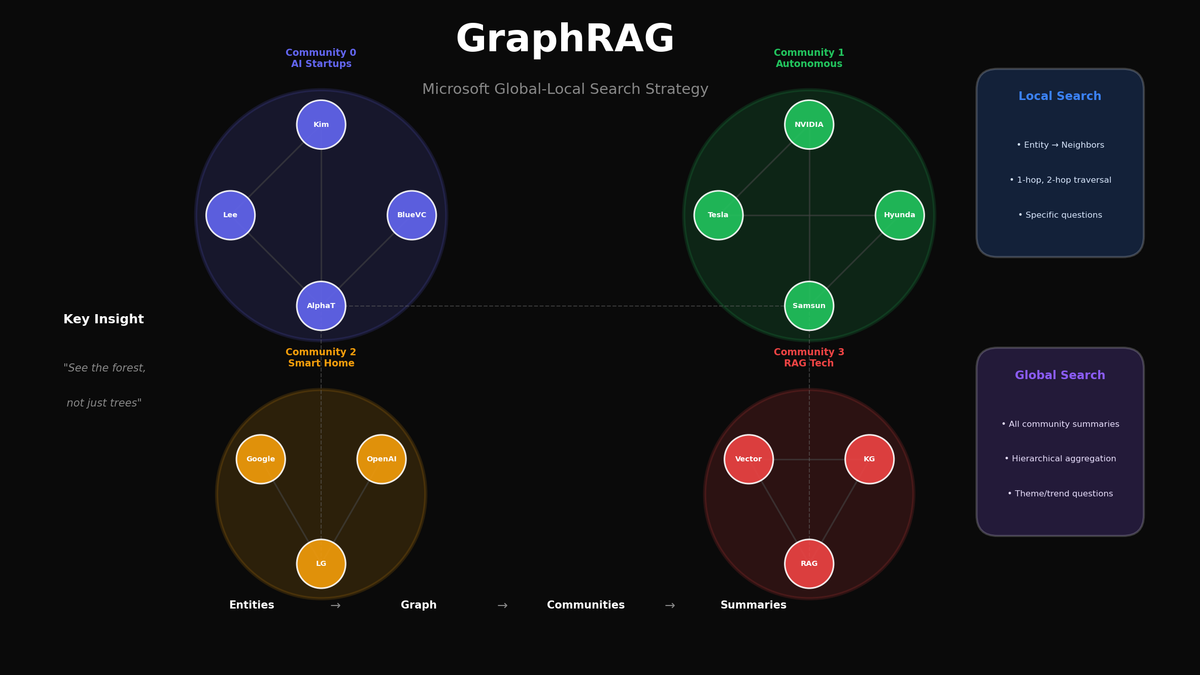
GraphRAG: Microsoft's Global-Local Dual Search Strategy
Why can't traditional RAG answer "What are the main themes in these documents?" Microsoft Research's GraphRAG reveals the secret of community-based search.
Introduction: The Critical Blind Spot of Traditional RAG
Try asking a traditional RAG system this question:
"What are the major trends and patterns across these 1000 documents?"
Result? Failure. Or a meaningless, fragmented answer.
Why Does It Fail?
Recall how traditional RAG works:
- Convert the question to an embedding
- Retrieve the K most similar chunks
- Generate an answer from retrieved chunks
The problem is that "similar chunks" are not "representative chunks."
Analogy: It's like trying to see the forest but only being shown the 3 nearest trees.
| Query Type | Traditional RAG | GraphRAG |
|---|---|---|
| Specific fact retrieval | Good | Good |
| Overall summary/themes | Fails | Solved |
| Pattern/trend analysis | Fails | Solved |
| Multi-document synthesis | Limited | Solved |
| Relationship inference | Not possible | Solved |
What is GraphRAG?
GraphRAG is a new RAG paradigm published by Microsoft Research in April 2024.
The core idea is simple:
"Generate summaries at indexing time, not at query time"
But it's not simple summarization. It's community-based hierarchical summarization.
4-Stage Pipeline
Documents → Entity Extraction → Graph Construction → Community Detection → Hierarchical Summarization- Entity Extraction: Extract entities and relationships from documents
- Graph Construction: Build a graph with entities as nodes and relationships as edges
- Community Detection: Group closely connected entities using the Leiden algorithm
- Hierarchical Summarization: Pre-generate summaries for each community
Now when asked "What are the main themes?", it combines all community summaries to answer.
Local vs Global Search
GraphRAG provides two search modes.
Local Search
Use case: Questions about specific entities
Example: "Which companies is AlphaTech partnering with?"
How it works:
- Extract "AlphaTech" entity from query
- Explore neighbor nodes of AlphaTech in the graph
- Collect 1-hop, 2-hop relationship information
- Generate answer from related information
Global Search
Use case: Questions about the entire dataset
Example: "What are the main themes and trends in these documents?"
How it works:
- Collect all community summaries
- Extract relevant information from each summary
- Synthesize partial answers into a final answer
This is the "seeing the forest" capability that traditional RAG couldn't provide.
Environment Setup
Required Packages
# Microsoft GraphRAG official library
pip install graphrag

# Additional dependencies
pip install networkx matplotlib pandas numpy
pip install tiktoken openai python-dotenv
Python Version Requirements
GraphRAG supports Python 3.10~3.12.
Step 1: Entity Extraction
The first stage of GraphRAG is extracting entities and relationships from documents.
The actual GraphRAG uses LLM, but let's implement it ourselves to understand the core logic.
Sample Data Preparation
We use a mix of news and technical documents to simulate an enterprise scenario.
SAMPLE_DOCUMENTS = [
    {
        "id": "news_1",
        "type": "news",
        "title": "AI Startup AlphaTech Secures Series B Funding",
        "content": """
        AI startup AlphaTech has secured $50M in Series B funding from VC firm BlueVentures.
        AlphaTech CEO John Smith stated, "With this investment, we will focus on advancing RAG technology."
        AlphaTech is collaborating with Samsung Electronics and LG Electronics to provide enterprise AI solutions.
        """
    },
    {
        "id": "news_2",
        "type": "news",
        "title": "Samsung Electronics Announces New AI Semiconductor",
        "content": """
        Samsung Electronics has unveiled its next-generation AI semiconductor 'Exynos AI'.
        This chip is compatible with AlphaTech's RAG engine and will be installed in Hyundai Motor's autonomous driving system.
        """
    },
    # ... more documents
]
Entity Data Structure
from dataclasses import dataclass, field
from typing import List

@dataclass
class Entity:
    """Extracted entity"""
    name: str
    type: str  # ORGANIZATION, PERSON, TECHNOLOGY, PRODUCT
    description: str = ""
    source_docs: List[str] = field(default_factory=list)

@dataclass
class Relationship:
    """Relationship between entities"""
    source: str
    target: str
    relation_type: str  # INVESTED_IN, PARTNERED_WITH, DEVELOPED
    weight: float = 1.0
    source_docs: List[str] = field(default_factory=list)
Entity Extractor Implementation
class EntityExtractor:
    """Extract entities and relationships from documents"""

    def __init__(self, entity_definitions: dict):
        self.entity_definitions = entity_definitions

    def extract_entities(self, documents: List[dict]) -> List[Entity]:
        """Extract entities from documents"""
        entities = {}

        for doc in documents:
            content = doc['content']
            doc_id = doc['id']

            for name, (entity_type, description) in self.entity_definitions.items():
                if name in content:
                    if name not in entities:
                        entities[name] = Entity(
                            name=name,
                            type=entity_type,
                            description=description,
                            source_docs=[doc_id]
                        )
                    else:
                        if doc_id not in entities[name].source_docs:
                            entities[name].source_docs.append(doc_id)

        return list(entities.values())

    def extract_relationships(self, documents: List[dict], entities: List[Entity]) -> List[Relationship]:
        """Extract relationships between entities in the same sentence"""
        relationships = []
        entity_names = {e.name for e in entities}

        for doc in documents:
            sentences = doc['content'].split('.')

            for sentence in sentences:
                # Find entities in the sentence
                found = [e for e in entities if e.name in sentence]

                # Create relationships between co-occurring entities
                for i, e1 in enumerate(found):
                    for e2 in found[i+1:]:
                        relationships.append(Relationship(
                            source=e1.name,
                            target=e2.name,
                            relation_type=self._infer_relation_type(e1, e2),
                            source_docs=[doc['id']]
                        ))

        return self._deduplicate(relationships)
Execution result:
Extracted entities: 39
Extracted relationships: 35

=== Entity Type Distribution ===
ORGANIZATION: 15
PERSON: 6
TECHNOLOGY: 7
PRODUCT: 5
TOOL: 5
Step 2: Graph Construction
Build a NetworkX graph from extracted entities and relationships.
import networkx as nx

class KnowledgeGraph:
    """Knowledge Graph for GraphRAG"""

    def __init__(self):
        self.graph = nx.Graph()  # Undirected (for community detection)
        self.directed_graph = nx.DiGraph()  # Directed (for queries)
        self.entities = {}

    def add_entities(self, entities: List[Entity]):
        for entity in entities:
            self.entities[entity.name] = entity
            self.graph.add_node(
                entity.name,
                type=entity.type,
                description=entity.description
            )

    def add_relationships(self, relationships: List[Relationship]):
        for rel in relationships:
            self.graph.add_edge(
                rel.source, rel.target,
                relation=rel.relation_type,
                weight=rel.weight
            )
Hub Node Analysis
Finding entities with many connections (hub nodes) reveals the key topics in the dataset.
degree_centrality = nx.degree_centrality(kg.graph)
top_hubs = sorted(degree_centrality.items(), key=lambda x: x[1], reverse=True)[:5]

print("=== Hub Nodes (Highly Connected Entities) ===")
for node, centrality in top_hubs:
print(f"{node}: {kg.graph.degree(node)} connections")=== Hub Nodes ===
AlphaTech: 15 connections
Samsung Electronics: 9 connections
RAG: 6 connections
LG Electronics: 6 connections
Hyundai Motor: 5 connectionsStep 3: Community Detection
The core secret of GraphRAG: Group closely connected entities using the Leiden algorithm.
Why Are Communities Important?
Communities are clusters of semantically related entities. Each community represents a "topic" or "theme."
For example:
- Community 0: AI Startup Ecosystem (AlphaTech, BlueVentures, investors)
- Community 1: Autonomous Driving/Semiconductors (Samsung, Hyundai, NVIDIA)
- Community 2: Smart Home AI (LG Electronics, OpenAI, Amazon)
Implementation
from networkx.algorithms import community

class CommunityDetector:
    """Community detection and hierarchy generation"""

    def __init__(self, graph: nx.Graph):
        self.graph = graph
        self.communities = []
        self.node_to_community = {}

    def detect_communities(self, resolution: float = 1.0) -> List[set]:
        """
        Detect communities using Louvain algorithm
        (Simplified version of Leiden algorithm)
        """
        communities = community.louvain_communities(
            self.graph,
            resolution=resolution,
            seed=42
        )

        self.communities = [set(c) for c in communities]

        # Node → Community mapping
        for i, comm in enumerate(self.communities):
            for node in comm:
                self.node_to_community[node] = i

        return self.communities
Execution result:
=== Detected Communities ===

Community 0 (11 members):
  Key members: AlphaTech, BlueVentures, John Smith, Sarah Johnson, Michael Park
  Estimated theme: AI Startup & Investment Ecosystem

Community 1 (8 members):
  Key members: Samsung Electronics, Hyundai Motor, NVIDIA, Tesla, Waymo
  Estimated theme: Autonomous Driving & AI Hardware

Community 2 (9 members):
  Key members: LG Electronics, OpenAI, Google, Amazon, Emily Chen
  Estimated theme: Smart Home & AI Assistant

Community 3 (6 members):
  Key members: RAG, Knowledge Graph, Vector Store, Embedding
  Estimated theme: RAG & Search Technology

Community 4 (5 members):
  Key members: LLM, Quantization, TensorRT, vLLM
  Estimated theme: LLM Optimization & Inference
Step 4: Hierarchical Summarization
Pre-generate summaries for each community.
This is the core secret of GraphRAG: Summaries are generated at indexing time, not query time.
class CommunitySummarizer:
    """Generate summaries for each community"""

    def __init__(self, graph: nx.Graph, communities: List[set]):
        self.graph = graph
        self.communities = communities
        self.summaries = {}

    def generate_summary(self, community_idx: int) -> str:
        """Generate community summary (in practice, uses LLM)"""
        members = list(self.communities[community_idx])
        subgraph = self.graph.subgraph(members)

        # Collect entity information
        entities_info = []
        for node in members[:5]:
            node_data = self.graph.nodes[node]
            entities_info.append({
                'name': node,
                'type': node_data.get('type'),
                'description': node_data.get('description')
            })

        # Collect relationship information
        relations_info = []
        for u, v, data in subgraph.edges(data=True):
            relations_info.append({
                'source': u,
                'target': v,
                'type': data.get('relation')
            })

        # Template-based summary generation
        summary = f"""This community primarily consists of {self._get_main_types(members)} entities.

Key Entities:
"""
        for e in entities_info:
            summary += f"- {e['name']} ({e['type']}): {e['description']}\n"

        summary += "\nCore Relationships:\n"
        for r in relations_info[:5]:
            summary += f"- {r['source']} --{r['type']}--> {r['target']}\n"

        return summary
Summary Example
=== Community 0 Summary ===
This community primarily consists of organization and person entities.

Key Entities:
- AlphaTech (ORGANIZATION): AI startup, RAG technology specialist
- BlueVentures (ORGANIZATION): Venture capital
- John Smith (PERSON): AlphaTech CEO
- Sarah Johnson (PERSON): AlphaTech CTO, Stanford alumna
- Michael Park (PERSON): BlueVentures partner

Core Relationships:
- AlphaTech --PARTNERED_WITH--> BlueVentures
- AlphaTech --EMPLOYS--> John Smith
- AlphaTech --EMPLOYS--> Sarah Johnson
GraphRAG Query Engine Implementation
Now let's implement a query engine that supports both Local and Global search.
class GraphRAGQueryEngine:
    """
    GraphRAG Query Engine
    - Local Search: Questions about specific entities
    - Global Search: Questions about the entire dataset
    """

    def __init__(self, graph, communities, summaries, node_to_community):
        self.graph = graph
        self.communities = communities
        self.summaries = summaries
        self.node_to_community = node_to_community

    def local_search(self, query: str, top_k: int = 5) -> dict:
        """
        Local Search: Questions about specific entities
        """
        # 1. Find entities in query
        found_entities = []
        for entity_name in self.graph.entities.keys():
            if entity_name.lower() in query.lower():
                found_entities.append(entity_name)

        if not found_entities:
            return {'mode': 'local', 'context': "Could not find relevant entities."}

        # 2. Collect related nodes (1-hop, 2-hop)
        related_nodes = set()
        for entity in found_entities:
            neighbors = self.graph.get_neighbors(entity)
            related_nodes.update(neighbors)

            for neighbor in neighbors[:3]:
                second_hop = self.graph.get_neighbors(neighbor)
                related_nodes.update(second_hop[:2])

        # 3. Build context
        context_parts = []
        for node in list(related_nodes)[:top_k]:
            node_info = self.graph.get_node_info(node)
            if node_info:
                context_parts.append(
                    f"- {node} ({node_info.get('type')}): {node_info.get('description')}"
                )

        return {
            'mode': 'local',
            'entities_found': found_entities,
            'context': '\n'.join(context_parts),
            'related_nodes': list(related_nodes)
        }

    def global_search(self, query: str) -> dict:
        """
        Global Search: Questions about the entire dataset
        """
        # Collect all community summaries
        all_summaries = []
        for idx, summary in self.summaries.items():
            all_summaries.append(f"[Community {idx}]\n{summary}")

        # Build global context
        global_context = f"""=== Dataset Overview ===
Total {len(self.communities)} communities, {sum(len(c) for c in self.communities)} entities

=== Community Summaries ===

"""
        global_context += '\n\n'.join(all_summaries)

        return {
            'mode': 'global',
            'context': global_context
        }

    def search(self, query: str, mode: str = 'auto') -> dict:
        """Unified search interface"""
        if mode == 'local':
            return self.local_search(query)
        elif mode == 'global':
            return self.global_search(query)
        else:
            # Auto mode detection
            global_keywords = ['overall', 'summary', 'main', 'trend', 'theme', 'overview']
            is_global = any(kw in query.lower() for kw in global_keywords)

            if is_global:
                return self.global_search(query)
            else:
                return self.local_search(query)
Test Results
Query: Which companies is AlphaTech partnering with?
Mode: local
Found Entities: ['AlphaTech']

Context:
- Samsung Electronics (ORGANIZATION): Conglomerate, semiconductors/electronics
- LG Electronics (ORGANIZATION): Conglomerate, electronics/appliances
- BlueVentures (ORGANIZATION): Venture capital
- AlphaTech --PARTNERED_WITH--> Samsung Electronics
- AlphaTech --PARTNERED_WITH--> LG Electronics
- AlphaTech --PARTNERED_WITH--> BlueVenturesQuery: What are the main themes and trends in this dataset?
Mode: global
Context:
=== Dataset Overview ===
Total 5 communities, 39 entities
=== Community Summaries ===
[Community 0]
AI Startup & Investment Ecosystem...
[Community 1]
Autonomous Driving & AI Hardware...Microsoft GraphRAG Official Library Usage
We've implemented the core logic ourselves above. Now let's learn how to use the official MS library.
CLI Usage
# 1. Create project directory
mkdir -p ./my_graphrag/input

# 2. Save input documents (.txt files)
cp my_documents/*.txt ./my_graphrag/input/

# 3. Initialize
graphrag init --root ./my_graphrag

# 4. Set API key (.env file)
echo "GRAPHRAG_API_KEY=your-openai-api-key" > ./my_graphrag/.env

# 5. Run indexing (takes time)
graphrag index --root ./my_graphrag

# 6. Global search
graphrag query --root ./my_graphrag --method global \
  --query "What are the main themes in these documents?"

# 7. Local search
graphrag query --root ./my_graphrag --method local \
  --query "Tell me about AlphaTech"
Python API Usage
import asyncio
from graphrag.query.indexer_adapters import (
    read_indexer_entities,
    read_indexer_relationships,
    read_indexer_reports,
    read_indexer_text_units,
)
from graphrag.query.llm.oai.chat_openai import ChatOpenAI
from graphrag.query.llm.oai.typing import OpenaiApiType
from graphrag.query.structured_search.global_search.community_context import GlobalCommunityContext
from graphrag.query.structured_search.global_search.search import GlobalSearch

# LLM configuration
llm = ChatOpenAI(
    api_key="your-api-key",
    model="gpt-4o-mini",
    api_type=OpenaiApiType.OpenAI,
)

# Load index data
INPUT_DIR = "./my_graphrag/output/artifacts"

entities = read_indexer_entities(INPUT_DIR)
relationships = read_indexer_relationships(INPUT_DIR)
reports = read_indexer_reports(INPUT_DIR)
text_units = read_indexer_text_units(INPUT_DIR)

# Global Search setup
context_builder = GlobalCommunityContext(
    community_reports=reports,
    entities=entities,
    token_encoder=token_encoder,
)

global_search = GlobalSearch(
    llm=llm,
    context_builder=context_builder,
    token_encoder=token_encoder,
)

# Execute query
result = await global_search.asearch("What are the main themes of this dataset?")
print(result.response)
Traditional RAG vs GraphRAG: Actual Comparison
Let's compare the responses of both systems to the same question.
Question: "What are the main themes and key figures in these documents?"
Traditional RAG Approach:
Chunk 1: AI startup AlphaTech has secured $50M in Series B funding from VC...
Chunk 2: Samsung Electronics has unveiled its next-generation AI semiconductor 'Exynos AI'...
Chunk 3: Hyundai Motor announced it has achieved Level 4 autonomous driving technology...

→ Problem: Only shows individual chunks, cannot answer "overall themes"
GraphRAG Approach:
=== Dataset Overview ===
Total 5 communities, 39 entities

Key Themes:
1. AI Startup Ecosystem (AlphaTech, BlueVentures, John Smith, Sarah Johnson)
2. Autonomous Driving/Semiconductors (Samsung Electronics, Hyundai Motor, NVIDIA)
3. Smart Home AI (LG Electronics, OpenAI, Emily Chen)
4. RAG/Search Technology (RAG, Knowledge Graph, Vector Store)
5. LLM Optimization (LLM, Quantization, TensorRT)

→ Solution: Community summaries enable seeing the "forest"
Cost and Performance Tradeoffs
GraphRAG is powerful but comes with costs.
Indexing Cost
| Item | Traditional RAG | GraphRAG |
|---|---|---|
| Embedding | 1x per document | 1x per document |
| LLM calls | None | Entity extraction + Summary generation |
| Estimated cost | ~$0.001 per document | ~$0.1-1.0 per document |
Query Cost
| Item | Traditional RAG | GraphRAG Local | GraphRAG Global |
|---|---|---|---|
| Retrieval | Vector search | Graph traversal | Load all summaries |
| LLM input | ~2000 tokens | ~3000 tokens | ~10000+ tokens |
When Should You Use GraphRAG?
| Scenario | Recommendation |
|---|---|
| Specific fact retrieval | Traditional RAG |
| Overall summary/trends | GraphRAG essential |
| Cost-sensitive | Traditional RAG |
| Relationship inference needed | GraphRAG |
| Real-time response needed | Traditional RAG |
Production Deployment Guide
1. Gradual Adoption
Don't apply GraphRAG to all documents. First:
- Identify the most important document sets
- Start with a small pilot (100-1000 documents)
- Measure cost and quality
- Gradually expand
2. Prompt Tuning
Default prompts aren't enough:
graphrag prompt-tune --root ./my_graphrag \
  --config ./settings.yaml \
  --no-entity-types
Define domain-specific entity types and relationship types.
3. Hybrid Approach
In production, hybrid is best:
def hybrid_search(query: str):
    # 1. Classify question type
    if is_global_question(query):
        return graphrag.global_search(query)
    elif contains_entity(query):
        return graphrag.local_search(query)
    else:
        return traditional_rag.search(query)
4. Caching Strategy
Community summaries don't change often. Reduce costs with caching:
# Community summary cache (Redis, etc.)
community_summaries = cache.get("community_summaries")
if not community_summaries:
    community_summaries = generate_all_summaries()
    cache.set("community_summaries", community_summaries, ttl=3600)
Ontology KG vs GraphRAG: When to Use What?
Ontology-based Knowledge Graph (from the previous article) and GraphRAG solve different problems.
| Characteristic | Ontology KG | GraphRAG |
|---|---|---|
| Graph structure | Predefined schema | Auto-extracted |
| Query method | SPARQL/Cypher | Natural language |
| Relationship accuracy | High (explicit) | Medium (inferred) |
| Build cost | High (manual) | Low (automatic) |
| Maintenance | Difficult | Easy |
| Suitable domains | Medical, Legal, Finance | General documents |
Recommended Combinations
- Structured knowledge + Unstructured documents: Use both Ontology KG + GraphRAG
- Quick prototyping: Start with GraphRAG
- High accuracy required: Ontology KG essential
Summary
Key Concepts
- Problem: Traditional RAG cannot see the "forest"
- Solution: Community-based hierarchical summarization
- Local Search: Specific entity → neighbor exploration
- Global Search: All community summaries → unified answer
Implementation Steps
- Entity Extraction
- Graph Construction
- Community Detection (Leiden/Louvain)
- Hierarchical Summarization
- Query Engine (Local/Global search)
Next Steps
- Multi-hop QA: Multi-hop reasoning RAG systems
- Temporal KG: Knowledge Graph with time dimension
- Automatic KG construction: LLM-based triple auto-extraction
References
- GraphRAG: From Local to Global - Microsoft Research paper
- Microsoft GraphRAG GitHub - Official library
- GraphRAG Documentation - Official documentation
Subscribe to Newsletter
Related Posts
Diffusion LLM Part 4: LLaDA 2.0 -> 2.1 -- Breaking 100B with MoE + Token Editing
MoE scaling, Token Editing (T2T+M2T), S-Mode/Q-Mode, RL Framework -- how LLaDA 2.X makes diffusion LLMs practical.
Diffusion LLM Part 3: LLaDA -- Building an 8B LLM with Masked Diffusion
Variable Masking, Fisher Consistency, In-Context Learning, Reversal Curse -- how LLaDA built a real LLM with diffusion.
Diffusion LLM Part 2: Discrete Diffusion -- How to Add Noise to Text
D3PM, Transition Matrices, Absorbing States, MDLM -- how to bring diffusion from continuous space to discrete tokens.