Ops & Systems

Overcoming RAG Limitations with Knowledge Graphs: Ontology-Based Retrieval Systems

Vector search alone isn't enough. Upgrade your RAG system with Knowledge Graphs that understand entity relationships.
Overcoming RAG Limitations with Knowledge Graphs: Ontology-Based Retrieval Systems

Overcoming RAG Limitations with Knowledge Graphs: Ontology-Based Retrieval Systems

Vector search alone isn't enough. Upgrade your RAG system with Knowledge Graphs that understand entity relationships.

TL;DR

  • RAG Limitations: Vector similarity alone can't capture entity relationships or hierarchies
  • Ontology: A schema that defines concepts and their relationships (RDF, OWL)
  • Knowledge Graph: Stores actual data as triples based on an ontology
  • Hybrid Search: Combine vector search + graph queries for more accurate context

1. The Hidden Limitations of RAG

The Blind Spots of Vector Search

A typical RAG pipeline:

  1. Split documents into chunks
  2. Convert each chunk to embeddings
  3. Retrieve chunks similar to the question
  4. Pass as context to LLM

Problems:

  • Lost Relationships: "A developed B" relationships get split during chunking
  • Ignored Hierarchies: Can't understand parent/child concept relationships
  • No Multi-hop Reasoning: Can't find "projects of the team that A's manager belongs to" in one query

Real Example

Question: "What technologies are used in projects that John works on?"

Vector Search Results:

  • Chunk 1: "John is a backend developer"
  • Chunk 2: "Project A uses React"
  • Chunk 3: "John participates in Project B"

→ Can't connect which projects John works on and what technologies those projects use

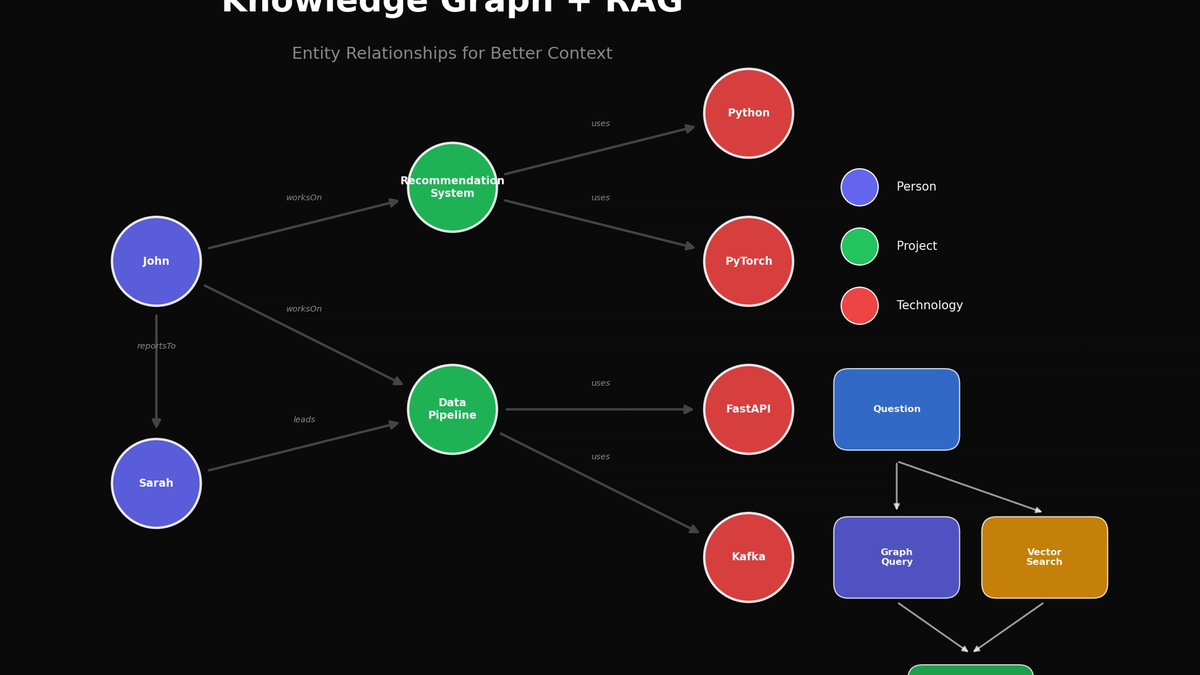
With a Knowledge Graph:

text
John --worksOn--> ProjectB --usesTech--> Python, FastAPI
John --worksOn--> ProjectC --usesTech--> React, TypeScript

→ One graph query gives the precise answer

2. Ontology Basics

What is an Ontology?

Ontology: A formal definition of concepts and their relationships in a specific domain

Components:

  • Classes: Types of concepts (e.g., Person, Project, Technology)
  • Properties: Relationship definitions (e.g., worksOn, uses)
  • Instances: Actual data (e.g., John, ProjectA)

RDF Triples

All knowledge is expressed as subject-predicate-object triples:

text
(John, role, Developer)
(John, worksOn, ProjectA)
(ProjectA, usesTechnology, Python)

Schema Definition (OWL/RDFS)

turtle
# Class definitions
:Person a owl:Class .
:Project a owl:Class .
:Technology a owl:Class .

# Property definitions
:worksOn a owl:ObjectProperty ;
    rdfs:domain :Person ;
    rdfs:range :Project .

:usesTechnology a owl:ObjectProperty ;
    rdfs:domain :Project ;
    rdfs:range :Technology .

3. Building Knowledge Graphs with Python

Install rdflib

bash
pip install rdflib

Basic Graph Creation

python
from rdflib import Graph, Namespace, Literal, RDF, RDFS, OWL
from rdflib.namespace import XSD

# Define namespace
EX = Namespace("http://example.org/")
g = Graph()
g.bind("ex", EX)

# Define classes
g.add((EX.Person, RDF.type, OWL.Class))
g.add((EX.Project, RDF.type, OWL.Class))
g.add((EX.Technology, RDF.type, OWL.Class))

# Add instances
g.add((EX.John, RDF.type, EX.Person))
g.add((EX.John, EX.name, Literal("John Smith")))
g.add((EX.John, EX.role, Literal("Backend Developer")))

g.add((EX.ProjectA, RDF.type, EX.Project))
g.add((EX.ProjectA, EX.name, Literal("Recommendation System")))

g.add((EX.Python, RDF.type, EX.Technology))
g.add((EX.FastAPI, RDF.type, EX.Technology))

# Add relationships
g.add((EX.John, EX.worksOn, EX.ProjectA))
g.add((EX.ProjectA, EX.usesTechnology, EX.Python))
g.add((EX.ProjectA, EX.usesTechnology, EX.FastAPI))

SPARQL Queries

python
# Query tech stack for projects John works on
query = """
PREFIX ex: <http://example.org/>

SELECT ?personName ?projectName ?techName
WHERE {
    ?person ex:name ?personName .
    ?person ex:worksOn ?project .
    ?project ex:name ?projectName .
    ?project ex:usesTechnology ?tech .
    ?tech ex:name ?techName .
    FILTER (?personName = "John Smith")
}
"""

results = g.query(query)
for row in results:
    print(f"{row.personName} → {row.projectName} → {row.techName}")

Output:

text
John Smith → Recommendation System → Python
John Smith → Recommendation System → FastAPI

4. Integrating RAG + Knowledge Graph

Hybrid Architecture

text
Question Input
    │
    ├─→ [Entity Extraction] → Knowledge Graph Query
    │                              │
    │                              ▼
    │                    Relationship-based Context
    │                              │
    └─→ [Vector Search] ──────────┼─→ [Context Merge] → LLM → Answer
                                  │
                           Similar Chunks

Implementation Example

python
from openai import OpenAI
import numpy as np

class HybridRAG:
    def __init__(self, graph, vector_store, llm_client):
        self.graph = graph
        self.vector_store = vector_store
        self.llm = llm_client

    def extract_entities(self, question: str) -> list:
        """Extract entities from question using LLM"""
        response = self.llm.chat.completions.create(
            model="gpt-4o-mini",
            messages=[{
                "role": "user",
                "content": f"Extract key entities (people, projects, technologies) from this question:\n{question}\n\nReturn as JSON: {{\"entities\": [...]}}"
            }],
            response_format={"type": "json_object"}
        )
        return json.loads(response.choices[0].message.content)["entities"]

    def query_graph(self, entities: list) -> str:
        """Query related triples from Knowledge Graph"""
        context_parts = []

        for entity in entities:
            query = f"""
            PREFIX ex: <http://example.org/>
            SELECT ?s ?p ?o
            WHERE {{
                {{ ?s ?p ?o . FILTER(CONTAINS(LCASE(STR(?s)), "{entity.lower()}")) }}
                UNION
                {{ ?s ?p ?o . FILTER(CONTAINS(LCASE(STR(?o)), "{entity.lower()}")) }}
            }}
            LIMIT 20
            """
            results = self.graph.query(query)
            for row in results:
                context_parts.append(f"{row.s} --{row.p}--> {row.o}")

        return "\n".join(context_parts)

    def vector_search(self, question: str, k: int = 5) -> str:
        """Vector similarity search"""
        results = self.vector_store.similarity_search(question, k=k)
        return "\n\n".join([doc.page_content for doc in results])

    def answer(self, question: str) -> str:
        """Execute hybrid RAG"""
        # 1. Extract entities
        entities = self.extract_entities(question)

        # 2. Graph query
        graph_context = self.query_graph(entities)

        # 3. Vector search
        vector_context = self.vector_search(question)

        # 4. Merge context and generate answer
        combined_context = f"""
## Relationship Information (Knowledge Graph)
{graph_context}

## Related Documents
{vector_context}
"""

        response = self.llm.chat.completions.create(
            model="gpt-4o",
            messages=[
                {"role": "system", "content": "Answer the question based on the given context."},
                {"role": "user", "content": f"Context:\n{combined_context}\n\nQuestion: {question}"}
            ]
        )

        return response.choices[0].message.content

5. Automatic Knowledge Graph Generation from Documents

LLM-Based Triple Extraction

python
def extract_triples_from_text(text: str, llm_client) -> list:
    """Automatically extract triples from documents"""

    prompt = """Extract knowledge graph triples from the following text.

Format: (subject, relation, object)

Examples:
- (John, role, Backend Developer)
- (ProjectA, usesTechnology, Python)
- (John, worksOn, ProjectA)

Text:
{text}

Return as JSON:
{{"triples": [["subject", "relation", "object"], ...]}}
"""

    response = llm_client.chat.completions.create(
        model="gpt-4o",
        messages=[{"role": "user", "content": prompt.format(text=text)}],
        response_format={"type": "json_object"}
    )

    return json.loads(response.choices[0].message.content)["triples"]


def build_graph_from_documents(documents: list, llm_client) -> Graph:
    """Build Knowledge Graph from document list"""

    g = Graph()
    EX = Namespace("http://example.org/")
    g.bind("ex", EX)

    for doc in documents:
        triples = extract_triples_from_text(doc, llm_client)

        for subj, pred, obj in triples:
            # Create URIs (remove spaces, lowercase)
            subj_uri = EX[subj.replace(" ", "_")]
            pred_uri = EX[pred.replace(" ", "_")]

            # Determine if object is entity or literal
            if any(keyword in pred.lower() for keyword in ["name", "value", "count", "date"]):
                g.add((subj_uri, pred_uri, Literal(obj)))
            else:
                obj_uri = EX[obj.replace(" ", "_")]
                g.add((subj_uri, pred_uri, obj_uri))

    return g

Usage Example

python
documents = [
    "John is a backend developer on the AI team. He currently leads the recommendation system project.",
    "The recommendation system project uses Python and FastAPI, started in March 2024.",
    "Sarah is the AI team lead and John's manager. She oversees the entire ML pipeline.",
]

graph = build_graph_from_documents(documents, client)

# Visualize graph
print(graph.serialize(format="turtle"))

6. Graph Storage Options

Local/Small Scale

OptionProsCons
rdflib (in-memory)Simple, no dependenciesCan't handle large data
SQLite + rdflibPersistence, simpleConcurrency limits

Production

OptionProsCons
Neo4jMature ecosystem, Cypher queriesLicense cost
Amazon NeptuneFully managed, SPARQL supportAWS lock-in
Apache Jena FusekiOpen source, standard SPARQLOperational complexity

Neo4j Integration Example

python
from neo4j import GraphDatabase

class Neo4jKnowledgeGraph:
    def __init__(self, uri, user, password):
        self.driver = GraphDatabase.driver(uri, auth=(user, password))

    def add_triple(self, subject, predicate, obj):
        with self.driver.session() as session:
            session.run("""
                MERGE (s:Entity {name: $subject})
                MERGE (o:Entity {name: $object})
                MERGE (s)-[r:RELATION {type: $predicate}]->(o)
            """, subject=subject, predicate=predicate, object=obj)

    def query(self, entity_name):
        with self.driver.session() as session:
            result = session.run("""
                MATCH (s:Entity {name: $name})-[r]->(o)
                RETURN s.name, type(r), o.name
            """, name=entity_name)
            return [(record[0], record[1], record[2]) for record in result]

7. Practical Tips

Ontology Design Principles

  1. Domain-Specific: Design for your domain rather than using generic ontologies
  2. Start Simple: Begin with core entities and relationships, expand gradually
  3. Naming Consistency: Stick to one convention (CamelCase, snake_case, etc.)
  4. Relationship Direction: Be clear about "A owns B" vs "B belongs to A"

Hybrid Search Tuning

python
# Weight adjustment
def hybrid_score(graph_results, vector_results, alpha=0.6):
    """
    alpha: weight for graph results (0~1)
    - Relationship-focused questions: higher alpha
    - Semantic similarity focus: lower alpha
    """
    graph_score = len(graph_results) / max_graph_results
    vector_score = np.mean([r.score for r in vector_results])

    return alpha * graph_score + (1 - alpha) * vector_score

Caching Strategy

python
from functools import lru_cache

@lru_cache(maxsize=1000)
def cached_graph_query(entity: str) -> tuple:
    """Cache frequently queried entities"""
    results = graph.query(sparql_query.format(entity=entity))
    return tuple(results)  # Convert to hashable type

Conclusion

Knowledge Graphs are a powerful tool for solving RAG's "context fragmentation" problem.

ApproachProsBest For
Vector search onlySimple implementationGeneral document Q&A
KG onlyPrecise relationship reasoningStructured data
HybridBenefits of bothComplex domain knowledge

Start simple:

  1. Define core entities/relationships with rdflib
  2. Add graph query results to your existing RAG
  3. Measure effectiveness and expand gradually

References