Neo4j + LangChain으로 구축하는 GraphRAG 시스템
자연어 질문을 Cypher 쿼리로 자동 변환하고, 그래프 데이터베이스의 관계 정보를 활용한 정확한 답변을 생성하세요.
Neo4j + LangChain으로 구축하는 GraphRAG 시스템
자연어 질문을 Cypher 쿼리로 자동 변환하고, 그래프 데이터베이스의 관계 정보를 활용한 정확한 답변을 생성하세요.
TL;DR
- Neo4j: 관계 중심의 그래프 데이터베이스
- LangChain Neo4jGraph: Python에서 Neo4j 연결 및 스키마 자동 추출
- GraphCypherQAChain: 자연어 → Cypher 쿼리 자동 변환
- 하이브리드 검색: Vector Index + Graph Traversal 결합
1. 왜 Neo4j + LangChain인가?
기존 RAG의 한계
일반적인 Vector RAG:
text
질문 → 임베딩 → 유사 청크 검색 → LLM 답변문제점:
- "A의 상사가 담당하는 프로젝트는?" 같은 멀티홉 질문 불가
- 엔티티 간 관계 정보 손실
- 청크 분할 시 컨텍스트 단절
Neo4j + LangChain 솔루션
text
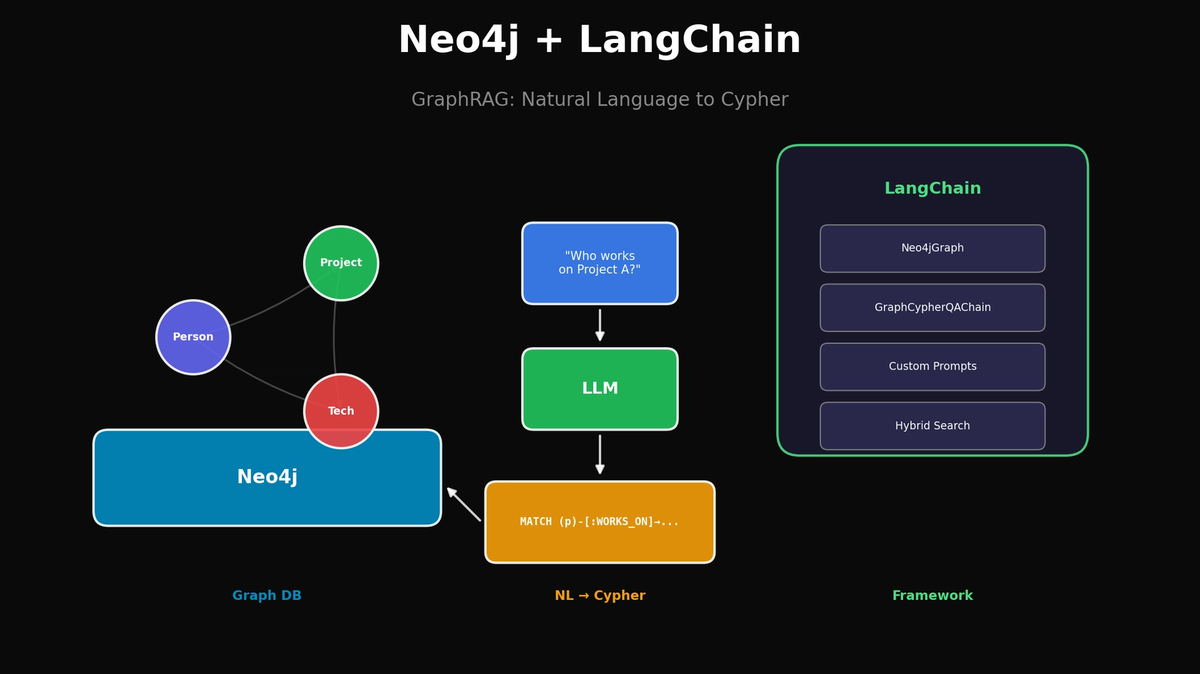
질문 → LLM(Cypher 생성) → Neo4j 쿼리 → 정확한 결과 → LLM 답변장점:
- 관계 기반 정확한 탐색
- 멀티홉 쿼리 자연스럽게 처리
- 스키마 기반 구조화된 답변
2. 환경 설정
Neo4j 설치
bash
# Docker로 Neo4j 실행
docker run -d \
  --name neo4j \
  -p 7474:7474 -p 7687:7687 \
  -e NEO4J_AUTH=neo4j/password123 \
  -e NEO4J_PLUGINS='["apoc", "graph-data-science"]' \
  neo4j:5.15.0
Python 패키지 설치
bash
pip install langchain langchain-openai langchain-community neo4j3. Neo4j 연결 및 데이터 구축
기본 연결
python
from langchain_community.graphs import Neo4jGraph

# Neo4j 연결
graph = Neo4jGraph(
    url="bolt://localhost:7687",
    username="neo4j",
    password="password123"
)

# 스키마 확인
print(graph.schema)
샘플 데이터 생성
python
# 회사 조직 데이터 생성
setup_query = """
// 팀 생성
CREATE (ai:Team {name: 'AI Team', budget: 500000})
CREATE (data:Team {name: 'Data Team', budget: 300000})
CREATE (backend:Team {name: 'Backend Team', budget: 400000})

// 직원 생성
CREATE (john:Person {name: 'John Smith', role: 'Senior Developer', salary: 120000})
CREATE (sarah:Person {name: 'Sarah Johnson', role: 'Team Lead', salary: 150000})
CREATE (mike:Person {name: 'Mike Chen', role: 'Data Scientist', salary: 130000})
CREATE (david:Person {name: 'David Kim', role: 'Team Lead', salary: 145000})
CREATE (emily:Person {name: 'Emily Brown', role: 'Developer', salary: 95000})

// 프로젝트 생성
CREATE (rec:Project {name: 'Recommendation System', status: 'active', deadline: '2024-06-01'})
CREATE (pipe:Project {name: 'Data Pipeline', status: 'active', deadline: '2024-04-15'})
CREATE (web:Project {name: 'Web Platform', status: 'completed', deadline: '2024-01-30'})

// 기술 스택
CREATE (python:Technology {name: 'Python'})
CREATE (pytorch:Technology {name: 'PyTorch'})
CREATE (fastapi:Technology {name: 'FastAPI'})
CREATE (kafka:Technology {name: 'Kafka'})
CREATE (react:Technology {name: 'React'})

// 관계 설정
CREATE (john)-[:BELONGS_TO]->(ai)
CREATE (sarah)-[:BELONGS_TO]->(ai)
CREATE (sarah)-[:MANAGES]->(ai)
CREATE (mike)-[:BELONGS_TO]->(data)
CREATE (david)-[:BELONGS_TO]->(data)
CREATE (david)-[:MANAGES]->(data)
CREATE (emily)-[:BELONGS_TO]->(backend)

CREATE (john)-[:REPORTS_TO]->(sarah)
CREATE (mike)-[:REPORTS_TO]->(david)

CREATE (john)-[:WORKS_ON]->(rec)
CREATE (mike)-[:WORKS_ON]->(rec)
CREATE (mike)-[:WORKS_ON]->(pipe)
CREATE (david)-[:WORKS_ON]->(pipe)
CREATE (emily)-[:WORKS_ON]->(web)

CREATE (john)-[:LEADS]->(rec)
CREATE (david)-[:LEADS]->(pipe)

CREATE (rec)-[:USES]->(python)
CREATE (rec)-[:USES]->(pytorch)
CREATE (rec)-[:USES]->(fastapi)
CREATE (pipe)-[:USES]->(python)
CREATE (pipe)-[:USES]->(kafka)
CREATE (web)-[:USES]->(react)
CREATE (web)-[:USES]->(fastapi)
"""

graph.query(setup_query)
print("Data created successfully!")

# 스키마 새로고침
graph.refresh_schema()
print(graph.schema)
4. GraphCypherQAChain 구축
기본 Chain 설정
python
from langchain_openai import ChatOpenAI
from langchain.chains import GraphCypherQAChain

# LLM 설정
llm = ChatOpenAI(model="gpt-4o", temperature=0)

# GraphCypherQAChain 생성
chain = GraphCypherQAChain.from_llm(
    llm=llm,
    graph=graph,
    verbose=True,  # 생성된 Cypher 쿼리 확인
    return_intermediate_steps=True
)
자연어 질문 테스트
python
# 질문 1: 단순 조회
response = chain.invoke({"query": "Who works on the Recommendation System project?"})
print(response["result"])
# → John Smith and Mike Chen work on the Recommendation System project.

# 질문 2: 멀티홉 쿼리
response = chain.invoke({"query": "What technologies are used in projects that John works on?"})
print(response["result"])
# → Python, PyTorch, and FastAPI

# 질문 3: 집계 쿼리
response = chain.invoke({"query": "How many people are in each team?"})
print(response["result"])
# → AI Team: 2, Data Team: 2, Backend Team: 1

# 생성된 Cypher 쿼리 확인
print(response["intermediate_steps"][0]["query"])
5. 커스텀 프롬프트로 정확도 높이기
Cypher 생성 프롬프트 커스터마이징
python
from langchain.prompts import PromptTemplate

CYPHER_GENERATION_TEMPLATE = """Task: Generate a Cypher query to answer the question.

Schema:
{schema}

Instructions:
- Use only node labels and relationship types from the schema
- For names, use case-insensitive matching with toLower()
- Return meaningful property values, not just node references
- Use OPTIONAL MATCH for relationships that might not exist

Examples:
Question: Who is John's manager?
Cypher: MATCH (p:Person {{name: 'John Smith'}})-[:REPORTS_TO]->(manager:Person) RETURN manager.name

Question: What projects use Python?
Cypher: MATCH (p:Project)-[:USES]->(t:Technology {{name: 'Python'}}) RETURN p.name

Question: {question}
Cypher:"""

cypher_prompt = PromptTemplate(
    template=CYPHER_GENERATION_TEMPLATE,
    input_variables=["schema", "question"]
)

chain = GraphCypherQAChain.from_llm(
    llm=llm,
    graph=graph,
    cypher_prompt=cypher_prompt,
    verbose=True
)
답변 생성 프롬프트 커스터마이징
python
ANSWER_TEMPLATE = """Based on the query results, provide a natural and complete answer.

Question: {question}
Query Results: {context}

Instructions:
- Answer in a conversational tone
- If results are empty, say "I couldn't find that information"
- Include relevant details from the results
- Be concise but complete

Answer:"""

answer_prompt = PromptTemplate(
    template=ANSWER_TEMPLATE,
    input_variables=["question", "context"]
)

chain = GraphCypherQAChain.from_llm(
    llm=llm,
    graph=graph,
    cypher_prompt=cypher_prompt,
    qa_prompt=answer_prompt,
    verbose=True
)
6. Vector + Graph 하이브리드 검색
Neo4j Vector Index 설정
python
from langchain_openai import OpenAIEmbeddings
from langchain_community.vectorstores import Neo4jVector

# 문서 데이터 추가 (프로젝트 설명 등)
documents = [
    "The Recommendation System project uses collaborative filtering and deep learning to suggest products.",
    "Data Pipeline handles real-time data ingestion from multiple sources using Kafka.",
    "The Web Platform provides a React-based dashboard for analytics and reporting.",
]

# Vector Index 생성
vector_store = Neo4jVector.from_texts(
    texts=documents,
    embedding=OpenAIEmbeddings(),
    url="bolt://localhost:7687",
    username="neo4j",
    password="password123",
    index_name="project_docs",
    node_label="Document"
)
하이브리드 검색 구현
python
class HybridNeo4jRAG:
    def __init__(self, graph, vector_store, llm):
        self.graph = graph
        self.vector_store = vector_store
        self.llm = llm
        self.cypher_chain = GraphCypherQAChain.from_llm(
            llm=llm, graph=graph, verbose=False
        )

    def search(self, question: str) -> dict:
        # 1. 구조화된 정보: Graph 쿼리
        try:
            graph_result = self.cypher_chain.invoke({"query": question})
            graph_context = graph_result.get("result", "")
        except Exception as e:
            graph_context = ""

        # 2. 비구조화된 정보: Vector 검색
        vector_results = self.vector_store.similarity_search(question, k=3)
        vector_context = "\n".join([doc.page_content for doc in vector_results])

        # 3. 컨텍스트 결합
        combined_context = f"""
## Structured Data (from Knowledge Graph)
{graph_context}

## Related Documents
{vector_context}
"""

        # 4. 최종 답변 생성
        final_prompt = f"""Answer the question based on the following context.

Context:
{combined_context}

Question: {question}

Provide a comprehensive answer combining both structured and unstructured information."""

        response = self.llm.invoke(final_prompt)

        return {
            "answer": response.content,
            "graph_context": graph_context,
            "vector_context": vector_context
        }

# 사용
hybrid_rag = HybridNeo4jRAG(graph, vector_store, llm)
result = hybrid_rag.search("Tell me about the Recommendation System project and who works on it")
print(result["answer"])
7. 실무 적용 팁
에러 핸들링
python
from langchain.chains import GraphCypherQAChain

def safe_query(chain, question: str) -> str:
    try:
        result = chain.invoke({"query": question})
        return result["result"]
    except Exception as e:
        if "syntax error" in str(e).lower():
            return "I couldn't understand that query. Could you rephrase?"
        elif "connection" in str(e).lower():
            return "Database connection issue. Please try again."
        else:
            return f"An error occurred: {str(e)}"
쿼리 검증
python
def validate_cypher(graph, cypher: str) -> bool:
    """EXPLAIN으로 쿼리 문법 검증 (실행하지 않음)"""
    try:
        graph.query(f"EXPLAIN {cypher}")
        return True
    except:
        return False
캐싱 전략
python
from functools import lru_cache
import hashlib

class CachedGraphRAG:
    def __init__(self, chain):
        self.chain = chain
        self.cache = {}

    def query(self, question: str) -> str:
        # 질문 정규화 및 해시
        normalized = question.lower().strip()
        cache_key = hashlib.md5(normalized.encode()).hexdigest()

        if cache_key in self.cache:
            return self.cache[cache_key]

        result = self.chain.invoke({"query": question})
        self.cache[cache_key] = result["result"]

        return result["result"]
8. 성능 최적화
인덱스 생성
python
# 자주 검색하는 속성에 인덱스 추가
graph.query("CREATE INDEX person_name IF NOT EXISTS FOR (p:Person) ON (p.name)")
graph.query("CREATE INDEX project_name IF NOT EXISTS FOR (p:Project) ON (p.name)")
graph.query("CREATE INDEX team_name IF NOT EXISTS FOR (t:Team) ON (t.name)")
쿼리 결과 제한
python
# Chain 생성 시 결과 제한
chain = GraphCypherQAChain.from_llm(
    llm=llm,
    graph=graph,
    top_k=10,  # 최대 10개 결과만 반환
    verbose=True
)
결론
Neo4j + LangChain 조합은 기존 Vector RAG의 한계를 극복하는 강력한 솔루션입니다.
| 상황 | 추천 방식 |
|---|---|
| 관계 기반 질문 | GraphCypherQAChain |
| 의미 기반 검색 | Vector Search |
| 복합 질문 | Hybrid (둘 다 사용) |
시작하기:
- Docker로 Neo4j 실행
- 도메인 데이터 모델링 (노드, 관계)
- GraphCypherQAChain으로 자연어 질의 구현
- 필요시 Vector Index 추가
참고 자료
이메일로 받아보기
관련 포스트
⚡️
Ops & Systems
Google Stitch MCP API: AI 에이전트로 UI 디자인 생성하기
Google Labs의 Stitch가 MCP 서버를 지원하여 Claude Code, Cursor 등에서 API를 통해 UI 디자인을 생성할 수 있습니다. 참고: 일부 내용은 비공식 소스 기반이며 변경될 수 있습니다.
Ops & Systems
ClawdBot을 Cloudflare Tunnel로 안전하게 보호하기
Shodan에서 노출된 ClawdBot 인스턴스들의 보안 위험과 Cloudflare Tunnel을 사용한 안전한 설정 방법을 알아봅니다.

Ops & Systems
Claude Code에서 Google Stitch MCP 연동하기: AI로 UI 디자인 자동화
Google Stitch를 Claude Code와 연동하여 텍스트 프롬프트만으로 전문가 수준의 UI를 생성하는 방법을 단계별로 알아봅니다.