Building GraphRAG with Neo4j + LangChain
Automatically convert natural language questions to Cypher queries and generate accurate answers using relationship data from your graph database.
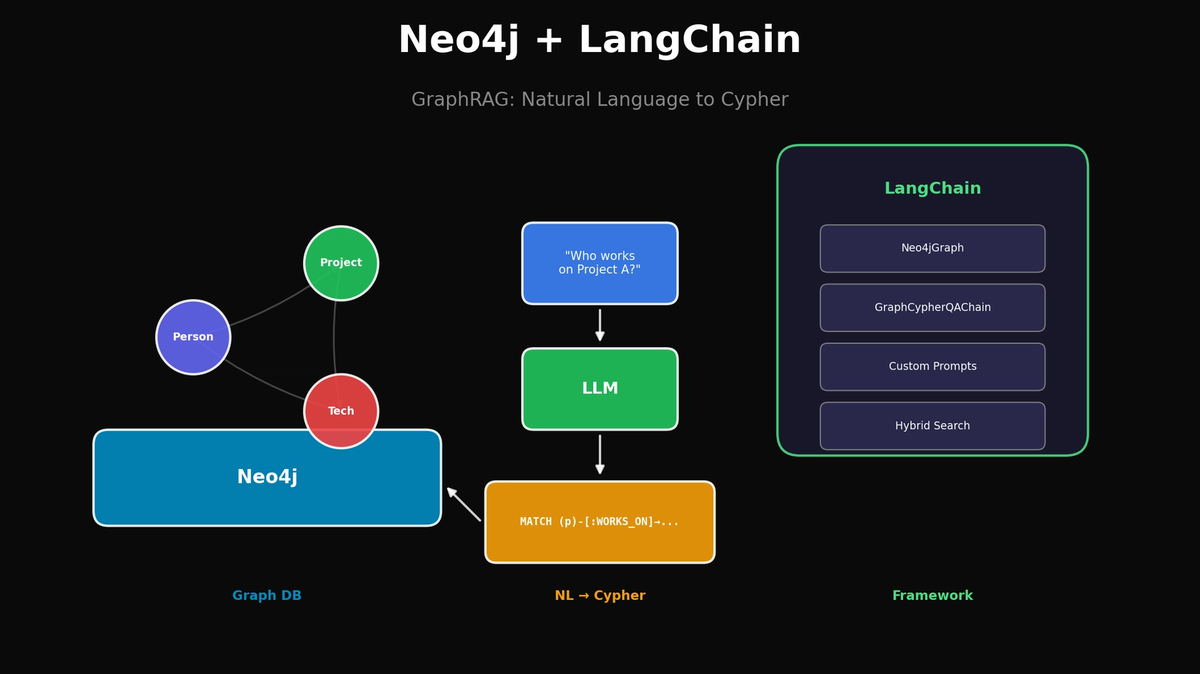
Building GraphRAG with Neo4j + LangChain
Automatically convert natural language questions to Cypher queries and generate accurate answers using relationship data from your graph database.
TL;DR
- Neo4j: Relationship-centric graph database
- LangChain Neo4jGraph: Connect to Neo4j and auto-extract schema in Python
- GraphCypherQAChain: Automatic natural language → Cypher query conversion
- Hybrid Search: Combine Vector Index + Graph Traversal
1. Why Neo4j + LangChain?
Limitations of Traditional RAG
Typical Vector RAG:
Question → Embedding → Similar chunk retrieval → LLM answerProblems:
- Can't handle multi-hop questions like "What projects does A's manager lead?"
- Loses entity relationship information
- Context fragmentation during chunk splitting
Neo4j + LangChain Solution
Question → LLM (Cypher generation) → Neo4j query → Precise results → LLM answerBenefits:
- Accurate relationship-based traversal
- Natural multi-hop query handling
- Schema-based structured answers
2. Environment Setup
Install Neo4j
# Run Neo4j with Docker
docker run -d \
  --name neo4j \
  -p 7474:7474 -p 7687:7687 \
  -e NEO4J_AUTH=neo4j/password123 \
  -e NEO4J_PLUGINS='["apoc", "graph-data-science"]' \
  neo4j:5.15.0
Install Python Packages
pip install langchain langchain-openai langchain-community neo4j3. Connecting to Neo4j and Building Data
Basic Connection
from langchain_community.graphs import Neo4jGraph

# Connect to Neo4j
graph = Neo4jGraph(
    url="bolt://localhost:7687",
    username="neo4j",
    password="password123"
)

# Check schema
print(graph.schema)
Create Sample Data
# Create company organization data
setup_query = """
// Create teams
CREATE (ai:Team {name: 'AI Team', budget: 500000})
CREATE (data:Team {name: 'Data Team', budget: 300000})
CREATE (backend:Team {name: 'Backend Team', budget: 400000})

// Create employees
CREATE (john:Person {name: 'John Smith', role: 'Senior Developer', salary: 120000})
CREATE (sarah:Person {name: 'Sarah Johnson', role: 'Team Lead', salary: 150000})
CREATE (mike:Person {name: 'Mike Chen', role: 'Data Scientist', salary: 130000})
CREATE (david:Person {name: 'David Kim', role: 'Team Lead', salary: 145000})
CREATE (emily:Person {name: 'Emily Brown', role: 'Developer', salary: 95000})

// Create projects
CREATE (rec:Project {name: 'Recommendation System', status: 'active', deadline: '2024-06-01'})
CREATE (pipe:Project {name: 'Data Pipeline', status: 'active', deadline: '2024-04-15'})
CREATE (web:Project {name: 'Web Platform', status: 'completed', deadline: '2024-01-30'})

// Technologies
CREATE (python:Technology {name: 'Python'})
CREATE (pytorch:Technology {name: 'PyTorch'})
CREATE (fastapi:Technology {name: 'FastAPI'})
CREATE (kafka:Technology {name: 'Kafka'})
CREATE (react:Technology {name: 'React'})

// Create relationships
CREATE (john)-[:BELONGS_TO]->(ai)
CREATE (sarah)-[:BELONGS_TO]->(ai)
CREATE (sarah)-[:MANAGES]->(ai)
CREATE (mike)-[:BELONGS_TO]->(data)
CREATE (david)-[:BELONGS_TO]->(data)
CREATE (david)-[:MANAGES]->(data)
CREATE (emily)-[:BELONGS_TO]->(backend)

CREATE (john)-[:REPORTS_TO]->(sarah)
CREATE (mike)-[:REPORTS_TO]->(david)

CREATE (john)-[:WORKS_ON]->(rec)
CREATE (mike)-[:WORKS_ON]->(rec)
CREATE (mike)-[:WORKS_ON]->(pipe)
CREATE (david)-[:WORKS_ON]->(pipe)
CREATE (emily)-[:WORKS_ON]->(web)

CREATE (john)-[:LEADS]->(rec)
CREATE (david)-[:LEADS]->(pipe)

CREATE (rec)-[:USES]->(python)
CREATE (rec)-[:USES]->(pytorch)
CREATE (rec)-[:USES]->(fastapi)
CREATE (pipe)-[:USES]->(python)
CREATE (pipe)-[:USES]->(kafka)
CREATE (web)-[:USES]->(react)
CREATE (web)-[:USES]->(fastapi)
"""

graph.query(setup_query)
print("Data created successfully!")

# Refresh schema
graph.refresh_schema()
print(graph.schema)
4. Building GraphCypherQAChain
Basic Chain Setup
from langchain_openai import ChatOpenAI
from langchain.chains import GraphCypherQAChain

# Configure LLM
llm = ChatOpenAI(model="gpt-4o", temperature=0)

# Create GraphCypherQAChain
chain = GraphCypherQAChain.from_llm(
    llm=llm,
    graph=graph,
    verbose=True,  # See generated Cypher queries
    return_intermediate_steps=True
)
Test Natural Language Questions
# Question 1: Simple query
response = chain.invoke({"query": "Who works on the Recommendation System project?"})
print(response["result"])
# → John Smith and Mike Chen work on the Recommendation System project.

# Question 2: Multi-hop query
response = chain.invoke({"query": "What technologies are used in projects that John works on?"})
print(response["result"])
# → Python, PyTorch, and FastAPI

# Question 3: Aggregation query
response = chain.invoke({"query": "How many people are in each team?"})
print(response["result"])
# → AI Team: 2, Data Team: 2, Backend Team: 1

# Check generated Cypher query
print(response["intermediate_steps"][0]["query"])
5. Improving Accuracy with Custom Prompts
Customize Cypher Generation Prompt
from langchain.prompts import PromptTemplate

CYPHER_GENERATION_TEMPLATE = """Task: Generate a Cypher query to answer the question.

Schema:
{schema}

Instructions:
- Use only node labels and relationship types from the schema
- For names, use case-insensitive matching with toLower()
- Return meaningful property values, not just node references
- Use OPTIONAL MATCH for relationships that might not exist

Examples:
Question: Who is John's manager?
Cypher: MATCH (p:Person {{name: 'John Smith'}})-[:REPORTS_TO]->(manager:Person) RETURN manager.name

Question: What projects use Python?
Cypher: MATCH (p:Project)-[:USES]->(t:Technology {{name: 'Python'}}) RETURN p.name

Question: {question}
Cypher:"""

cypher_prompt = PromptTemplate(
    template=CYPHER_GENERATION_TEMPLATE,
    input_variables=["schema", "question"]
)

chain = GraphCypherQAChain.from_llm(
    llm=llm,
    graph=graph,
    cypher_prompt=cypher_prompt,
    verbose=True
)
Customize Answer Generation Prompt
ANSWER_TEMPLATE = """Based on the query results, provide a natural and complete answer.

Question: {question}
Query Results: {context}

Instructions:
- Answer in a conversational tone
- If results are empty, say "I couldn't find that information"
- Include relevant details from the results
- Be concise but complete

Answer:"""

answer_prompt = PromptTemplate(
    template=ANSWER_TEMPLATE,
    input_variables=["question", "context"]
)

chain = GraphCypherQAChain.from_llm(
    llm=llm,
    graph=graph,
    cypher_prompt=cypher_prompt,
    qa_prompt=answer_prompt,
    verbose=True
)
6. Vector + Graph Hybrid Search
Set Up Neo4j Vector Index
from langchain_openai import OpenAIEmbeddings
from langchain_community.vectorstores import Neo4jVector

# Add document data (project descriptions, etc.)
documents = [
    "The Recommendation System project uses collaborative filtering and deep learning to suggest products.",
    "Data Pipeline handles real-time data ingestion from multiple sources using Kafka.",
    "The Web Platform provides a React-based dashboard for analytics and reporting.",
]

# Create Vector Index
vector_store = Neo4jVector.from_texts(
    texts=documents,
    embedding=OpenAIEmbeddings(),
    url="bolt://localhost:7687",
    username="neo4j",
    password="password123",
    index_name="project_docs",
    node_label="Document"
)
Implement Hybrid Search
class HybridNeo4jRAG:
    def __init__(self, graph, vector_store, llm):
        self.graph = graph
        self.vector_store = vector_store
        self.llm = llm
        self.cypher_chain = GraphCypherQAChain.from_llm(
            llm=llm, graph=graph, verbose=False
        )

    def search(self, question: str) -> dict:
        # 1. Structured info: Graph query
        try:
            graph_result = self.cypher_chain.invoke({"query": question})
            graph_context = graph_result.get("result", "")
        except Exception as e:
            graph_context = ""

        # 2. Unstructured info: Vector search
        vector_results = self.vector_store.similarity_search(question, k=3)
        vector_context = "\n".join([doc.page_content for doc in vector_results])

        # 3. Combine contexts
        combined_context = f"""
## Structured Data (from Knowledge Graph)
{graph_context}

## Related Documents
{vector_context}
"""

        # 4. Generate final answer
        final_prompt = f"""Answer the question based on the following context.

Context:
{combined_context}

Question: {question}

Provide a comprehensive answer combining both structured and unstructured information."""

        response = self.llm.invoke(final_prompt)

        return {
            "answer": response.content,
            "graph_context": graph_context,
            "vector_context": vector_context
        }

# Usage
hybrid_rag = HybridNeo4jRAG(graph, vector_store, llm)
result = hybrid_rag.search("Tell me about the Recommendation System project and who works on it")
print(result["answer"])
7. Production Tips
Error Handling
from langchain.chains import GraphCypherQAChain

def safe_query(chain, question: str) -> str:
    try:
        result = chain.invoke({"query": question})
        return result["result"]
    except Exception as e:
        if "syntax error" in str(e).lower():
            return "I couldn't understand that query. Could you rephrase?"
        elif "connection" in str(e).lower():
            return "Database connection issue. Please try again."
        else:
            return f"An error occurred: {str(e)}"
Query Validation
def validate_cypher(graph, cypher: str) -> bool:
    """Validate query syntax with EXPLAIN (doesn't execute)"""
    try:
        graph.query(f"EXPLAIN {cypher}")
        return True
    except:
        return False
Caching Strategy
from functools import lru_cache
import hashlib

class CachedGraphRAG:
    def __init__(self, chain):
        self.chain = chain
        self.cache = {}

    def query(self, question: str) -> str:
        # Normalize and hash question
        normalized = question.lower().strip()
        cache_key = hashlib.md5(normalized.encode()).hexdigest()

        if cache_key in self.cache:
            return self.cache[cache_key]

        result = self.chain.invoke({"query": question})
        self.cache[cache_key] = result["result"]

        return result["result"]
8. Performance Optimization
Create Indexes
# Add indexes for frequently searched properties
graph.query("CREATE INDEX person_name IF NOT EXISTS FOR (p:Person) ON (p.name)")
graph.query("CREATE INDEX project_name IF NOT EXISTS FOR (p:Project) ON (p.name)")
graph.query("CREATE INDEX team_name IF NOT EXISTS FOR (t:Team) ON (t.name)")
Limit Query Results
# Limit results when creating chain
chain = GraphCypherQAChain.from_llm(
    llm=llm,
    graph=graph,
    top_k=10,  # Return max 10 results
    verbose=True
)
Conclusion
The Neo4j + LangChain combination is a powerful solution for overcoming traditional Vector RAG limitations.
| Situation | Recommended Approach |
|---|---|
| Relationship-based questions | GraphCypherQAChain |
| Semantic search | Vector Search |
| Complex questions | Hybrid (use both) |
Getting started:
- Run Neo4j with Docker
- Model your domain data (nodes, relationships)
- Implement natural language queries with GraphCypherQAChain
- Add Vector Index as needed
References
Subscribe to Newsletter
Related Posts
Google Stitch MCP API: Generate UI Designs via AI Agents
Google Labs Stitch now supports MCP servers, allowing AI tools like Claude Code and Cursor to generate UI designs through API calls. Note: Some details in this article are from unofficial sources and may change.
Securing ClawdBot with Cloudflare Tunnel
Learn about the security risks of exposed ClawdBot instances on Shodan and how to secure them using Cloudflare Tunnel.

Integrating Google Stitch MCP with Claude Code: Automate UI Design with AI
Learn how to connect Google Stitch with Claude Code via MCP to generate professional-grade UI designs from text prompts.